Performance
Website Security Basics for Contractors
By Fidyan Ahmed, founder · Published · Last updated · 6 min read
On this page
Small business website security is a short list, not a scary product pitch. Lock the address, keep the software current, keep a backup you can restore, stop junk forms, and lock the domain. Do those five things and you are ahead of a site that only looks pretty.
Key takeaways
- The padlock encrypts the visit. It does not update the software.
- Keep an admin login that you can use without calling a freelancer.
- A backup counts only after you have restored it once.
- Lock the domain so a stranger cannot move the name.
SSL and the padlock
The padlock in the browser means the page is served over an encrypted connection. A customer typing a phone number into your form is not sending it as plain text across the cafe network. If the address starts with http and the browser warns, people leave. They should. Fix the certificate before you argue about design.
The certificate has an end date. When it expires, the warning comes back even if nothing else changed. Know who renews it. On many hosts it renews by itself. On a hand built server it might not. Write the owner of that task in the same note as the host login.
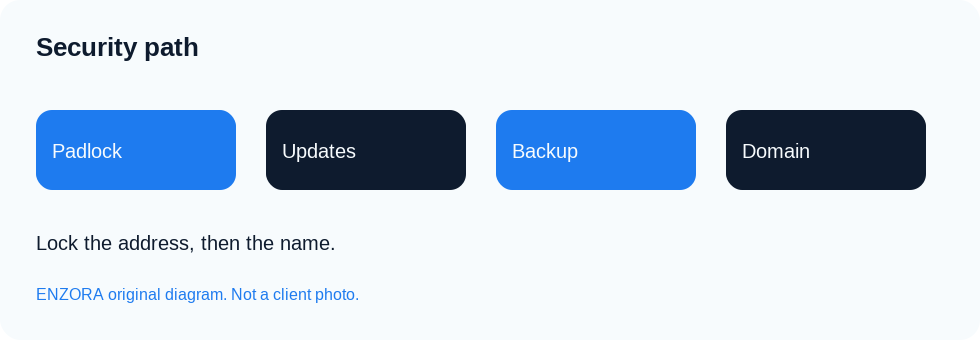
Picture a homeowner on a phone who taps your ad and sees a warning about the connection. They leave and call a different company. Your crew was fine. The certificate was not. The lock path diagram is address, padlock, form, then the inbox. Use the redirect checker to see that the old http address jumps once to the locked address. A long chain of jumps is a separate problem. Security and backups is the service that sets this up if you do not want to hold the login yourself.
A warning is not a design problem. It is a trust problem. The customer does not know the difference between a missed renewal and a risky site. They only see that the browser asked them to be careful. Fix the lock, then go back to photos and slogans. Ask the host whether renewal is automatic and who gets the email if it fails.
This week, open the site on a phone and look for the padlock. Then open the http version and confirm it lands on the locked one. If the warning appears, stop other marketing until that is fixed.
Updates
Old software is how many small sites get defaced. A form plugin, a theme, or the site builder itself can have a hole that was fixed months ago. If you never update, you are still running the hole. Updates are not glamorous. They are the job.
You need a login that can see the update screen. If only a past freelancer can see it, you do not control the site. Ask for an admin user in your name. Turn on updates you understand, and read what changed when a big update is offered. A rushed update can break a form. That is why the next section is backups. Update after you know you can roll back.
Do not install a pile of plugins you will not use. Each one is another thing to update. A contact form, a backup tool, and little else is a calmer site than twenty add ons. Website maintenance is the ongoing version of this habit if you want it on a schedule instead of in your head.
This week, sign in and write down the names of the theme and the form tool, plus whether an update is waiting. If you cannot sign in, that is the task. Do not buy a new theme until you can log in to the one you have.
Backups
A backup is a copy of the site and, if you have one, the database of form entries and pages. The host may keep copies. You should know how far back they go and how to ask for a restore. A copy that lives only on the same server as the live site can vanish in the same fire. Ask whether a copy also sits somewhere else.
The test is the restore. Once, on a quiet day, restore a copy to a staging address or ask the host to show you the steps. If nobody can explain the steps, you do not have a backup. You have a checkbox. Take a fresh copy before a redesign or a big plugin update. The maintenance plan guide puts backups on the monthly list. The monthly health check is the short version you can do yourself.
A backup on the same server as the live site can disappear in the same incident. Ask whether a second copy lives somewhere else. You need a place and a date. If the host includes copies, write that down. If copies are your job, put a reminder on the same day as the form test.
This week, find the backup screen or the host email that mentions backups. Note the date of the newest copy. If you cannot find a date, ask the host in writing where the copy is.
Forms and spam
Your form is a door. Spammers will knock. A flood of junk hides the real leak call. A filter can block many bots. A short form still lets a real person finish. Do not add five puzzles that a homeowner will not solve on a phone.
Do not publish form notes on a public page. That can leak phone numbers. Send the form to an inbox a person reads, and keep a copy you can search. If the form starts emailing a stranger, change the destination and change the password. That is a security event, not a design tweak.
Test the form after every update. Updates are the moment a form silently stops. Send a note with a clear test subject so the office does not treat it as a customer. Then delete or file the test so it does not sit in the lead list.
Junk forms hide the real leads. Open the inbox and see whether a person could miss a true request under the noise. Keep the fields to what you need to call back. A long form does not make you safer. A filter plus a short form is the practical pair.
This week, submit the form from your phone and confirm it arrives. If junk is most of the inbox, turn on the host's spam check and watch for a day so you do not block real people.
Domain lock
The domain is the name customers type and the name on the truck. The registrar is the company where that name is registered. If the account email is an old designer, they can move the name or let it expire. Move the account to an email you read. Turn on the lock that blocks a transfer unless you approve it. Turn on renewal so the name does not lapse while you are on a job.
Write down the renewal date. A lapsed name can be bought by someone else, and your email can break the same day. That is worse than a slow page. Do not change name servers as a casual experiment. Mail records live there. If a change is needed, do it with a written plan and a person who will watch the inbox.
This week, log in to the registrar. Confirm the email is yours, the lock is on, and the renewal date is in the future. Save that date next to the host login. If you cannot log in, recover the account before you do anything else on this list.
| Check | What good looks like |
|---|---|
| Padlock | The address is encrypted and http jumps to it |
| Login | You can sign in as an admin |
| Updates | You know what is waiting |
| Backup | You can name the newest copy |
| Form | A test arrives, junk does not bury it |
| Domain | Lock on, email is yours, renewal is known |
Next step
Want a second look at logins and the padlock? Get a free site review. Tell us who holds the host login. We will look at the lock, the form, and whether a backup is named. We will not invent a threat count.
Questions
Does the padlock mean my site is safe?
The padlock means the connection is encrypted. Visitors are not sending the form in the clear. It does not mean the software is updated or that you have a backup. Treat the lock as one check, then look at logins, updates, and a restore test.
Who should hold the admin login?
You should. A builder can have a login while they work, and you should be able to remove it. Do not leave the only password in someone else's email. Write down where the login lives, and use a password you do not reuse on Facebook.
How often should I back up the site?
Often enough that losing a week of edits would hurt. For a brochure site, a weekly copy plus a copy before any big change is a sound habit. The important part is the restore. A backup you have never opened is a hope, not a plan.
What if the contact form fills with junk?
Turn on a check that blocks obvious bots, and do not publish every submission on the page. Keep the form short so real customers still finish it. If junk still arrives, ask your host what filter is on. Do not take the form down if it is your only lead path.
Should I lock the domain?
Yes, if your registrar offers a lock that stops a transfer without your approval. The domain is the name on the truck. If someone moves it, your email and your site can go with it. Confirm the lock is on, and confirm the account email is yours.
Was this helpful?
Related ENZORA services
Want help with your website?
Get a fixed quote from the ENZORA team. We work with businesses worldwide.