SEO
Free Tools vs Paid SEO Software: What Small Businesses Really Need
By Fidyan Ahmed, founder · Published · 7 min read

On this page
Free SEO tools are enough for the checks a local business repeats: can people open the site, can Google read it, and are you writing about the jobs you actually do. Paid software adds bigger datasets. Buy that only when someone will use it.
Key takeaways
- Start with Google's own tools and a site people can use on a phone.
- Do not pay for rank charts you will never open.
- Use a free check to find broken basics before you debate software.
- Pay when the extra data will change a real page or a real profile.
What paid suites do
A paid SEO suite usually bundles several jobs. It may crawl a site, track phrases, and show lists of links from other sites. Those lists can be large. They can also sit untouched. The software does not call your customers, and it does not write a true sentence about your work.
The sales page will talk about scores and gaps. Treat those as leads to inspect, not as orders. A "missing" phrase might be a job you do not want. A link report might include sites that do not matter for a one town plumber. You still have to decide.
Paid tools change their plans. This article will not quote a price or a package name as if it were stable. If you are comparing two suites, list the three questions you need answered each month. If a tool does not answer those questions in a way you understand, it is the wrong tool, even if the demo looks busy.
Picture a roofer who buys a suite because a forum said serious companies have one. He logs in twice. The charts do not tell him that his storm page never mentions the city. The page was the problem. The login was a distraction. He would have found the gap by reading the page out loud.
This week, write the three questions you want SEO to answer. Examples: which pages Google has trouble reading, which job pages never mention the town, and whether the phone number is on every page. If a paid tool is the only way you will answer them, it is a candidate. If not, do not buy it yet.
What a local business actually uses
A local service business lives on a few pages, a Google Business Profile, and a phone that gets answered. The work that moves calls is specific. Name the service. Name the towns. Show real photos. Make the number tappable. Ask for reviews without bribing anyone. The local SEO checklist walks that path without a software tour.
You also want to know that Google can fetch the site. That is a technical check, not a brand exercise. A title that is missing, a page that blocks visitors, or a form that fails will not be saved by a prettier chart. The small business SEO audit guide is the longer version of "look at the real pages."
Most weeks, the owner does not need a national link index. They need to know yesterday's form arrived and that the storm page is still online. Build the habit around those facts. Add fancier data when the simple loop is already happening.
Picture an electrician with one city and a short set of service pages. She updates the profile, checks the form, and reads Search Console once a month. She does not track a long list of phrases. Her competitor's expensive login is not her job. Her job is the page that explains panel upgrades in that city.
This week, open your profile and your top service page. If the town name is missing from the page, add it in a true sentence. That edit beats a new subscription.
A free toolkit for the daily work
Google offers Search Console so site owners can see how Google reads their pages. Use the account that should own the site. If a freelancer set it up under their own login, move the ownership before you need it. The ownership guide covers that kind of handoff.
On our site, the Website Audit gives a plain score and the first fixes, from the live page, not from a made up sample. Keyword Ideas groups phrases for a service and a city. Those two cover a lot of the monthly questions: is the page basically sound, and what words are people using?
You can also use the Keyword Difficulty Checker, the Backlink Checker, and the Site SEO Crawler.
Use Search Console and these tools, and read the pages yourself. A crawler is most useful when you have many URLs. A ten page site can be read by a person in an afternoon.
Picture a painter who runs the audit, fixes the missing title, and uses keyword ideas to name a page "cabinet painting" instead of "services." She does not export a spreadsheet. The site got clearer. That is the point of a free toolkit.
This week, verify Search Console and run the Website Audit on your home page. Write down three fixes. Do the one that helps a customer call you.
When paying makes sense
Pay when the free tools stop answering a question you truly have. A company with several locations may want a crawl that checks every city page for the right phone number. A site with hundreds of articles may want a crawler so a person does not open each URL by hand. A campaign that depends on mentions from other sites may want a link index, if someone will review it.
Do not pay to calm anxiety. A dashboard can feel like progress while the form is still broken. Spend the first hour on the site a customer sees. If a salesperson cannot show how last month's report changed a page, you do not need the second month.
Also count the time. A tool that needs a specialist to interpret every screen is a second bill, even when this article does not print the price. Ask who on your team will log in. If the answer is "nobody," skip it. SEO growth is a person doing the work on a schedule. That is different from a login.
Picture a multi crew HVAC company that finally has a long list of city pages. A manual check starts to slip. They pay for a crawler because a person will look at the failures each month and fix the wrong phone numbers. The purchase matches a job. The roofer with one town does not have that job yet.
This week, if you already pay for a suite, open it and name one action you took from it in the last month. If you cannot name one, cancel or assign an owner. Do not keep it as a lucky charm.
Our toolkit walkthrough
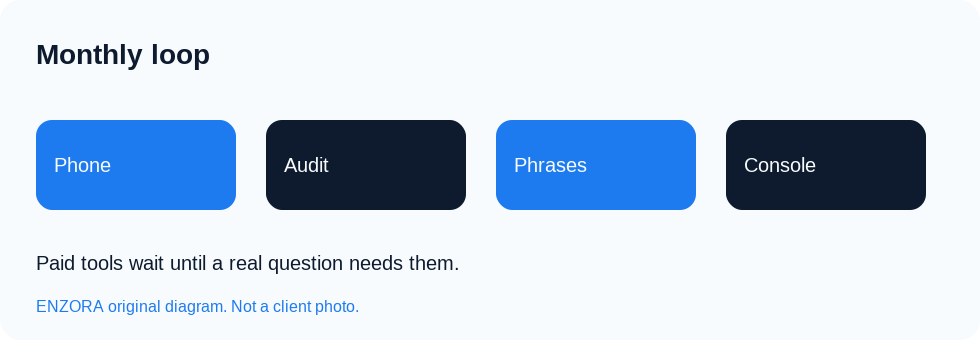
Here is a simple loop for a home service site. First, open the home page on a phone and tap the number. Second, run the Website Audit and read the first fixes in plain words. Third, use Keyword Ideas for your main service plus your main town. Fourth, compare those phrases to the headings you already have. Add a phrase only when the page truly offers that job.
Then open Search Console and look for pages Google reports as troubled. Fix one. Do not collect a long list and freeze. The SEO audit service is how we turn that kind of list into an order of work when you want a second set of eyes.
When the missing tools go live, add them at the edges. Difficulty helps you choose between two phrases you might write. A backlink check helps when you are wondering who mentions you. A crawler helps when the page count grows. None of them replace the phone number on the first screen.
| Need | Start here |
|---|---|
| Can people use the page | Website Audit, then the phone tap |
| What words to write | Keyword Ideas, then your real services |
| How Google reads the site | Search Console |
| Many pages to check | A crawler, when you will read the results |
| Who links to you | A backlink check, when you will act on it |
The tool path diagram is that loop in one picture: phone, audit, phrases, then Search Console. Paid tools sit off to the side until a question needs them.
This week, run the loop once and save the three fixes. Repeat next month before you book a demo.
Want us to fix this for you? Get a free fix plan.
Questions
Do I need paid SEO software to show up on Google?
No. Paid software does not buy a ranking. Google still has to understand your pages. A local business can start with a clear site, a Google Business Profile, and Google's own Search Console. Add a paid suite only when you will act on data the free tools do not give you.
What is Search Console?
It is Google's site owner tool. You prove you control the site, then you can see how Google reads pages and whether it reports security issues. Start at Google's about page and use the account that should own the property. Do not leave that login only with a freelancer.
What should a plumber or HVAC owner check each month?
Check that the site loads, the phone number works, and the main services are written in plain words. Look at Search Console for pages Google could not read. Update the Google Business Profile with a real photo. Skip rank charts you will not act on.
When is a paid suite worth it?
When you have many pages, several locations, or a person who will use the reports every month. A crawler for a large site, or a backlink study you will actually follow, can be that moment. A login nobody opens is a bill, not a plan.
Can free tools replace an SEO audit?
They can show the first problems, such as a missing title or a broken link path. They do not sit with you and decide which fix wins the next job. Use the tools to gather facts, then make a short list. Our SEO audit service is that judgment, not a second copy of the same button.
Was this helpful?
Related ENZORA services
Want help with your website?
Get a fixed quote from the ENZORA team. We work with businesses worldwide.