Performance
What to Do When Your Website Goes Down
By Fidyan Ahmed, founder · Published · Last updated · 7 min read
On this page
If your website is down, do not refresh for an hour and hope. Check whether anyone else can open it, name the kind of failure, and call the company that owns that piece. Then set a monitor so the next failure tells you first.
Key takeaways
- Confirm the outage on cellular data and with a second person.
- Separate a name problem, a certificate warning, and a server error.
- Call the domain company, the host, or the last editor, in that order of cause.
- Turn on a monitor and keep a backup you have actually restored.
Down for everyone or just you?
Your browser can fail alone. A full cache, a bad wifi login, or a parental filter can make one phone look like an outage. Before you post that the site is down, turn off wifi and open the page on cellular data. Then ask someone outside your office to try. If they see the page, the problem is local. Restart the phone and try a second browser.
If both tests fail, treat it as real. Write down the time and the exact words on the screen. "Cannot find the server" is different from "connection is not private" and different from a blank error number. That sentence tells the next person where to look.
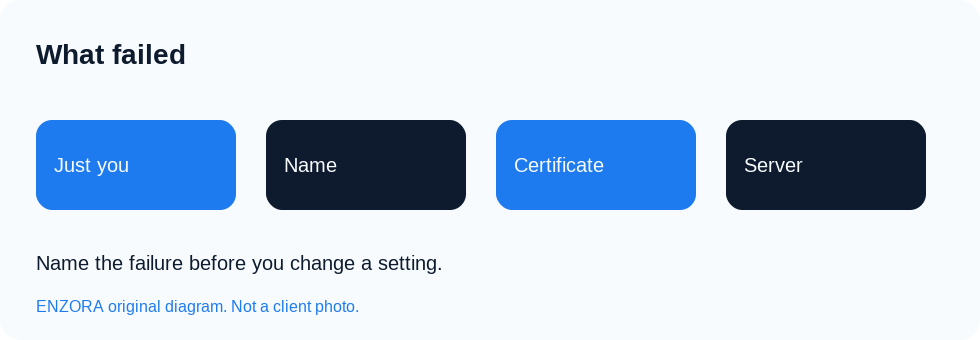
Do not change five settings while you are guessing. One change at a time, or you will not know what fixed it. Leave the domain and the host alone until you know which one is involved. The outage diagram is the split: just you, the name, the certificate, or the server.
Picture a plumber whose office wifi died. He tells customers the site is down and spends the morning on hold. His partner opens the site on a phone in the driveway. The site was up. The router was not. Two minutes of cellular data would have saved the morning.
This week, save a note in your phone: cellular test, second person, copy the error. Use it the next time someone says the site is broken. The Website Down Checker is the tool for the "is it only me" question.
Until that page is live, open the address in the Redirect Checker. A chain of errors is a clue. A normal final page means the public site answered.
DNS, SSL, or server?
DNS is the address book. If the name does not resolve, browsers cannot find a computer to ask. That often belongs to the company where you bought the domain, or to whoever last edited the name records. Do not change those records from a blog post. A wrong edit can also break email. If you are not sure, stop and call.
A certificate problem sounds like a warning that the connection is not private, or that the date on the certificate is wrong. The site may still be "there" while the browser refuses to open it. Hosts often renew that certificate for you. If it expired, they are the first call. The security guide explains what a secure address does and does not prove.
A server problem is when the name resolves and the certificate is fine, but the page shows an error or never finishes. That is the host, or the software on the host. A recent plugin update is a common cause. Ask what changed in the last day. The speed guide covers a slow page. Slow is not the same as down. Say which one you mean.
Picture an HVAC company whose site shows a certificate warning on a Monday. The host finds an expired certificate and renews it. Email never moved, because nobody edited the mail records. Calling the host first was the right call for that screen. A DNS edit would have been the wrong one.
This week, write three lines: who holds the domain, who hosts the site, and who last edited it. Put the phone numbers next to the lines. The Domain WHOIS and Age tool is how you confirm the domain holder when you are unsure.
Who to call first
Match the call to the failure. Name will not resolve: the domain company. Certificate warning: the host. One page broken right after an edit: the person who edited it. Whole site timing out: the host. Email also failing after a record change: stop and get the person who edited DNS, and do not guess a fix on the live records.
Have the facts ready. Your domain name, the time you noticed, the exact error, and whether a second person sees it. Say whether you can still log in to the host. Offer a backup if you have one. A calm list gets a faster answer than a long story.
If you cannot log in, say so at the start. The host may need to prove you are the owner. Keep that proof somewhere that is not only inside the dead site. A password saved only in the site's own email will not help if mail is down too.
Picture a roofer who calls the web designer about a certificate warning. The designer does not hold the host login. An hour is lost. The owner then calls the host and the certificate is renewed. Next time the owner calls the host first because the screen matches the certificate line on his note.
This week, put those three numbers on a card in the truck and in the office. Website maintenance is the service that holds this list between emergencies so you are not rebuilding it under stress.
Setting up free monitoring
You should hear about an outage before a customer does. Use a monitor that requests your home page on a schedule and sends you an email or a text when the request fails. Free plans exist at many companies. Read the current plan yourself. This guide will not guess what a vendor includes this month.
Point the monitor at the real home page, not at a test link nobody visits. Add the form page if that is how you get jobs. Test the alert. Use a bad address once and confirm the message arrives. Then point it back. A monitor that has never alerted you is an untested smoke alarm.
Do not rely on your own daily visit. You will be on a roof. The monitor will not. Check that the alert goes to more than one person. If it goes only to a mailbox nobody opens, it is theater.
Picture a garage door company that learns about a down site from a missed call at dinner. After that, two people get the alert. The next failure is a text at lunch, and the host is called while the site is still the morning's problem, not the next day's.
This week, turn on one monitor for the home page and send the test alert. Save the login with the host login, not in a chat thread.
Preventing repeat outages
Prevention is boring on purpose. Keep a backup and restore it once so you know the steps. Update plugins on a copy when you can, then update the live site when the copy looks right. Remove software you do not use. The indexing guide matters after you are back up, because a long outage can confuse search. Get the site answering first.
Do not let one freelancer hold the only admin user. You should be able to log in when they are on vacation. Write down the host, the domain company, and how to reach them after hours. Review that note twice a year.
When the site returns, click the form and the phone number. A page that loads with a broken form is only half fixed. Tell the crew the site is back so they stop apologizing for a problem that ended.
| What you see | Who to call |
|---|---|
| Works on cellular, fails on office wifi | Your local network, not the host |
| Name cannot be found | The domain company |
| Certificate or privacy warning | The host |
| Error page or timeout for everyone | The host, and the last editor |
| Only one new page is broken | The person who edited it |
This week, restore nothing if you are not in an outage, but find the backup and read the restore steps once. Knowing where they are is the whole task. Run a Website Audit after you are back so a broken form is not the next surprise.
Want us to fix this for you? Get a free fix plan.
Questions
How do I tell if the site is down for everyone?
Turn off the office wifi and open the page on cellular data. Ask a second person who is not on your network to try. If it fails for both of you, it is not just your browser. If it works for them, restart your phone and try again before you call the host.
What is the difference between DNS, SSL, and the server?
DNS is the address book that turns your name into a location. SSL is the certificate that lets the secure address work. The server is the computer that sends the page. A name that will not resolve, a certificate warning, and a server error are three different calls.
Who should I call first?
If the name will not resolve, call the company that holds the domain. If the certificate warning is new, call the host. If only one page is broken after an edit, call the person who made the edit. Bring the exact error text. A vague "it is down" slows the fix.
Can I get a text when the site fails?
Yes. Use a monitor that loads your home page on a schedule and emails or texts you when it fails. Test it once by pointing it at a bad address so you trust the alert. A monitor you have never seen fire is a guess.
How do I avoid the same outage next month?
Keep a backup you have restored at least once. Update on a copy before you update the live site. Do not let one person hold the only login. Write down the host, the domain company, and the after hours number before you need them.
Was this helpful?
Related ENZORA services
Want help with your website?
Get a fixed quote from the ENZORA team. We work with businesses worldwide.