SEO
Using AI to Write Blog Posts Without Hurting Your SEO
By Fidyan Ahmed, founder · Published · Last updated · 7 min read

On this page
AI blog writing can help you outline a post. It hurts you when the draft is published as if it were your experience. Google rewards useful pages and treats mass pages made to game search as spam. Use the tool for a draft. Add what you know. Check every fact. Then publish.
Key takeaways
- Google does not ban AI. It bans pages made mainly to game rankings.
- A model can sound sure and still be wrong. You must check facts.
- Add towns, jobs, and photos that only you can confirm.
- One reviewed post is safer than a stack of untouched drafts.
What Google says about AI content
On 8 Feb 2023, Google Search Central posted guidance on AI content. The post says ranking systems aim to reward original, helpful content, no matter how it is produced. It also says using automation, including AI, mainly to manipulate rankings violates spam policies.
The same post answers a direct question. Appropriate use of AI is not against the guidelines. Using it to game rankings is. The authors, Danny Sullivan and Chris Nelson, also say an AI byline is probably not the best way to show readers how a page was made. Add a disclosure when a reader would ask how the page was created.
A newer page, using generative AI content, was updated 1 Oct 2026. It says these tools can help you research and can add structure. It also says generating many pages without value for users may violate the spam policy on scaled content abuse. Models predict words. They do not look up your facts. You must check the draft, the title, the description, and the image text before you publish.
Picture a painter who asks a tool for "twelve posts about painting." The tool returns twelve pages that name towns the painter does not serve and a claim about a license the painter does not hold. Publishing that set is the harm. Asking for an outline of one post about cabinet paint, then rewriting it, is the safer use.
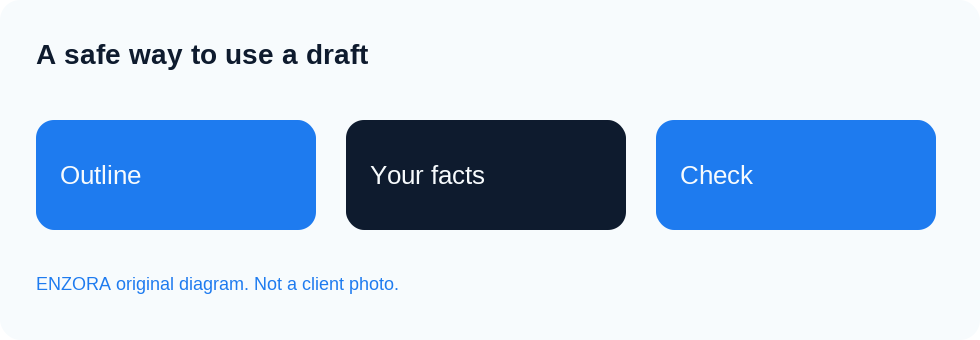
The draft diagram shows four steps. Outline, local facts, fact check, then publish. Do not skip the middle two.
This week, read the February 2023 post and the October 2026 page. Write one sentence you will follow: no page goes live until a person checks it. Try the AI Blog Post Writer. Content writing can do that check with you.
Where AI helps and where it hurts
AI helps when the blank page is the problem. It can suggest headings. It can turn your notes into cleaner sentences. It can list questions a customer might ask. You still decide which questions are real.
AI hurts when you trust a detail you did not verify. It can invent a law, a warranty, or a "typical" price. This site does not print prices in guides, and you should not publish a price you did not choose. It can also write the same post a hundred other shops could publish. That page does not show your work.
Google's spam policies, updated 28 Aug 2026, describe scaled content abuse as many pages made mainly to manipulate rankings, including with generative tools, when the pages add little value. Scraping other sites and swapping words is in the same section. A light edit of someone else's article is not your article.
Picture an electrician who pastes a tool draft about panel upgrades. The draft says the city inspects every job on Tuesdays. That is not true in that city. A customer plans around a false day. The page is now a problem even if the sentences sound smooth.
Use AI for the shape. Use yourself for the claims. If a sentence starts with a number, a law, or a promise, highlight it. Those are the lines that need a source or a deletion.
This week, take one old draft and highlight every fact. If you cannot point to where you know it, cut the sentence. Try the AI Content Detector. A detector score is not a Google rule. The rule is whether the page helps. Check clarity with the live Content Checker.
Adding real local experience
Local experience is the part a model cannot know. It is the street you will not drive after dark. It is the job you refuse. It is the photo from last Thursday. Google's helpful content guide asks who, how, and why. Checked 23 Nov 2026. Your name, your method, and your reason belong on the page.
Add three kinds of proof you can stand behind. Name the services you actually sell. Name the towns you actually cover. Describe one step of the visit in the order you really do it. Skip a story you cannot confirm.
Picture a tree crew after a storm. A useful post says you take emergency calls for hanging limbs, you do not grind stumps on the same night, and you need a clear path for the truck. Those lines come from the crew. A tool can tidy the grammar after you write them. It should not invent the policy.
Photos should be yours. Do not upload a house you cannot identify. Ask before you show a face or a house number. A blank stock photo does not add experience. A simple photo of your truck at a job you are allowed to show does.
Put the author where people can see it. Link to your contact page. If a tool helped the draft, a short note is enough when readers would expect it. You do not need a legal essay. You need to be honest.
This week, add a "how a visit works" block to your next post before you ask a tool for prose. Five lines from the crew are the experience. The AI search guide is a related read on how answers get quoted. Keep your facts boring and true.
Fact checking AI drafts
Fact checking is a pass with a pen, not a feeling. Read the draft as if a customer will trust it. Mark names, dates, hours, license claims, and any sentence that sounds like a study.
Google's generative AI page says the review covers metadata too. A wrong title can show in search. Check the title with the same care as the story.
Use this list.
| Line type | What you do | Publish when |
|---|---|---|
| A town or neighborhood | Match it to towns you serve | It is on your real list |
| A price or a discount | Remove it from the draft | You set it on your own rate card |
| A law or a code rule | Open the official page | You can link that page |
| A rank or a percent | Delete it unless you cite a source | The source is the original page |
| Hours and phone | Match the site and the truck | They are the same in all three places |
Do not ask the same tool if a line is true. It can repeat the mistake. Open the official page, or ask a person who does the job.
Picture a washing draft that says bleach is always safe on every roof. Your lead tech would never say always. Cut it. Write the cautious line you use on the phone.
Try the Duplicate Content Checker (free). Compare your draft to any page you used for ideas. If a sentence matches, rewrite it. The duplicate content guide explains the difference between a shared topic and a copied page.
This week, fact check one draft with the table. If you highlight more lines than you can check, the draft is too big. Cut it in half and check the half.
A safe workflow
Use the same five moves every time. You can write them on a card in the truck.
First, pick one question a real customer asked this month. Second, write five facts only you know. Third, ask the tool for an outline, not a finished post. Fourth, write the page in your words and fold the facts in. Fifth, a second person reads it, or you read it the next morning.
Do not generate a month of posts in one sitting. You will not review them. The spam policy is about lots of low value pages, not about the brand of the tool. A human written page with no experience has the same problem.
Keep a note of what the tool wrote and what you changed. You do not have to publish the note. It helps you see if the live page is actually yours. If the live page is still the raw draft, you are not done.
Picture the workflow on a "what to do before we arrive" post. The customer question is real. Your facts are the gate code, the pets, and the water spigot. The tool only suggests the order of the headings. You write the lines. Your office manager reads the phone number. Then you publish.
Link the post from the service page it supports. A post that no page points to is easy to forget. Content writing can own the review step if your crew will not. The launch checklist is a good last look at the page around the post.
This week, run the five moves on a single post. Stop when it is checked. Do not start a second post until the first one is live and linked.
Want us to fix this for you?
Get a free fix plan. Send the draft you are unsure about. Contact ENZORA.
Questions
Does Google ban AI blog writing?
No. On 8 Feb 2023 Google said proper use of AI is not against its guidelines. The same post says it is spam if the main goal is to manipulate rankings. A later guide, updated 1 Oct 2026, says many pages with no added value can be scaled content abuse. Use AI to help a real page. Do not use it to mint empty pages.
Should I list AI as the author?
Google's 8 Feb 2023 post says giving AI the byline is probably not the best way to be clear. Readers ask who wrote this. Put a real person when a person stands behind the facts. You can also say a tool helped with the draft if a reader would want to know how the page was made.
Can AI invent my service area?
It can, and that is a problem. A model predicts words. It does not know which towns you drive to. If you publish a town you do not serve, you will get the wrong calls and a page you cannot defend. Type the towns yourself. Delete any place you will not go.
How do I fact check a draft?
Read every name, price claim, law, and hour. If you did not type the fact, confirm it or cut it. Google's generative AI guide says this review also covers titles, descriptions, and image text. Check the phone number against the one on your truck. Then read the draft aloud once.
How many AI posts can I publish in a week?
There is no official weekly cap in the pages cited here. The risk is a pile of pages that do not help. Publish when a post has your experience in it and a person has checked it. If you cannot review it, do not post it. Steady and true beats a burst of thin pages.
Was this helpful?
Related ENZORA services
Want help with your website?
Get a fixed quote from the ENZORA team. We work with businesses worldwide.