For Home-Service Pros
Why Your Website Is Not Showing Up on Google (and How to Fix It)
By Fidyan Ahmed, founder · Published · Last updated · 6 min read

On this page
A website not showing on google usually has a plain cause. Google has not found it, you told Google to skip it, or the page is a thin copy. Work through those checks before you blame the market. Most fixes are settings, not a new slogan.
Key takeaways
- Confirm the page is allowed in search before you rewrite it.
- Use Search Console to see what Google reports, not a rumor.
- Keep one domain, and redirect the old one.
- Remove or improve pages that only swap a city name.
Indexing basics
Indexing means Google has stored the page and may show it. Crawling means Google visited it. A visit does not guarantee a listing. A brand-new domain can take time. A page that returns an error cannot be stored. Open the address yourself. If you see a password wall or a broken layout, Google may see that too.
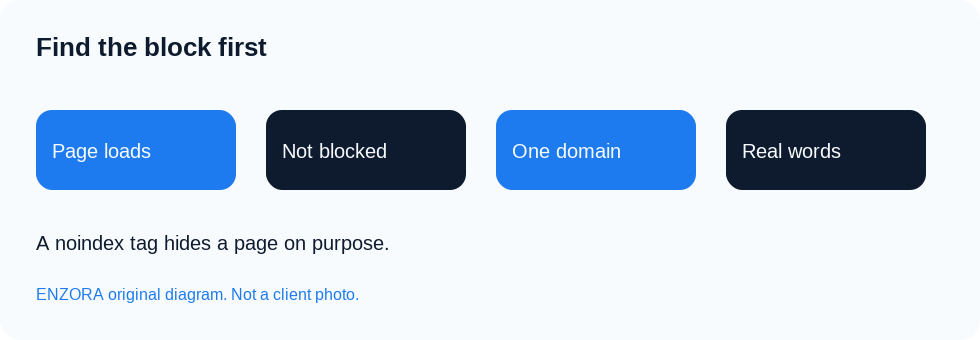
Give each important page a unique title and a real explanation. A home page that says "welcome to our website" and nothing else is easy to ignore. Name the trade and the towns. Link the job pages from the home page so a visit can find them. The find path diagram is address works, not blocked, unique words, then a request to look. A page that only loads when you are logged in as the owner will look missing to everyone else. Check in a private window. If the host shows a coming soon page to the public and the real page only to you, Google is seeing the coming soon page.
This week, open the home page and one job page in a private window. If either fails, fix that before any other SEO task. A website audit will also flag a dead address and a thin title.
Search Console
Search Console is free and it belongs to the owner. Add the property for the exact address you use, including https. Prove ownership the way the screen asks. Then use URL inspection on the home page. Read the result. It may say the page is indexed, or that it is excluded, or that Google has not seen it.
Do not panic at one unfamiliar word. Write down the status and the date. If the page is new, you can request indexing after you know it is not blocked. Requesting indexing is not a rank button. It asks Google to look. The local SEO guide still matters after the page is indexed, because a listed page can still be a weak card.
If you do not have access, ask whoever built the site to add you as an owner. Do not let the only login sit with a freelancer you cannot reach. The site and the console should both be in your account. Write down which Google account owns the property so the next helper does not create a second one by mistake. Two properties for the same site split the picture and make the status harder to trust. Keep one.
This week, sign in and inspect the home page. Save a screenshot of the status. If you cannot sign in, that is the first fix.
Robots and noindex
You can block a page on purpose. A staging copy, a thank-you page, or a draft should not always be in search. The block is a robots.txt rule or a noindex tag. Google explains robots in the robots intro and explains noindex in the block indexing guide.
The mistake is leaving the block on after launch. A whole site with noindex will not show, no matter how good the photos are. A robots file that disallows every folder does the same. The robots and sitemap checker reads the live files and tells you what they say in plain language.
Also check the host. Sometimes the builder's preview domain is indexed and the real domain is blocked, or the reverse. You want the real domain open and the preview closed. A password page on the live domain will also keep customers and Google out. Remove the password when you launch. A leftover noindex from a staging copy is the same kind of mistake. Search the page source for that word if the checker is unclear.
This week, run the checker on the live domain. If it reports a block you did not mean, remove that block and inspect the URL again in Search Console.
Duplicate domains
Two domains with the same site split signals and confuse customers. Pick the name on the truck. Redirect the other to it with a permanent redirect. Test the old address. It should land on the new one in one hop, with https. Update the Google profile website field the same day.
www and the bare domain are a smaller version of the same problem. Choose one and redirect the other. Do not leave both as equal copies. Google's note on consolidating duplicate URLs describes how to pick a main address.
If an old builder still hosts a copy, ask them to remove it or to redirect it. A forgotten copy with an old phone number will keep ringing the wrong line in search. Search the business name and see if an old address still appears. That result is a clue, not a rank report. Click it. If it is your old site, redirect it before you write another page of new copy. Tell the host which address is the one you want kept. Ask them to confirm the redirect in a reply you can save.
This week, type every domain you own into a phone. Note which ones load a site. Keep one. Redirect the rest.
Thin pages
A thin page has almost nothing useful on it. A town name swapped into the same paragraph is the common contractor version. Google can ignore those pages, and customers can feel the copy. Write pages only for jobs and towns you can describe. Remove the rest or combine them into one honest area page.
Titles that still say "Home" or "My Site" are a cousin of the thin page. They do not say what you do. Give each live page a title that names the job or the place. Then make the first paragraph match the title. A title that promises emergency work needs a page that shows the number and the hours, not a generic welcome. If the body could be pasted onto a rival's site and still make sense, it is too thin. Add a fact only you can say.
SEO audit is the right help when many pages are thin and you want a list, not a guess. Speed can also hide a page that is slow to show anything. The speed guide is the next read if the page exists but feels stuck.
This week, open the five pages you care about most. If one could fit any company in any town, rewrite it or take it down.
A fix list
Use this order. Skipping ahead wastes a week.
| Step | What you do |
|---|---|
| 1 | The address loads on a phone |
| 2 | Search Console shows you as an owner |
| 3 | Robots and noindex allow the pages you want |
| 4 | One domain, old ones redirect |
| 5 | Titles name the job |
| 6 | Thin town copies are gone |
| 7 | The profile link matches the live site |
| 8 | You request indexing only after the blocks are gone |
This week, do the first three steps. Do not buy links or a rank package while the site is blocked. A blocked site cannot win that argument. After the block is gone, wait and inspect again before you add more pages. New pages on a blocked site do not fix the block. When the status changes, note the date so you do not request indexing every morning out of habit. One careful request beats a pile of repeats that teach you nothing. Give the page a day before you decide the fix failed. Then inspect it once more and stop.
Next step
Want someone to read the console status with you? Get a free site review. Tell us the domain. We will look at blocks, copies, and titles. We will not promise a ranking.
Questions
Why is my new site missing from Google?
A new site is not instant. Google has to find the pages and choose to index them. Check that the site is not blocked, that the address works, and that Search Console can see it. A page with almost no words is easy to skip. Give it a real explanation of the job.
What is Search Console for?
Search Console is Google's free tool for owners. It shows whether Google can see a page and some reasons it might not. You prove you own the site, then you can inspect a URL. It does not rank you by itself. It tells you what Google already did.
Can a noindex tag hide my whole site?
Yes. A noindex tag or a robots rule can keep a page out of search on purpose. That is right for a draft. It is wrong for a page you want customers to find. Read the live page source or use a checker before you assume the words are the problem.
What if I have two domains?
Pick one. Point the other at it with a proper redirect. Two live copies split your name and can confuse Google. Update the profile website field to the domain you keep. Test the old address on a phone before you tell customers to use it.
Should I submit every page?
Start with the important ones: home, the main jobs, and contact. A sitemap helps Google find the list. Submitting a pile of empty town pages does not help. Fix the thin pages or remove them, then ask Google to look again.
Was this helpful?
Related ENZORA services
Want help with your website?
Get a fixed quote from the ENZORA team. We work with businesses worldwide.