Web Design
Online Booking for Service Businesses: Options Compared
By Fidyan Ahmed, founder · Published · Last updated · 7 min read

On this page
Online booking for a service business is a way to offer a time without playing phone tag. It helps when the job can be planned. It hurts when the calendar lies, the deposit is a surprise, or the page hides your phone number.
Key takeaways
- Use booking for jobs you can schedule. Keep the phone for emergencies.
- Put the scheduler on your site only if it stays easy on a phone.
- Write the deposit rule before anyone pays.
- Sync one crew calendar so two people cannot take the same hour.
Booking tools
A booking tool is any path that lets a customer ask for a time. That can be a form with a date field, a link to a scheduler, or a calendar on your own page. The brand name matters less than a few facts. Can the customer finish on a phone? Can you see the request? Can the crew tell that the slot is taken?
Picture a cleaner who only answers the phone while driving. Evening visitors leave a voicemail and book someone else. A short scheduler for recurring cleans would catch those people. A scheduler for "emergency flood" would be the wrong tool, because a flood cannot wait for a calendar square. Split the paths. Call for urgent work. Book for the weekly or monthly visit.
Start with the jobs you already repeat. Maintenance, a standard clean, a gutter visit, an estimate window. Give each one a plain name, a duration you can really keep, and the towns you will drive. If the drive time changes the day, do not offer every hour to every zip code. Leave travel gaps. A tool that ignores the drive will stack jobs you cannot reach.
This week, list the jobs that are safe to book without a phone call. If the list is empty, do not buy a scheduler yet. Fix the phone path first. Web design can place the book button next to the call button. CRM setup is how the request lands in a list a person will actually open. The form guide is the simpler cousin if you only need a request, not a clock time.
Embed vs link
An embed means the scheduler appears inside your page. A link means the button opens the tool's own page. Both can work. The embed feels like your site. The link is often easier to keep updated, and it is less likely to break your layout when the tool changes its code.
On a phone, test the embed with your thumb. Some boxes are too tall, cut off the pay button, or hide your phone number behind the frame. If the customer cannot see how to call you while they book, the embed is failing. A link that opens a clear page can be kinder than a broken box. Put your number in the first screen of that other page too, if the tool allows it.
Picture a garage door company that embeds a scheduler under a huge photo. On a desktop the calendar looks fine. On a phone the days are tiny and the next button sits under the browser bar. People pinch and give up. The same company with a button that says "Pick a time" and opens a page built for a phone will book more of the people who try. The fancy embed was the problem.
This week, book a test appointment on your phone. Note every place you hesitate. If you hesitate, your customer will leave. Automation can connect the request to a text or an email after it is sent. Do not add a second scheduler from another vendor on the same page. Two calendars means two truths.
Deposits
A deposit is a promise that the slot matters. Use one when a missed visit wastes a crew you could have sent elsewhere. Skip it when you are still filling the week and a deposit would scare off a first time customer. There is no single rule for every trade. There is a rule for honesty. The customer should see the amount, what it covers, and when they get it back before they pay.
Do not copy a deposit policy from another site. Your card processor may limit how you charge, how you refund, and what you must show on the receipt. Read that processor's public rules. If a state consumer office has a rule for your trade, follow that too. This guide will not invent a legal line for your state. If you are unsure, ask the processor and a local advisor before you turn the switch on.
Picture a landscaper who takes a deposit and then the words on the page say "due at the visit." The customer arrives ready to pay in full and argues about the charge already on the card. The work may still happen. The review will mention the surprise. Write one policy. Use it on the page, in the receipt, and in the text reminder. Say what weather does to the date. Say who to call to move the day.
This week, read your booking page as if you were the customer. Circle any money rule that appears only after the pay button. Move that rule above the button. If you do not want a deposit, say the visit is confirmed without one, so people are not afraid of a hidden charge.
No shows
A no show is a customer who does not appear and does not warn you. Shaming them on the page does not fix the route. A clear reminder does more. Send a short text the day before with the time, the address, and a way to change the visit. Send another note the morning of the job if the drive is long. Keep the words plain. Do not threaten in the first message.
Offer a way to reschedule that is as easy as the original booking. If changing the time means a phone call during your busy hour, people will just not show. A link to pick a new time is kinder and it frees the slot for someone else. If you use a deposit, say in the reminder whether a late cancel keeps it. Do not change that rule after they miss you.
Picture a detailer who books Saturday mornings and gets quiet driveways. The only reminder was an email on the day they booked, a week earlier. A text the day before would have caught the people who forgot. You do not need a statistic to try that. You need one week of reminders and a note of who still missed. If the same people miss twice, the deposit or a card on file is a business choice, not a guess from a blog.
This week, write the reminder in your notes app and send it by hand for the next jobs on the board. If the crew likes the result, turn on the automatic text inside the tool you already use. The texting guide covers consent before you message a list. Do not text people who only asked for a quote and never agreed to updates.
Calendar sync
The booking page is a window. The calendar is the book. If the window does not write into the book, you will double book. Choose one calendar the office and the crew both trust. Connect the scheduler to it. When a job is added by phone, block that time in the same calendar before you hang up. A side notebook will drift.
Check time zones if you serve more than one area, and check the hours the tool thinks you work. A tool set to the wrong zone will offer times you are asleep or times you are already on a roof. Set buffers for travel. A short job across town is not a short hole on the calendar. You know your roads. The tool does not, unless you tell it.
Picture two office staff who both "own" the schedule. One uses the booking tool. One uses a paper board. On Friday they each promise the same afternoon. The customer who is second to the door is the one who writes the review. Pick a single owner for changes, even if several people can view the day. CRM setup helps when the booking should also create a job card, not only a calendar square.
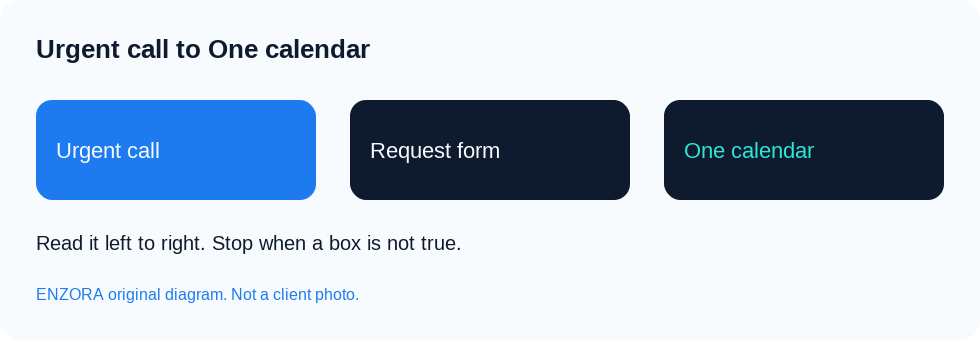
The booking diagram shows the choice: phone for urgent work, a request form, or a scheduler tied to one calendar. Use the NAP Checker to be sure the phone number on the booking page matches the number on your site and your profile. A booking path with a different number looks like a different company.
| Path | Best for | Watch out |
|---|---|---|
| Phone only | Emergencies and odd jobs | Missed calls after hours |
| Request form | Quotes that need a look | Nobody sees the email |
| Link to a scheduler | A fast start | The page does not look like you |
| Embed on your site | A visit that should feel like your brand | Tiny buttons on a phone |
| Deposit | Slots that are costly to lose | A surprise charge |
This week, book a fake job, then add a phone job on top of it. If the tool lets both exist, the sync is not done. Fix that before you advertise the button. The click to call guide still matters, because many people will tap the number instead of the calendar.
Next step
Want help choosing a booking path that matches the crew? Get a free site review. Tell us how jobs are booked today. We will point at a simple setup. We will not invent a no show rate.
Questions
Do I need online booking if people still call?
Not always. If every job is an emergency and you dispatch by phone, a tappable number matters more than a calendar. Online booking helps when the work can be planned, such as a tune up, a cleaning, or an estimate. Keep the phone for urgent calls. Offer a time picker only for jobs you can keep.
Should the scheduler sit on my site or open another site?
A link that opens another site is faster to set up. An embed keeps the header, the phone number, and your look on the screen. Use the embed when people are already on your site and you want them to stay. Use a plain link when the tool's page is clearer than a cramped box on a phone.
Should I take a deposit when someone books?
Take a deposit when a no show costs you a crew slot you cannot refill. Say the amount, when it is due, and when it is refundable before they pay. Match the words on the page to the words in the receipt. Do not hide the rule in a terms file nobody opens. Check your card processor's rules before you turn it on.
What if two people book the same hour?
Then the calendar is not the source of truth. Pick one calendar the crew trusts. Connect the booking tool to that calendar, or turn off times that are already full. A pretty scheduler that double books will create angry customers. Test it by booking a slot yourself and checking the crew phone.
Can I still ask them to call to confirm?
Yes. A booking can be a request, not a promise, if you say that in the first screen. Tell them you will confirm by text or by a call. Do not let the tool say the job is locked if a person still has to check the route. Honest words prevent a fight on the driveway.
Was this helpful?
Related ENZORA services
Want help with your website?
Get a fixed quote from the ENZORA team. We work with businesses worldwide.