For Home-Service Pros
How Plumbers Can Get More Calls From Their Website
By Fidyan Ahmed, founder · Published · Last updated · 10 min read

On this page
A plumber website has one job. It should help a worried homeowner call you or send a clear request. If the number is hard to tap, or the page is slow, that person calls the next truck. These plumber website tips focus on the path from search to a real ring.
Key takeaways
- Put a tappable phone number in the first screen of every page.
- Give emergency leaks a page of their own, apart from scheduled work.
- Show real reviews, and do not invent or filter them to look perfect.
- Keep the first screen light so it opens on a phone signal.
Why calls die on mobile
Most people who need a plumber are on a phone. They are in a kitchen, a basement, or a car. One thumb is free. Your page has a short moment to show a real phone number. If the number is a picture, the thumb cannot tap it. If it sits under a huge photo of a van, they may never scroll.
Google reads the phone layout before the wide desktop layout. The write-up is in the mobile-first indexing guide on Google Search Central. A layout that only makes sense on a wide desktop misses the way people actually call. The best plumber website is the one a person can use with one thumb.
Picture a homeowner with a wet floor. The screen is bright. A wide photo of a truck fills the top. The number is in the footer, in pale gray. They pinch to zoom and miss the digits. They leave and dial another company. Your crew never got a chance. That is a design miss, not a slow season.
Do this today. Open your home page on your own phone, on cellular data, not shop Wi-Fi. Can you tap the number without scrolling? If you cannot, move a real phone link to the top. Ask one person who is not on your crew to find it with a thumb. If they hesitate, the page is still hiding the call. A plumbing site built for calls starts with that test, not with a new logo.
Click-to-call and a sticky call bar
A click-to-call link is a phone number the browser can dial. The code is a link that starts with tel: and then your real business number. The words on screen can be "Call now" or the number itself. Both should hit the same link. Do not put the number only inside a photo. A photo cannot dial.
A sticky call bar stays on screen while the person scrolls. On a phone, put it at the bottom so it sits near the thumb. Two actions are enough. One is Call. The other is a short request, for people who cannot talk in a store aisle. Do not add five more buttons. Extra choices slow the tap.
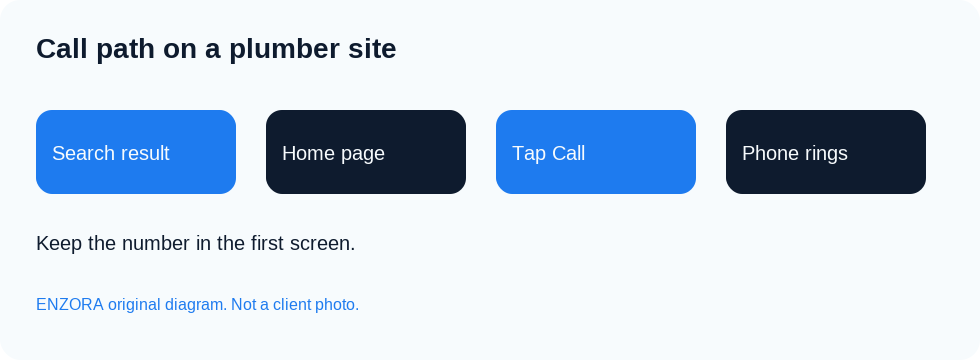
Here is a simple layout you can copy. The top of the page shows your city, the words emergency plumbing, and the number. The bottom bar repeats Call and Request a visit. The middle of the page explains leaks, water heaters, and drains in plain lines. The call path diagram shows that order: search result, home page, tap, your phone rings.
Watch the bar so it does not cover the form button. Scroll to the end of the page on a phone. If the last button hides under the bar, add space at the bottom. Check a small phone too. A wide screen can hide the problem.
Do this today. Add the tel: link to the header and to the bottom bar. Call it from a second phone. If your phone does not ring, the link is wrong. Then scroll a long page and confirm the bar never covers Call or Send.
Emergency pages and scheduled service pages
Emergency work and scheduled work are different jobs. A burst pipe needs a person now. A water heater install needs a date, a model, and a clear scope. One page that shouts about both will confuse the reader. They will not know if you can come tonight or only next week.
Give emergency service its own page. The first line should say what you handle after hours, such as active leaks and no water. Name the towns you will drive to at night. Say what you do not do in the middle of the night, so you do not train people to call you for a remodel. Put the phone number in the first screen. A short form can sit under it for a photo of the leak and the street.
Give scheduled work its own page too. Water heater replacement, fixture installs, and remodels can share a calm tone. Ask for the job type, the address, and a time window that is honest. Do not promise a same day visit on a page that is really a quote for later. Mixed promises create angry calls.
Picture two searches. One person types emergency plumber and a city. Another types water heater replacement and that city. If both land on a page that only says "we do it all," neither feels sure. Two pages let each search match a clear offer. That is a plumber website example worth copying.
Do this today. Write the first sentence of your emergency page and the first sentence of your scheduled page on paper. If they sound the same, rewrite them until a stranger can tell the jobs apart. Then link both pages from the home page with those same words.
Showing reviews the right way
Reviews help a homeowner pick a truck. They only help if they are real. Do not write them yourself. Do not buy them. Never ask a tech to post as if they hired the company. Federal rule 16 CFR 465.2 treats a review as deceptive when it misrepresents that the reviewer exists, used the service, or what the experience was. The text is in the eCFR rule on consumer reviews, edition dated 1 Jan 2026.
Show a few real reviews on the page, and link to the profile where the rest live. Quote them as written. You may skip a review that is abuse or spam, but do not hide the low stars just because they sting. A page of only perfect lines looks staged. One honest note about a late arrival, next to how you fixed it, reads like a real shop.
Google also has rules for review snippets in search. Read the review snippet guide before you add star markup. Markup should match reviews people can see, not a number you typed into the code. Do not invent a rating, a count of reviews, or a prize.
Picture a home page with a badge that says "top-rated" and no link. A careful homeowner cannot check it. Now picture short quotes, each with a first name, a town you serve, and a link to the profile. That page is easier to trust. You do not need a widget that hides the hard notes.
Do this today. Open the profile and read your latest reviews out loud. Put two of them on the site in full. Link the profile from the same block. Remove any badge you cannot point to a real source.
Quote forms plumbers actually answer
A long form feels like homework. People standing in a puddle will not finish it. Ask for the facts you need to call back or to roll a truck. A useful set is the name, a mobile number, the address, the problem in one line, and a photo if they can take one. A time window helps for scheduled work. That is enough to ring them.
Label every field in plain words. "What is leaking?" is clearer than "describe your project." Make the phone field open a number keyboard. Mark what is required. If you need a model number, say it is optional. People quit when a required box makes no sense.
Tell them what happens next. "We call this number during business hours" is fair. A promise of an instant reply is a promise you must keep, so do not print it unless your shop really does that. If you are on a job, say you return calls after the current stop. Honest timing beats a fast claim you miss.
Send the form to a phone your dispatcher actually watches. An inbox nobody opens is a lost job. Test the path on a regular schedule. Name who owns the first call so the homeowner is not left waiting.
Picture a form that asks how they heard about you before it asks what is leaking. The leak page should not do that. Move survey questions to a follow-up text, after you have helped. The first form is for the job.
Do this today. Delete every field you would not need on a phone call. Submit the form yourself and confirm it reaches the person who dispatches. If it lands in a junk folder, fix that before you buy more ads.
Speed on 4G
A slow page feels closed. On a weak signal, a huge photo can keep the number from showing. You do not need a perfect score to win the call. You need the first screen to appear with the number on it. Google describes loading, response to taps, and layout shift in its Core Web Vitals guide. Use that as the checklist, not as a trophy.
The usual weight on a plumber site is the hero photo. A truck photo shot on a new phone can be several times larger than the screen needs. Resize it, and offer a modern format. Do not set the photo as a background that loads late and then shoves the number down. That jump makes people tap the wrong thing. Leave the number in the HTML, not painted into the image.
Scripts slow pages too. Chat bubbles, old sliders, and extra tags can delay the first tap. Keep one chat tool if you will really answer it. Autoplay video is a poor fit for a leak page. It eats data and pushes the call bar down.
Picture the same home page on shop Wi-Fi and in a basement. On Wi-Fi the van photo looks sharp and the number appears at once. In the basement the photo crawls and the number shows late. They tap the wrong spot and leave. Test the page the way your caller will.
Do this today. Run a free website audit and open the page on cellular data. If the number is late, shrink the top image and remove one tool you do not use. Then load the page again beside a friend. You should both see the number without a wait you can count out loud.
A plumber website checklist
Use this list on your phone. It is a pass, not a redesign speech. If a row fails, fix that row before you add new pages. Web design for service companies is the right scope when several rows fail at once. If you also heat and cool homes, the HVAC site checklist covers seasonal pages. Electricians can use the electrician must-haves for license lines and emergency taps.
| Check | What good looks like | Do this today |
|---|---|---|
| Phone link | The number taps and dials | Call it from a second phone |
| Sticky bar | Call stays visible and does not cover Send | Scroll to the bottom on a small phone |
| Emergency page | Night work is clear and separate | Read the first line out loud |
| Scheduled page | Installs do not promise a midnight visit | Match the form to the real booking |
| Reviews | Real quotes, with a link to the profile | Remove any badge you cannot prove |
| Form | Short, and it reaches the dispatcher | Submit a test and confirm the ping |
| Speed | The number shows on a weak signal | Shrink the top photo and retest |
The diagram linked above is the picture version of this table. Search, page, tap, ring. If your live site adds a step, such as a popup before the number, that step is a place calls go to die.
Do this today. Walk the seven rows on one phone and write pass or fail. Fix the first fail before you touch colors or fonts. A clear call path beats a new theme that still hides the number.
Next step
Want a second set of eyes on the call path? Get a free site review. Tell us your main town and whether you take emergency calls. We will look at the number, the pages, and the form. We will not invent a ranking or a call count.
Questions
What should a plumber website include?
Start with a tappable phone number, your service area, and a short form. Add one page for emergency leaks and another for planned work such as water heaters. Show real reviews, your license if your state requires one, and photos of your own jobs. A page that hides the number under a logo is not finished.
Do I need a separate page for emergency plumbing?
Yes, if you take after hours calls. A homeowner with a burst pipe is not shopping for a remodel. Give that visit its own page with the number first, what you can do tonight, and what you will not promise. Keep scheduled jobs on a different page so the two jobs do not compete.
How do I show reviews without breaking the rules?
Use reviews real customers wrote, and do not edit the meaning. Federal rule 16 CFR 465.2, in the eCFR edition dated 1 Jan 2026, treats fake reviews as deceptive. Link to the profile where the reviews live. Do not buy praise or ask staff to pretend they hired you.
Why do mobile visitors leave without calling?
The usual causes are simple. The number is not a link, it sits below a huge photo, or the page takes too long to show anything useful. Test on a phone using cellular data, not the shop Wi-Fi. If you have to pinch or scroll to call, the visitor will too.
How fast should a plumber website open?
Fast enough that the phone number shows before the visitor gives up. Google explains loading, tap response, and layout shift as Core Web Vitals in its search docs. You do not need a lab to start. Open the page on a phone, then shrink the photo that blocks the number.
Was this helpful?
Related ENZORA services
Want help with your website?
Get a fixed quote from the ENZORA team. We work with businesses worldwide.