For Home-Service Pros
Quote Request Forms That Get Filled Out
By Fidyan Ahmed, founder · Published · Last updated · 7 min read

On this page
A quote request form should be easy to finish on a phone and easy for your office to act on. Ask for the facts you need to call back or to roll a truck. Tell people what happens next. A long form feels like homework, and homework does not get done in a driveway.
Key takeaways
- Ask for name, mobile, address, and the problem. Invite a photo.
- Use more than one step only when each step is truly short.
- Say what happens after they tap send, in words you will keep.
- Test the form yourself and make sure dispatch sees it.
Fewer fields
Every extra box is a reason to quit. Start with name, mobile number, address, and what they need. That is a quote request form a person can finish with one thumb. A time window helps for planned work. A novel does not.
Mark what is required. Make the phone field open a number keyboard. Label the problem in their words. "What is going on?" beats "project description." Do not require how they heard about you. Ask that later if you care.
If two people might reply, decide who owns the first call. A form that emails everyone and no one is a lost job. Put the address in the subject so the route can be sorted. Tell the customer which number will call them back so they do not ignore an unknown line.
Picture a form that asks for a budget range, a square footage guess, and a paragraph before it asks for a phone number. The eager customer still leaves. Cut those boxes. Conversion help is the longer pass on this kind of friction. The homepage guide shows where the form should sit.
This week, delete one required field you never use on the callback. Submit the shorter form from your phone.
Multi-step forms
A multi-step form can feel lighter when step one is only the problem and the phone, and step two is the address and a photo. People who are not serious may drop off. That can be fine. People who are serious should not hit a wall.
Do not use steps to hide the same long list. If you still ask twenty things, you still have a long form. Show how far along they are in plain language, such as "step 2 of 2," only if that count is true. Keep the back button working. Losing their answers when they tap back is a good way to lose the lead.
On a small phone, check the keyboard. It should not cover Next or Send. Add space at the bottom. A sticky call bar must not cover those buttons either. The call guide shows how a bar can steal the tap. If a step reloads and clears the address, fix that before you add more questions. People will not type a street twice. A lost field feels like the form is broken, and many of them will leave.
This week, walk the form on the smallest phone in the shop. If you get stuck, your customers will too. Shorten the step where you got stuck.
Photo upload
A photo of a leak, a roof, a yard, or a door can save a wasted trip. Invite it. Require it only when your process truly stops without it. Tell them what to shoot: the whole area and one close view. Do not demand a perfect gallery.
If the upload fails on a weak signal, the form should still send the words. Say they can text the photo to the same number. A trapped spinner is a lost lead. Compress on the phone if your tool allows it so a huge camera file does not time out.
Store the photo where dispatch can open it. A link that expires before the tech sees it is a broken handoff. Test with a real picture, not a tiny sample icon. Tell them the photo can be of the problem, not of their face, so they are more willing to send it. A dark blur is still useful if the address and the words arrived with it. Do not reject the lead because the picture is imperfect.
This week, send a test photo from a driveway, not from the office Wi-Fi. Confirm the scheduler can open it. If they cannot, fix the path before you call the form done.
Text-back
Some customers would rather text than fill a form. Offer the number for texts if a person reads them. Say the hours. An auto reply can repeat what you will do next, in the same words as the thank-you page. Do not auto reply with a promise of an instant visit unless that is true.
The form and the text should land in the same queue. If texts go to a personal phone that is off on Sunday and forms go to an inbox nobody opens, you have two leaks. Pick an owner.
Do not ask for the same details in a text thread that the form already collected if they came from the form. If they only text, ask for the address and a photo in the reply. Keep it to those facts. Save the thread where the scheduler can see it the next morning. If texts only live on one personal phone, the business does not have the lead when that phone is off. Move the thread to the shared inbox before the end of the day.
This week, text the business number from your own phone and see who answers and when. Update the page if the real hours are different.
Thank-you pages
The thank-you page is proof the form worked. Say the note arrived. Say whether you call or text. Repeat the hours. Repeat the phone number for anything urgent. Do not dump them on a blank screen or back on the home page with no confirmation.
You can suggest one next step, such as adding a photo if they skipped it. Do not start a second sales pitch. They just asked for help. A calm page builds more trust than a popup.
If you track leads, the thank-you page is often where the event fires. Test that the event matches a real submission. A page view that fires when they only look at the form will inflate your notes. The indexing guide mentions thank-you pages as something you might keep out of search. A noindex on that page is reasonable. Do not noindex the form page itself. Repeat the job they asked about so they know the note was about the right visit. If you will call from a different number than the one on the site, say that number here so they answer.
This week, submit a test and read the thank-you page out loud. If it does not say what happens next, rewrite it before you spend on ads.
Tracking leads
Write down where the lead came from: form, text, or call. You do not need a complex stack to start. A shared note with the date and the job type is enough for a month. Then you can see whether the form is worth the space.
Make sure the lead reaches a human. A tool that stores messages in a login nobody opens is not tracking. It is a closet. Website audit can show whether the form is hard to find. It will not answer the phone for you.
| Piece | Keep | Cut |
|---|---|---|
| Fields | Name, mobile, address, problem | A required essay |
| Steps | Short, with a working back button | A long list in disguise |
| Photo | Invited, with a text backup | A trap if upload fails |
| Reply | Hours you will keep | A fake instant promise |
| Thanks | What happens next | A blank screen |
| Notes | Form, text, or call | A dashboard nobody opens |
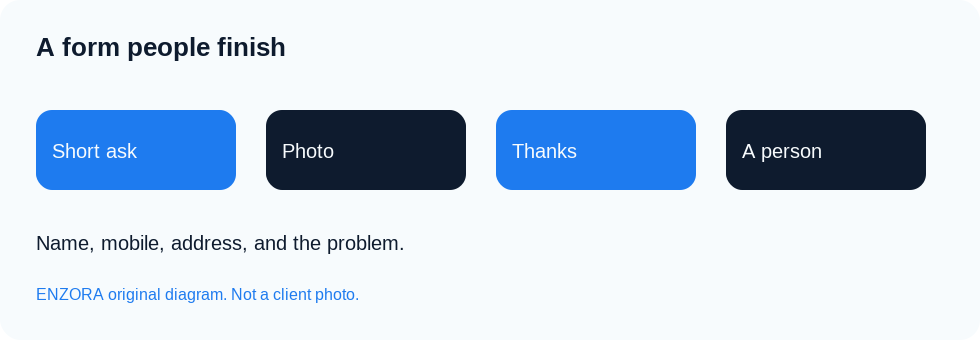
The form path diagram is the same idea in a line: short ask, photo if they can, thank you, a person sees it.
This week, send one test and follow it until a human replies. If that chain breaks, fix the chain. Do not add fields.
Next step
Want a pass on the form you have? Get a free site review. You can also reach us through the contact page. Tell us which job the form is for. We will look at the fields and the thank-you page. We will not invent a conversion rate.
Questions
How many fields should a quote form have?
Ask for the name, a mobile number, the address, and the problem in one line. A photo helps and can be optional. Skip a long survey. If you need a model number, ask after you call. People on a phone quit when the form feels like an application.
Are multi-step forms better?
They can be, when each step is short and the first step is easy. Do not hide a long form behind three pretty screens that still ask for everything. Show progress in plain words. Test the last step on a small phone so the button is not covered.
Should I require a photo?
Require it only if you cannot price or route without it and you know most customers can take one. Otherwise invite the photo and let the form send. A broken upload should not trap the lead. Offer a note that they can text the picture.
What should the thank-you page say?
Say that the note arrived, what you will do next, and the hours you reply. Repeat the phone number for urgent jobs. Do not promise a clock you will miss. A vague thanks with no next step feels like the form vanished.
How do I know the form works?
Send a test from your phone every month and after every edit. Confirm the message reaches the person who schedules, with the address visible. If it lands in a junk folder, fix that before you send ads to the page.
Was this helpful?
Related ENZORA services
Want help with your website?
Get a fixed quote from the ENZORA team. We work with businesses worldwide.