SEO
Why Google Isn't Indexing Your Page (and How to Fix It)
By Fidyan Ahmed, founder · Published · Last updated · 7 min read

On this page
A page not indexed is a page Google has not kept in search results. The page can still open in a browser. First confirm the public URL loads. Then look for a block, a noindex tag, or a thin copy of another page. Guessing a penalty wastes the afternoon.
Key takeaways
- Confirm the public page loads before you blame Google.
- Remove a noindex or a sitewide robots block you did not mean.
- Thin and duplicate pages can be fetched and still skipped.
- Ask for a recrawl after the page is worth keeping.
Is it really not indexed?
Open a private window and load the exact URL. If you see a login wall, a coming soon message, or a 404, Google is not the first problem. Fix the page a stranger sees. Your editor view does not count.
Then search for that full URL. If your page does not appear, it may not be indexed, or a different URL may be the one Google kept. In Search Console, use URL inspection if the property is yours. Google's URL inspection help is the doc for that tool. Read the result it shows. Do not invent a reason the tool did not give you.
A brand new page can simply be waiting. There is no public timer that says a page must appear on a certain day. Give it a real link from a page Google already knows, such as the home page or a service page. The crawl guide is the way to see whether the URL even returns a success code.
Picture a heater page you published on Friday. On Saturday it is missing from a search for the exact URL. The private window shows the page. The menu does not link to it. Inspection has not been run. The next step is a link and an inspection, not a rewrite of the whole site.
This week, test one missing URL in a private window and in URL inspection if you have Search Console. Write down the exact message. Do not start a fix until you have that message.
Noindex, robots.txt and canonicals
Noindex is a direct ask not to index a page. Google's block indexing guide explains the meta tag and the HTTP header. A staging site should use it. A live home page should not. Themes and plugins sometimes leave the tag on after launch. View the source and search for noindex.
Robots.txt is different. It can stop a crawl. Google's robots intro is the overview. Google's canonical guide, last updated 20 Aug 2026, also warns that a disallow is a bad way to pick a preferred URL, because a blocked URL might still be indexed without its content. If you want a page gone, noindex or a real removal is the clearer tool. If you want it found, do not disallow it.
A canonical tag tells Google which copy you prefer. The canonical guide says that tag is a hint, not a rule. If your service page canonical points at the home page, you asked Google to treat the home page as the main copy. Point the tag at the page itself unless a duplicate should defer to another URL. The canonical guide on this site walks that choice in plain words.
The Google Index Checker and the Canonical Indexability Checker check whether a page looks indexable. The Robots and Sitemap tool warns if robots.txt blocks the site or the sitemap is missing. It does not log into Search Console for you. SEO Audit can read the tag with you if the theme hides it.
This week, view source on the missing page. If you see noindex, remove it if the page should be public. If the canonical points somewhere else, fix that before you request a recrawl.
Crawled but not indexed
Sometimes Google fetched the page and still did not keep it. The status code guide says a success code does not guarantee indexing. The content has to be worth keeping. A page that is almost empty, a page that only says "welcome," or a page that repeats another URL can be crawled and skipped.
Google's canonicalization troubleshooting says to check which URL Google chose as canonical, and to make clustered pages actually different. It also says that after a content fix, Google might hold pages in a duplicate cluster for up to two weeks. That is a waiting note, not a promise that two weeks will index a thin page.
Add a real explanation of the job, a unique title, and a link from a related page. Remove a copied paragraph you pasted from another service. The on page guide shows what a service page should contain. Do not add a block of city names and call that unique.
Picture two drain pages that share the same three paragraphs and swap only the city in the title. Google may keep one and skip the other. Write the city page only if you have something true to say about that city. Otherwise one strong page is better.
This week, compare the skipped page with the page Google did keep, if inspection tells you there is a chosen URL. Make them different in a way a customer would notice, or stop publishing the copy.
Thin and duplicate pages
Thin means the page does not answer anything. A title, a slider, and a phone in a picture is thin. Duplicate means another URL already says the same thing. Google's canonical guide says some duplication is normal, such as http and https, and that it is not automatically a spam violation. It also says many URLs for the same content make the site harder to understand.
Pick one URL for each job. Redirect the extras if you can. If you must keep a print view or a tracking parameter, canonical the copy back to the clean URL. Do not canonical every service page to the home page. That throws away the specific page.
Tag pages, search result pages, and empty category pages are common duplicates on blogs and stores. Keep them out of the sitemap if you do not want them as results. Link the pages you do want from the menu. The internal linking guide covers that path.
A soft 404 is a cousin of thin. The code says success, the words say the page is missing. Google's status guide calls that out. Replace it or redirect it. Do not ask Google to index an error dressed as a page.
This week, list every URL that targets the same job. Keep one. Redirect or canonical the others. Then add a paragraph only the kept page needs.
Asking Google to recrawl
Fix the page first. A recrawl of a blocked or empty page will not invent content. When the public URL loads, the noindex is gone, the canonical is right, and a real page links to it, use URL inspection and request indexing if the button is there. Google's inspection help is the reference for that screen. There is no fee for the request, and there is no way to buy a faster index from a stranger.
Do not submit the URL every hour. Do not submit a list of empty town pages. The troubleshooting note about up to two weeks applies to duplicate clusters after a fix. Other URLs move on Google's own schedule. Check again later and read the new inspection result.
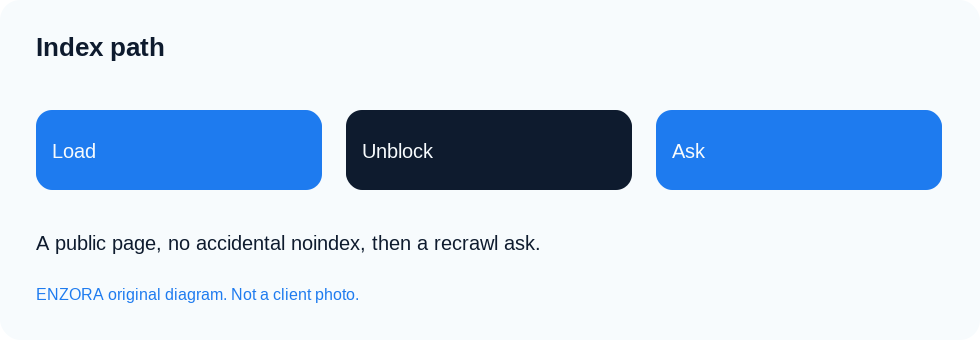
The index path diagram is load, unblock, unique words, then ask. The App Router checklist is useful if the site is custom and the sitemap or robots file is generated. The same order works on a template site.
| Step | Question | If the answer is no |
|---|---|---|
| 1 | Does the public URL load? | Fix the page or the host |
| 2 | Is noindex absent? | Remove it on purpose |
| 3 | Can robots.txt fetch it? | Remove the disallow |
| 4 | Does the canonical match this URL? | Point it at the page you want |
| 5 | Is the page more than a copy? | Add real words or redirect |
This week, do steps 1 through 4 on one URL. Request indexing only after those pass. Write the date you asked, so you do not spam the button.
Next step
Want us to fix this for you? Get a free fix plan. Send the URL that will not appear. We will look at the block, the canonical, and the words. We will not promise a day it will show up.
Questions
How do I check if a page is indexed?
Search Google for the full URL, and use URL inspection in Search Console if you own the site. Google's inspection help explains that tool. A page can load in your browser and still be absent from the index. Do not decide from a logged in editor that shows a draft. Check the public address in a private window first.
What does noindex do?
A noindex rule asks Google not to index that page. Google's block indexing guide explains the robots meta tag and the header version. Use it on purpose for a thank you page or a private draft. Do not leave it on the home page after launch. If the whole site is noindex, new posts will not fix the absence. Remove the rule on the pages you want found.
Can robots.txt keep a page out?
A disallow can stop Google from crawling the page. Google's canonical guide also says a blocked URL might still be indexed without its content, which is a poor result. Do not use robots.txt as a way to choose the main URL. Use the Robots and Sitemap tool to see if the file blocks the whole site. Then read the file yourself before you delete lines you do not understand.
What if Google crawled the page and still skipped it?
Then the fetch worked and the index did not keep it. Thin pages, empty pages, and copies of another URL are common reasons. Google's status guide says a success code does not guarantee indexing. Add something useful and unique, link the page from a real page, and make the canonical tag point at the URL you want. Then inspect the URL again.
How fast will a recrawl happen?
There is no clock you can set. Google's canonical troubleshooting guide, reviewed 23 Nov 2026, says that after you fix duplicate content, pages might stay in a duplicate cluster for up to two weeks. That note is about duplicates, not a promise for every URL. Request indexing from the inspection tool if it is offered. Then wait and check again. Do not request the same URL every hour.
Was this helpful?
Related ENZORA services
Want help with your website?
Get a fixed quote from the ENZORA team. We work with businesses worldwide.