SEO
On Page SEO for Service Pages: A Practical Grader Walkthrough
By Fidyan Ahmed, founder · Published · Last updated · 7 min read

On this page
On page seo is the work on the page itself. For a service page, that means the title, the heading, the sections, and the links all name one job. Google's title link guide says it may use your title, your headings, and other prominent text. Give it one clear story.
Key takeaways
- One service page should be about one job.
- Read a top result for topics, then write your own page.
- Put the job in the title, the H1, and the first lines.
- Preview the snippet, and do not stuff a phrase.
What Google needs on a service page
Google needs a page it can fetch, a title that fits the content, and text that matches the search. The title link guide says mismatched titles and headings can confuse which line becomes the result. Make the visible title and the H1 say the same job. Put that job in the first lines, not only in the footer.
A service page also needs a way to respond. A phone link and a short form are for the customer. They also prove the page is a real offer. Name the towns you serve if you travel. Do not list a state you will not drive. The local SEO checklist covers the map card that should match this page.
Google's starter guide says to use headings so people can scan, and to write your own content. It does not ask you to hide keywords in the same color as the background. Say the job in normal sentences. If you clean drains, say drain cleaning. If you do not, do not borrow the phrase.
Picture a water heater page. The title says water heater repair and the city. The H1 repeats that. A section says what you do on the visit. A section says when you need a full replacement instead. The phone is a real link. That is on page seo for a trade. It is not a blog post about the history of heaters.
This week, open your main service page on a phone. If you cannot tell the job in one glance, fix the H1 before you add a paragraph. Content Writing can draft that page with you if the blank screen is the blocker.
Using top ranking pages as a guide
Search the job plus the town in a private window. Open two or three results that are real companies, not ads if you can tell them apart. Note the questions they answer. Do they name brands, warranties, emergency hours, or towns? That list is a guide. It is not a script.
Do not copy their sentences. The starter guide says to create the content yourself. A copied block can also be wrong for your license or your prices. You do not know their insurance. You do know your own visit. Write that.
Ignore pages that are only a directory or a map pack. You are studying a service page, not the whole results screen. If every rival leads with a call button and a list of towns, your page can do that too, with your towns and your number.
The On Page SEO Grader checks the page you paste. The Content Checker still gives a word count, a reading grade, and a stuffing warning. Paste your draft, not the rival's page. If it warns that a phrase repeats, cut the repeats. It will not tell you that you outrank anyone.
This week, make a five line note from one rival page: topics they cover. Add only the topics that are true for you. Drop the rest. If a topic needs a license you do not hold, leave it off even if it ranks for them.
Terms and headings to add
Use the words a customer says. "No hot water" belongs on a water heater page if that is the call you take. "AC not cooling" belongs on a cooling page. Put each idea under a heading so the page scans. The starter guide treats headings as a way to break up the page for people.
Do not add a heading for every synonym. One section for the problem, one for what the visit includes, one for what you do not do, and one for how to book is enough. The heading guide goes deeper on levels. Keep a single H1 and use H2 for the sections. The Heading Structure Checker can help you review that outline.
Skip a block of city names with no sentences. A heading that is only "Dallas Houston Austin" is a list, not a section. If you serve a town, give it a real sentence or leave it on the area list.
The Heading Structure Checker reviews the heading outline. The Content Checker is still useful for reading level. You can also see the outline by reading the headings out loud. SEO Growth is the ongoing work if you want a monthly pass on these pages.
This week, add one missing section you actually get calls about. Name it with the customer's words. Delete a heading that repeats the title with no new fact.
Title and meta that earn clicks
The title should name the service and, if the page is local, the place. Keep it specific. Google's title guide says it may rewrite a title, especially when headings disagree. Give it one obvious line. The SERP Preview shows a sample result and whether the title looks too long. Use the preview. Do not trust a rumor about a magic character count.
The description should say who it is for and what to do next. "We repair tank water heaters in the towns on this page. Call the number at the top." That is enough. Do not stuff the city five times. Do not promise you are number one.
Match the H1 to the title closely. They do not need to be identical. They should not fight. A title about drains and an H1 about remodeling will confuse the person and the result.
Picture the preview on a phone. The job is visible. The town is visible if it fits. The description is a sentence, not a slogan. If the tool cuts the end, move the job to the front and cut the slogan, not the job.
This week, run the main service title through the SERP Preview. If the job is cut off, shorten the title and check again. Read the new title out loud. If it could fit a different trade, it is still too vague. Put the job back at the front and cut the extra claim.
Before and after example
Here is a made up page, not a client and not a result we measured. Before: the title is "Home Services." The H1 is "Welcome to our website." The first paragraph talks about family values and does not name a trade. The only link says "click here."
After: the title is "Drain cleaning in Mesa." The H1 matches. The first lines say you clear kitchen and bath drains and you do not dig up sewer lines. A section lists what to try before you call, without telling people to open a pipe. The phone is a link. A link to the water heater page uses the words "water heater repair," not "click here." Google's starter guide says link text should describe the page it points to.
| Piece | Before | After |
|---|---|---|
| Title | Home Services | Drain cleaning in Mesa |
| H1 | Welcome to our website | Drain cleaning in Mesa |
| First lines | Family values, no job named | What you clear, and what you do not |
| Link | Click here | Water heater repair |
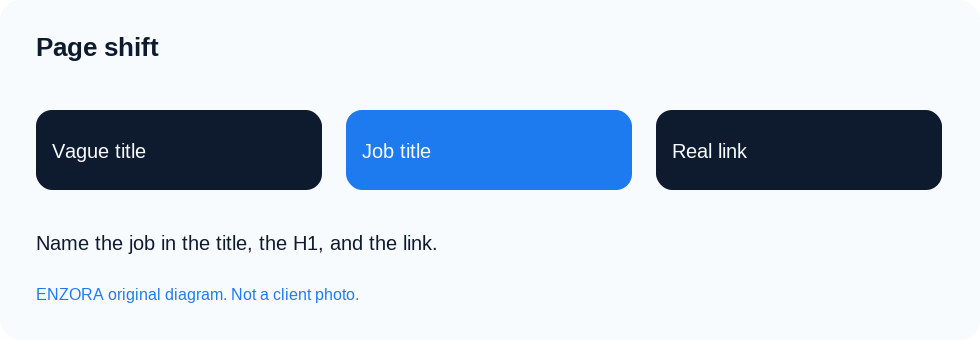
The before and after diagram is that same shift: vague title, then a job title, then a real link. Change the city to yours. Do not keep Mesa if you do not work there. The content checklist is a useful pass before the page goes live.
This week, rewrite one weak service page in that shape. Read it to someone who answers the phone. If they say the page promises a job you refuse, fix the sentence before you publish.
Next step
Want us to fix this for you? Get a free fix plan. Tell us which service page matters most. We will look at the title, the headings, and the links. We will not promise a position, and we will not copy a rival page into yours.
Questions
What is on page SEO for a service page?
It is the writing and structure on that URL. The title, the main heading, the sections, and the links should name the same job. On page seo does not include buying links or editing a rival's site. Google's title link guide says the title and headings are clues it may use. They are clues, not a switch that forces a ranking.
Should I copy the page that ranks first?
No. Read it to see which questions it answers, then write your own answers. Google's starter guide says not to copy other people's content in part or in whole. A copied page can also describe a city or a license you do not have. Use the rival page as a list of topics. Use your jobs as the proof.
How long should the page be?
Long enough to explain the job, the towns, and the next step. There is no word quota in the Google guides this article cites. A thin page that only says to call is hard to trust. A page that repeats one phrase over and over is hard to read. Say what the visit includes, what it does not include, and how to reach you.
Does the meta description have to match a character count?
Google can rewrite the snippet. The SERP Preview tool shows where a title or description may be cut in a sample result. Use that preview instead of a magic character count. Write a plain sentence about the job and the action. If the preview cuts the town name, shorten the front of the line so the job still shows.
Can a tool grade the page for me?
The live Content Checker can count words, estimate a reading grade, and warn if a phrase is stuffed. It does not score headings or promise a rank. The SERP Preview shows a sample result. A separate on page grader is not on the site yet. You still have to read the page on a phone and see if the number is easy to tap.
Was this helpful?
Related ENZORA services
Want help with your website?
Get a fixed quote from the ENZORA team. We work with businesses worldwide.