SEO
Run a Free SEO Crawl of Your Website: A Step by Step Guide
By Fidyan Ahmed, founder · Published · Last updated · 7 min read

On this page
An seo crawler fetches your pages and lists what it found. It shows status codes, titles, headings, and links. It does not rank you, and it does not know your best job. Google's HTTP status code guide, last updated 4 Feb 2026, says a success code does not guarantee indexing. Treat the list as a to do sheet, not as a trophy.
Key takeaways
- Crawl the pages a customer can reach, not a fantasy site map.
- Read status codes before you rewrite titles.
- Fix home page links that fail before you add new pages.
- Use a live tool for the check it really does, and say so.
What a crawler sees
A crawler asks a URL for the page. The server answers with a code and, if things work, the HTML. The crawler can read the title, the main heading, the other headings, and the links. It cannot tell that your emergency line is the thing you care about unless that line is in the page.
Google's status guide says a 2xx success code means the content can be considered for processing. For Search, that still does not guarantee indexing. A pretty 200 page that says "page not found" in the words can show up as a soft 404 in Search Console. The guide says that happens when the content looks like an error, an empty page, or an error message.
A crawler also misses what a person sees after they tap. A phone number in a picture may not be a link. A button that only works after a script runs may be easy to miss. Google's crawlable links notes say Google can generally crawl a normal link element. If the only path to a service page is a script, do not assume the crawl found it.
Picture a home page with four service links and a contact link. A first crawl of that set is enough to start. You do not need every old tag page. The crawl diagram is home, status, title, then fix. The small business SEO audit is the longer checklist if you want the wider pass.
This week, write the URLs you want a stranger to find. If a page is not on that list, do not panic when a crawl skips it.
Running your first 50 page crawl
Fifty pages is a cap for a first pass, not a score. Many trade sites have fewer pages than that. Start at the home page. Follow the links in the menu and the footer. Add each service page and the contact page. Stop when you hit 50 URLs or you run out of real pages. Skip calendar files, thank you pages, and old test addresses.
The Site SEO Crawler can walk more than one page on a site. The Website Audit scores the page you submit. It looks at trust, search basics, speed signals, and contact paths. Run the audit on the home page, then on the main service page, and use the crawler when you have many URLs.
The Broken Link Checker checks links on the home page and lists the ones that error. Blocked sites can stay "not checked." That is an honest limit. Use it on your live home page, not on a staging address you do not want public.
Write a simple sheet: URL, code, title, one note. You can do that in a notes app. Do not buy a crawl export full of columns you will not read. If a link leaves your site, you only need to know that it opens. You are not responsible for rewriting someone else's title.
This week, crawl or list the home page and every page it links to on your own site. Save the sheet. You will use it in the next three sections.
Reading status codes
Read the code before you judge the words. Google's guide, last updated 4 Feb 2026, is the source for how Google treats the common codes. A 200 means success, and the content goes on for processing. Indexing is still not guaranteed.
A 301 is a permanent move. Google follows it and treats the redirect as a strong signal that the target should be processed. Use a 301 when you retire a URL on purpose. Do not chain five hops if one will do. The Redirect Checker shows each hop on a URL you paste.
A 404 means not found. Google's guide groups 404 with other 4xx client errors, except 429. It says Google does not index 4xx URLs, and URLs that already were indexed and now return 4xx are removed over time. That is correct for a page you deleted. It is a problem when your menu still links to it.
A 500 is a server error. The guide says 5xx responses make Google slow crawling, and content from those URLs is ignored. If your host is throwing errors, fix the host before you rewrite a title. A soft 404 is the tricky one: the code says success, the page says error. Do not leave a blank "oops" page on a 200.
This week, sort the sheet. Put 5xx first, then menu links that 404, then soft pages that say error while the code says success.
Titles, descriptions and H1s
After the codes are calm, read the title and the main heading on each kept page. The title is the line in the browser tab and often in search. The H1 is the big heading on the page. They should name the same job. A title that says "Home" and a heading that says "Welcome" do not tell anyone what you do.
Google's title link guidance says Google may use the title, the headings, and other prominent text when it builds the link in search. It can rewrite the line. Give it one clear title so it has less reason to guess. Do not paste the same title on every service.
The description is the short summary you hope shows under the title. It is not a guarantee. Write one sentence about the job and the town, then one about the next step, such as a call. The SERP Preview shows where a title or description may be cut. Use it before you publish. The App Router checklist is a technical cousin if your site is custom.
Picture a drain page titled "Services" with an H1 that says "Our team." Change the title and the H1 so both say drain cleaning and the city, if that is the real page. Leave the about page titled for the about page.
This week, fix the title and H1 on the one service page that gets the most calls. Do not batch edit ten pages until that one reads clearly on a phone.
Fix order: what to do first
Fix in an order that unblocks people. Server errors first, because Google ignores the content on a 5xx. Then broken links in the menu and footer. Then soft 404 pages that pretend to load. Then titles and H1s on the money pages. Then the nice to have wording.
| Order | What you see | First fix |
|---|---|---|
| 1 | 5xx or the site will not load | Talk to the host before any rewrite |
| 2 | Menu link returns 404 | Point the link at a live page or remove it |
| 3 | 200 page that says the page is missing | Add real content or redirect |
| 4 | Title and H1 do not name the job | Rewrite that one page |
| 5 | Robots or sitemap looks wrong | Read the files before you add pages |
The Canonical Indexability Checker looks at canonical tags and whether a page can be indexed. The Robots and Sitemap tool tells you if robots.txt blocks the site or the sitemap is missing. It does not judge every title. SEO Audit is the service if you want the sheet reviewed with you.
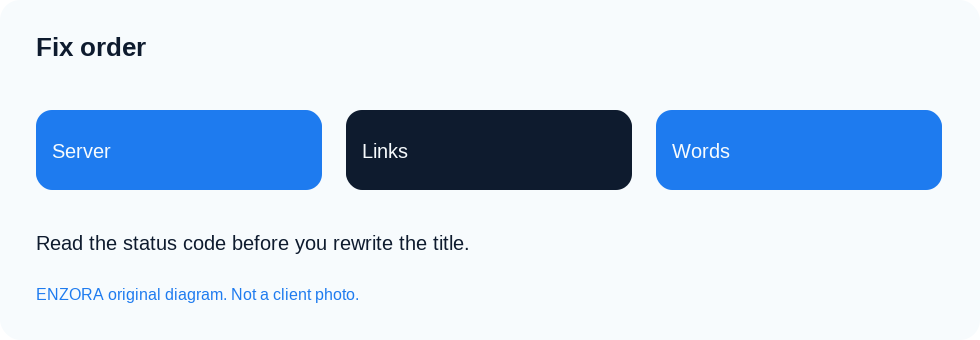
The fix order diagram puts server, links, then words in one row so you do not start with a new blog post while the menu is broken.
This week, do row 1 and row 2 only. Stop when those are clean. A second crawl can wait until the links you already have actually open.
Next step
Want us to fix this for you? Get a free fix plan. Send the home page address. We will look at the codes and the titles. We will not invent a traffic number from the crawl, and we will not pretend a one page check was a full site crawl.
Questions
What does an SEO crawler actually look at?
It requests a page the way a browser does, then reads the status code, the title, the headings, and the links. It does not know which job you want more calls for. You still have to decide which pages matter. Google's status code notes, last updated 4 Feb 2026, say a success code does not guarantee indexing. A crawl is a list, not a promise.
How many pages should my first crawl include?
Start with the pages a customer can reach from the home page, and stop around 50 if the site is larger. A contractor site is often smaller than that. List the home page, each service, and contact before you add old blog posts. Fix the broken links in that set before you crawl a second time. A longer list does not help if the first links already fail.
What is a soft 404?
Google's status code guide, last updated 4 Feb 2026, says Search Console can show a soft 404 when a page returns a success code but the content looks like an error, an empty page, or an error message. The number says success. The words say the page is gone. Replace that page with real content or send people to a live page with a permanent redirect.
Does a 404 hurt the whole site?
A missing page should return a not found code, and Google's guide says it does not index 4xx URLs. An old URL that now returns 4xx can leave the index over time. That is expected for a page you retired. The problem is a link on your home page that still points at it. Fix the link. Do not hide the error with a fake success page.
Which ENZORA tool crawls 50 pages today?
None of the live tools claim a 50 page crawl. The Website Audit scores one page you submit. The Broken Link Checker looks at links on the home page. The Robots and Sitemap checker reads those two files. A fuller crawler is not on the site yet. Use the live tools for the first pass, and read the list yourself.
Was this helpful?
Related ENZORA services
Want help with your website?
Get a fixed quote from the ENZORA team. We work with businesses worldwide.