SEO
How to Write Service Pages That Rank and Convert
By Fidyan Ahmed, founder · Published · Last updated · 6 min read

On this page
Service page seo means one page that matches one job a person typed. They should see what you do, where you go, proof that is real, and a way to call. A slogan page for every service will not do that. Write the page the way you explain the job on the phone.
Key takeaways
- One page, one job, in the customer's words.
- Say what the visit includes and what it does not.
- Use proof you can show, or skip the proof.
- Link to real pages only, then check them.
Search intent
Intent is the job behind the words. Someone who types emergency leak wants a number and a night answer. Someone who types water heater replacement wants scope and a way to book a look. If both land on a page that says we do it all, neither feels sure.
Read the phrase and answer it in the first lines. Do not open with the company history. Name the job, the towns, and the next step. The keyword ideas tool can list phrases for a service and a city. Use a phrase only if you truly offer that job there. A list is not a promise.
Picture two pages. One headline is quality plumbing solutions. The other is leak repair, with the towns and a call button. The second page matches the search. The first page makes the visitor work. Service page seo is choosing the second pattern. Content writing can draft it if you would rather talk than type. The health check is how you notice later if the page broke.
This week, pick the one job you want more calls for. Write the phrase a customer would type. Make that phrase the working title of the page.
Structure
A simple structure is enough. A title that names the job. A first paragraph that says who it is for and where. A section on what you do. A section on what you do not do. Proof. A short set of questions. A call or a form. You can change the labels. You should not skip the next step.
Use headings a person can scan on a phone. Short paragraphs. The content checker can tell you if a phrase is repeated too often and if the reading level is heavy. It does not write the page for you. If the tool warns that one phrase is stuffed, you probably swapped a city name into the same line.
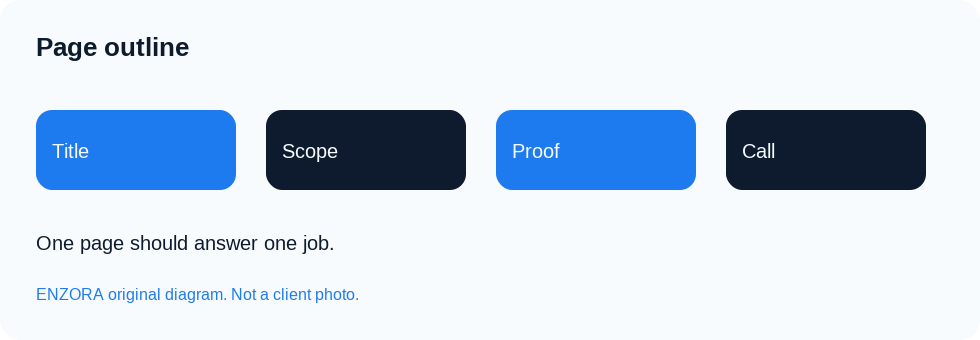
Do not hide the phone number below a long story. Put a tap near the top and repeat it at the end. The page outline diagram is title, scope, limits, proof, ask.
This week, sketch those five blocks on paper before you open the editor. If a block has no true sentence, leave it out.
Proof
Proof is a photo of that job, a review that mentions it, or a license line you can show. Match the proof to the page. A drain review on a remodel page is confusing. If you have no photo, do not borrow one. Describe the visit instead.
Do not invent a rating or a count of jobs. If you do not know a number, do not type one. Say you are glad to talk through a recent job like theirs. That is honest. A fake count is not, and it can become the thing a summary tool repeats.
Captions should say what the photo is. Town and job type are enough when they are true. Skip empty words like stunning transformation. The customer wants to know if you have done their kind of work.
This week, gather proof for one service only. If the folder is empty, publish the page without a gallery and add a photo after the next job.
FAQs
Use questions from real calls. How soon you can come. Whether you need someone home. What you will not touch. Answer in a few plain sentences. Keep the tone the same as the rest of the page. A legal voice in the FAQ and a casual voice above it feels like two companies.
Do not add a question only to repeat the town name. That is stuffing. One area question can list the towns. Link the contact path under the list. If you use FAQ markup, it should match the questions people can see on the page. Hidden questions in code are a mismatch.
Update the list when the job changes. An answer that promises same day work is a problem if you stopped offering that. Read the FAQ when you change the banner for the season.
This week, write three questions you answered twice this month. Put them on the page. Delete any question you have never heard.
Internal links
Link to the next useful page. A related service. The area you serve. The contact page. The profile if you discuss reviews. Do not link every page on the site from every service. A few true links are easier to keep.
The anchor should say what the page is. Leak repair is a better link than click here. Check that the address opens. A redesign often leaves old links behind. The redesign guide is about keeping those addresses alive. New service pages should be linked from the home page or the menu, or they stay hidden.
Do not link to a town page that only swaps the city. Send people to one honest area page instead. A link is a recommendation. Recommend pages you would want a customer to read.
This week, click every link on your main service page. Fix or remove any that fail. Add one link from the home page to that service if it is missing.
Examples
Here is a pattern, not a client story. Title: water heater replacement, plus your real city if you serve it. First lines: you replace tanks and tankless units in the towns you name, and you look before you quote. Middle: what the visit includes, and that you do not promise a same day install unless you do. Proof: one photo you took, or none. End: call or a short form. That page can be filled with your facts. It should not be filled with another company's towns.
A weak example is the same paragraph for drains, heaters, and remodels, with the noun swapped. Customers feel it. So will anyone comparing the pages. Write the limits that differ. Drains are not heaters. Say so.
| Block | Strong page | Weak page |
|---|---|---|
| Title | The job, maybe the town | Our services |
| First lines | Who it is for | Company history |
| Limits | What you will not do | We do it all |
| Proof | A real photo or none | A stock house |
| Ask | Call or a short form | A slogan only |
| Links | Related jobs that exist | Broken or fake town pages |
This week, rewrite one service page in that strong shape. Leave the others until this one is a page you would send to a customer.
Next step
Want a markup of one service page? Get a free site review. Tell us the job you want more of. We will look at the first lines, the proof, and the links. We will not promise a rank.
Questions
Should every job have its own page?
Give a page to each job you want more of. A leak and a remodel are different searches. A tiny task you rarely do can stay as a line on a main page. Do not build a page you will not update. A thin page is worse than no page.
How long should a service page be?
Long enough to answer what the visit is, what you do not do, and how to book. A few clear sections beat a wall of repeated town names. If you run out of true sentences, stop. Do not pad with a copied paragraph from another trade.
Can I use the same photos on every page?
Use photos of that job when you have them. A water heater page should not lead with a roof. If you only have one good photo, use it on the matching page and say what it shows. Do not pretend one picture is five different jobs.
Do FAQs help a service page?
They help when they are real questions from calls. Write the answer in plain words and keep a way to contact you next to them. Do not add questions you have never heard. A short true list is better than a long fake one.
Where should I link from a service page?
Link to related jobs you also do, to the area you serve, and to contact. Do not link to a page that does not exist. A homeowner who hits a missing page loses trust. Check the links after you publish.
Was this helpful?
Related ENZORA services
Want help with your website?
Get a fixed quote from the ENZORA team. We work with businesses worldwide.