Business
Google Ads vs Local Services Ads for Home-Service Businesses
By Fidyan Ahmed, founder · Published · Last updated · 8 min read

On this page
Google Ads and Local Services Ads both put your trade in front of people who are looking. They are not the same product. Google Ads vs Local Services Ads is a choice about how the person reaches you, and about what you must have ready. One path is a click to your page. The other is a lead from a verified listing. Read both before you fund either. This guide does not print prices. Your account does.
Key takeaways
- Search ads send a click to a page you control.
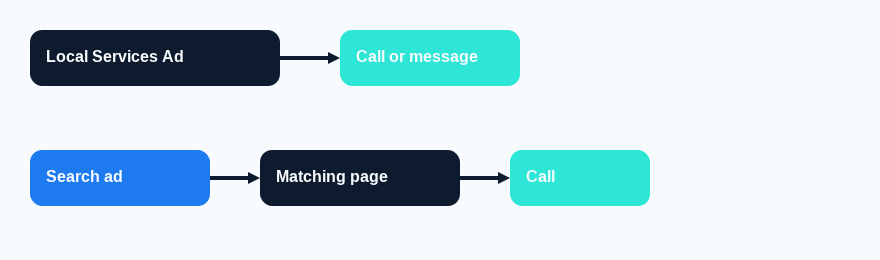
- Local Services Ads are for verified local businesses and can send the lead from the ad.
- Do not buy clicks to a page that still looks unfinished.
- Judge cost inside the account. Do not trust a number from a blog.
How Local Services Ads work
Local Services Ads are Google's ads for certain local businesses that pass a screening. The public overview is on Google's Local Services Ads page, reviewed 23 Nov 2026. The ad can show your business, a rating when you have real reviews, and a way to call or message. The person may never see your website. That is the point and the risk. If you do not answer, the lead dies in the ad.
Screening is part of the product. Google asks for business details and may check licenses and insurance where that applies to the trade. If you cannot pass, this ad is not available yet. Do not borrow another company's documents. Fix your own paperwork.
The lead arrives as a call or a message you must handle fast. Emergency trades feel this first. A missed call is a missed job, and the ad still happened. Staff the phone before you turn the ads up. A pretty listing with nobody to answer is an expensive voicemail.
Picture a plumber who passes screening and answers on the first ring. The caller says there is water on the floor. The plumber asks the address and the shutoff. The website is a backup, not the path. That is a fair use of this ad. A plumber who sends the call to a mailbox nobody checks should not start here.
Do this today. Read the product page and the requirements for your trade. If you qualify, call your own ad number after it is live and confirm it reaches a person. If you do not qualify, do not force it. Use a normal search ad, or fix the requirement first.
Google Ads on search
A search ad is a short promise plus a link. You choose the words you want to show for, you write the lines, and you choose the page. You pay when people click, under the rules of the account you open. The person lands on your site. If the site is slow, confusing, or still full of sample text, the click is wasted.
Match the ad to the page. If the ad says water heater replacement, the page should say that in the first screen, with a way to ask for a visit. If the ad says emergency leak, the page should show the phone immediately. The guide on Google Ads landing pages is the longer version of that match. Landing pages are the build when you need a page that exists only for the ad.
Negative ideas matter. You do not want to pay for searches you do not serve, such as a job you do not do or a town you will not drive to. Add those as negatives when you see them in the search terms. Check that report. It is the list of what you actually bought.
Here is a concrete pair. One ad group for no heat calls, with an ad that says no heat and a page that says no heat. A second ad group for seasonal tune ups, with a calmer page and a form. Mixing them in one ad sends the wrong person to the wrong page. They leave. You still clicked.
Do this today. Write one ad and name the exact URL it should open. Open that URL on a phone. If the first screen does not repeat the promise, fix the page before you fund the ad. Google Ads help is for setting this up and watching it, not for guessing.
Costs to watch
Costs live in the account. They change by town, by trade, and by week. A figure copied from a forum will not be your figure. Open the account, look at the range it shows, and decide if a real job can carry that cost. If the account is not open yet, you do not have a number. Do not let a salesperson invent one.
Watch three things, without staring at vanity charts. Are the leads real people in your service area. Are you answering them. Is the cost of those leads something a normal job can cover. If you cannot see the lead in a call log or a form, you cannot judge the ad. Tracking is part of the cost. The notes on tracking calls and forms belong next to any ad budget.
Local Services Ads often charge around the lead rather than only the click. Search ads often charge around the click. The exact rule is in the product you turn on. Read it there. A lead you did not answer is still a cost. A click to a broken page is still a cost. The waste is usually in the follow up, not in the logo on the ad.
Picture an owner who raised the budget because the dashboard looked busy. The calls were from outside the service area. The form emails were going to a former employee. The busy chart was real traffic and fake opportunity. Pause and fix the path. Then spend again.
Do this today. Write the questions you will use every week. How many calls from the ads. How many were in our towns. How many became a booked job. If you cannot answer, do not raise spending. The choice diagram puts the two paths side by side so the weekly check has a home.
Landing pages for each path
Local Services Ads may not need your page for the first contact. Your page still matters. People look you up after the call, and some leads will ask for a link. The page should match the business name, the phone, and the towns on the ad. A mismatch looks like a scam.
Search ads always need the page. Build one page per main offer. Keep the headline in the words of the ad. Put the phone in text. Put a short form under it for people who cannot talk. Remove extra menus if they wander into blog posts and never call. The page has one job.
Do not send ads to a PDF, a Facebook page, or a page that says the site is under construction. Those clicks cannot become a clean lead. Fix the page. Then turn the ad on. Default titles and sample text are especially painful on a paid click. Clean them first.
Do this today. Load the landing page on cellular data next to the ad preview. Read both out loud. They should sound like the same offer. If they do not, change the page or the ad until they do. Label the ad URL with the UTM builder so the lead is not anonymous.
Speed is part of the page. A heavy photo slider above the phone number burns the click. Use one clear photo of a real job if you have permission. Leave the rest lower on the page.
Which one to start
Start where the gap is. If you miss calls because you are not visible for emergency searches, and you can pass screening and answer the phone, look at Local Services Ads first. If you need to explain a planned install, and you have a page that tells the truth, look at search ads first. If the website is still a template, do the website first. Ads will not repair a page that does not say what you do.
You can add the second product later. Many crews end up with both. The emergency path uses the lead ad. The planned work uses search ads to a page. They should not share one messy budget with no labels. Name the campaigns after the job. Then you can turn one off without turning off the business.
| Question | Local Services Ads | Search ads |
|---|---|---|
| First step | A lead from the listing | A click to your page |
| You must have | Screening and a person who answers | A page that matches the ad |
| Main waste | Missed calls and bad lead fit | Clicks to a weak page |
| Where the price is | In that account | In that account |
| Start when | You can answer now | The page is ready now |
Do this today. Pick one row to start. Write the offer in one sentence. Confirm the phone or the page can carry it this week. Tell the person who answers the phone which ad is live so they know what the caller saw. A surprised dispatcher wastes the lead.
Ads are not a substitute for a site you own. If the only place you exist is an ad account, you are renting attention. Keep the website current even when the ads are carrying the week. The social notes in where customers should land make the same point about rented pages.
Next step
Want help choosing the path and the page? Get a free site review. Tell us whether you already have an ads account and whether the phone is answered live. We will look at the page the click would hit. We will not invent a cost.
Questions
What is the difference between Google Ads and Local Services Ads?
Google Ads can show a text ad that sends people to a page you choose. Local Services Ads are built for verified local businesses and can send a lead, such as a call or a message, from the ad itself. Google describes Local Services Ads on its product page. The live prices and the rules sit in the account, not in this article.
Which one should a new contractor start with?
Start with the one you can support. If your site is unfinished, fix the page before you buy clicks to it. If you can pass the checks for Local Services Ads and you answer the phone, that path matches emergency calls. If you need to explain a planned job, a search ad to a clear page can fit better. You can use both later.
Do these ads guarantee jobs?
No. An ad can bring a person to you. It cannot make them hire you. Your phone answer, your page, and your follow up do that. Anyone who promises a set number of jobs from a budget is guessing. Judge the account by leads you can see, not by a slogan.
Where do I see what it will cost?
Inside the ads account for your trade and your town. Costs change by city and by season. This guide will not print figures. Write down the number the account shows you, and compare it with what a real job is worth to you. If the account will not show a number yet, you are not ready to promise one either.
What page should a search ad open?
The page that matches the ad. An emergency ad should open an emergency page with the phone first. A replacement ad should open the replacement page with a form. Sending every ad to a generic home page makes people hunt. The landing page guide walks that match.
Was this helpful?
Related ENZORA services
Want help with your website?
Get a fixed quote from the ENZORA team. We work with businesses worldwide.