Business
Google Ads Copy That Gets Calls: A Contractor's Guide
By Fidyan Ahmed, founder · Published · Last updated · 7 min read

On this page
Google ads copy for a contractor should name the job, the place, and what happens when someone taps. Google builds the ad from the lines you enter. Your job is to write lines that stay true alone and together, inside the character limits, and inside the ad rules.
Key takeaways
- A responsive search ad mixes headlines and descriptions you provide.
- Headlines are short. Say the job and the town in plain words.
- Do not put a phone number in the ad text. That breaks editorial rules.
- Send the click to a page about the same job, then read the results before you rewrite everything.
Responsive search ads explained
A responsive search ad is the text ad most contractors use on Google now. You enter several headlines and several descriptions. Google Ads tests combinations. The help page about responsive search ads, checked 23 Nov 2026, says you can provide up to 15 headlines and 4 descriptions. You need at least 3 headlines and 2 descriptions. A headline field allows up to 30 characters. A description allows up to 90. Each path field allows up to 15.
Not every line shows every time. The page says at least one headline and one description are selected, and some lines may be shortened. Write each line so it still makes sense if it appears next to a different line. Do not start a sentence in headline one and finish it in headline two.
Google also says lines can show in more than the classic headline spot, including at the start of a description when that is predicted to fit. So a clever fragment can look broken. A full, short claim is safer.
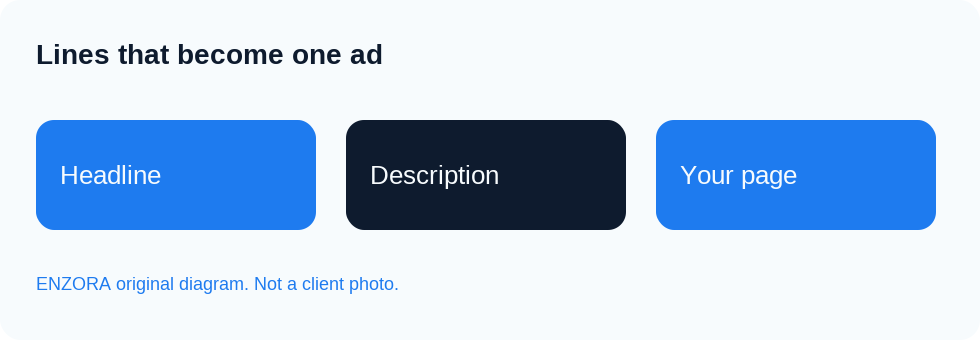
The ad lines diagram shows three headlines and two descriptions feeding one ad. Use it when you explain the account to a partner who has never opened it.
This week, open one ad group and count your headlines. If you have only the minimum, add lines that name a different real detail, not a repeat of the same words. Try the Ad Copy Generator. Check how a title may cut with SERP Preview. Google Ads can build the combinations with you.
Headlines that win calls
A headline has room for a few words. Use them on the job. "AC repair in Phoenix" tells a searching person they found a match. "Best comfort solutions" does not. You also should not claim a rank you cannot show.
Write at least one headline with the main job. Write one with the town or the area you actually serve. Write one with the next step, such as "Call for a leak" or "Book a visit". Keep each one under the 30 character limit. Count characters in a notes app before you paste. Spaces count.
Picture a roofer. Weak line: "Quality you deserve". Strong line: "Roof leak repair". Second line: "Phoenix and Mesa". Third line: "Same week visits" only if that is true. If you cannot promise the week, do not type it. A false line is worse than a plain one.
Google's page says to include a keyword you target in at least one headline, and to make the lines different. Repeating "roof repair" in ten slight ways is not fifteen ideas. It can also trip the repetition rule covered below.
Avoid all caps, extra symbols, and a stack of exclamation points. The editorial policy, checked 23 Nov 2026, does not allow capitalization that is not used for its real purpose, or punctuation that is not used correctly. It also does not allow a phone number in the ad text.
This week, draft six headlines on paper. Delete any line that is vague or untrue. Enter the rest. If a line is over 30 characters, cut a word. Do not abbreviate so hard that a stranger cannot read it.
Descriptions and assets
Descriptions give you more room. Up to 90 characters each, and at least two of them. Use the space to say what the visit includes and who it is for. "We find the leak and explain the fix before work starts" is a description. "We are passionate" is not.
The first description is the one most likely to show. Put the clearest offer there. If something must appear, Google says to pin it to description position 1, and it warns that pinning limits the test. Pin only what you must.
Assets are the extra pieces around the ad. Call assets, location assets, and sitelinks are common for a contractor. The sitelink should open a page about that exact topic. A sitelink named "Water heaters" that opens the home page is a broken promise.
Do not type the phone number into the description to get around the editorial rule. Use the call feature the right way, and put a tappable number on the landing page. The landing page guide is the page side of this work.
Picture an electrician with two descriptions. One says panel upgrades and service calls. The other says the cities. The headlines name "Panel upgrade" and "Electrical repair". A person searching for a panel sees a match. A person searching for a remodel does not, because you did not write a remodel line you do not sell.
This week, write two descriptions that could stand alone. Read them next to each headline. If a pair contradicts, change a line. Try the Ads Budget Calculator. The ad budget guide explains how to think about spend without a fake sample bill.
Policy traps
Policy traps are lines that get disapproved even when they sound like ads. Read the rules before you launch. The editorial page says ads should be clear and relevant. A warning comes at least 7 days before an account suspension for those editorial violations. Checked 23 Nov 2026.
These are the traps that catch contractors most often.
| Trap | What the policy says | What to write instead |
|---|---|---|
| Phone number in the text | Not allowed in ad text | Use a call asset and a page |
| Gimmicky repetition | Repeated words in the same asset or account | Say a new fact |
| Odd spacing or symbols | Extra spaces and misuse are not allowed | Normal words and spaces |
| Unclear business | The ad must name what you promote | Name the trade in a headline |
| A claim you cannot back | Do not mislead about the service | Say only what you do |
| All caps shout | Capitalization must be used normally | Sentence case or title case |
Local Services ads have extra rules if you use that product. The Local Services requirements, checked 23 Nov 2026, say you must not mislead people about licenses, insurance, service area, or prices. You also must not sell the lead to another company. Those rules are separate from a normal search ad, and they still apply to the words you choose.
Picture a line that says you are licensed in every city. If the license is only for one state, the line is false. Write the real area.
This week, read your live ads against the table. Fix one trap before you add new lines. If a disapproval names a policy, open that policy page and change the line it names. Do not keep resubmitting the same text.
Testing and improving
Testing means you change a line, you wait for real searches, and you read the asset report. It does not mean you rewrite the whole ad every morning. Google is already mixing the lines. Your job is to remove losers and add a clearer option.
Give a new ad enough time to serve before you judge it. A single morning is not a verdict. Look at which headlines show with the searches you care about. Pause a headline that attracts the wrong job, such as a DIY part when you only do full replacements.
Keep a simple note. Date, line you added, line you paused, and what you hoped would change. If you change five things at once, you will not know which one mattered.
The landing page is part of the test. If the ad gets taps and the page gets no calls, the page may be the problem. Check the phone, the speed, and the match between the headline and the first screen. Google Ads includes that loop if you want it managed.
Do not copy a competitor's ad word for word. You can learn which job they name. You still write your own offer. A copied line can also repeat a claim that is not true for you.
This week, pause one vague headline and add one specific headline. Change nothing else. Check the search terms after you have real traffic. Then decide the next single change. SEO growth is the separate service for ongoing search work.
Want us to fix this for you?
Get a free fix plan. Send the ad and the page it opens. Contact ENZORA.
Questions
What is a responsive search ad?
It is a search ad built from several headlines and descriptions. Google Ads assembles combinations and tests them. The help page, checked 23 Nov 2026, says you can enter up to 15 headlines and 4 descriptions. You need at least 3 headlines and 2 descriptions to save. Each headline allows up to 30 characters. Each description allows up to 90.
Should I pin every line?
Usually no. Google says a pinned line can show only in that slot, so the system has fewer options. Pin a line only when it must appear, such as a required disclaimer. If you pin every slot, the other lines never show. Leave most lines free so real searches can match them.
Can I put my phone number in the headline?
No. Google's editorial policy does not allow a phone number in ad text. Use a call asset or the call button the account already offers, and send the click to a page with a tap to call number. Do not type the digits into the headline to dodge that rule.
What should the landing page say?
The same job and the same town as the ad. If the ad says leak repair, the page should not open on a remodel story. Put the phone at the top. Match the offer. A mismatched page wastes the click even when the headline is clear. Read the landing page guide linked in this article before you launch.
How do I know which headline works?
Use the asset report in Google Ads after the ad has real clicks. Do not judge from a handful of impressions on day one. Pause a line that is unclear or that breaks policy. Keep a line that matches searches you want. Change one thing at a time so you can tell what moved.
Was this helpful?
Related ENZORA services
Want help with your website?
Get a fixed quote from the ENZORA team. We work with businesses worldwide.