Web Design
Wix vs Squarespace vs WordPress vs Custom for Contractors
By Fidyan Ahmed, founder · Published · Last updated · 6 min read

On this page
Choosing wix vs wordpress for contractors is really four choices: a hosted builder such as Wix or Squarespace, WordPress that you can move, or a custom build. The right one is the one you can edit, that loads the phone number on a phone, and that you can leave without losing the name.
Key takeaways
- Add monthly fees across the years you plan to stay. Do not stop at the setup price.
- Check whether you can set titles, speed, and redirects.
- Put the domain and the logins in your name.
- Use a custom build for a real tool, not for a simple brochure.
Cost over three years
The first invoice is not the whole cost. Builders often charge every month. Apps and a domain add more. Write a note: setup, monthly fee, and how many months you expect to keep it. Three years is a fair window for a contractor site you will not throw away next spring. Multiply only with the fee printed on the plan you were offered this month. Do not copy a price from a blog that may be old.
ENZORA's website ladder is on the pricing page. It groups brochure sites by page count. This guide does not copy those amounts. A builder subscription is not the same offer, and a store sits on a different card. Put the public ladder next to your own note so you compare the real cards, not a slogan. If a quote will not name a tier, ask again before you sign.
Picture a builder that looks free until the form, the domain, and the extra app show up on the card bill. The site was not free. It was split into lines. Write the lines down before you design a logo inside a tool you might leave.
This week, open the last bill from whoever hosts the site. Add it to the setup number you remember. If you cannot find the bill, that is the first fact to fix.
SEO control
Search needs titles you can edit, a way to describe each page, and clean addresses. Some builders make this easy. Some hide it. Before you pick, create a test page and change the title. See if the address can stay stable when you rename a button. See if you can add a redirect when you delete a page.
WordPress usually gives you those controls, and it also gives you plugins that can slow the site or break it. A builder can be simpler and also harder to tune. Read the WordPress and custom comparison if you want the longer tradeoff. The short version is: if you cannot edit the title, you will fight the tool later. Ask for a redirect test too. A tool that cannot point an old page at a new one will strand bookmarks. Try it with a throwaway page before you move the real site. A demo that cannot redirect will not learn the trick later. Ask to see the redirect on a phone, not only in a settings screen.
This week, try to change one title on your current site. If you cannot find the field, ask the builder where it is. If nobody knows, you do not have SEO control yet.
Speed
A pretty template can still be slow. Test the live demo on a phone using cellular data, not the sales video. The speed guide explains what to feel for: the number shows, the tap responds, the page does not jump. Google's Core Web Vitals page, reviewed 23 Nov 2026, states the goals of LCP within 2.5 seconds, INP under 200 milliseconds, and CLS under 0.1.
Builders and WordPress can both pass or fail that feel. The photos and the plugins decide a lot. A custom site is not automatically fast. It is fast when someone builds it that way and keeps it that way. Ask to see a phone test, not a screenshot of a score from a desktop on office Wi-Fi. If the demo number is fake, still time how long the first screen takes. A slow demo usually gets slower after you add your own photos. Plan for that, or pick a lighter layout. Time the first screen before you fall in love with the theme.
This week, open two sites you might copy, on a phone, away from Wi-Fi. Note which one shows a phone number first. Prefer that pattern, whatever the logo on the template is.
Ownership
Own the domain. Own the content. Know how to get a copy. If the site lives only inside a login you do not control, you are renting the whole presence. That can be fine for a test. It is risky for the number on the truck.
Ask these questions before you pay. Whose name is on the domain? Who can export the pages? What happens to the form leads if you cancel? Can you redirect the old addresses? Write the answers. A tool that will not export is a tool you should treat as temporary. Get the answers in email so they survive a staff change. If they will not put it in writing, treat the tool as a rental and keep your own copy of the words. Save the export the same week you launch, not a year later.
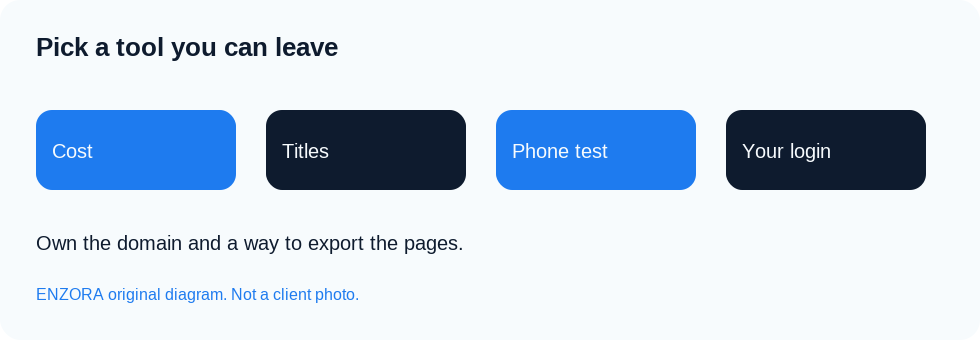
Web design and WordPress are two ways to end with accounts in your name. The platform brand matters less than that outcome. The choice diagram is four boxes with the same question under each: can I leave with my name and my pages?
This week, check the domain account. If the registrar login is not yours, move it before you debate themes.
Editing
Someone has to change the hours, the towns, and the photos. If that person is you, pick a tool you will open. If that person is a helper, pick a tool they already know. A custom site with no editor means a bill for every sentence. A builder you refuse to learn means the same bill.
Write down the edits you make in a normal month. Hours, a photo, a new town, a seasonal line. Try those edits in a trial. If each one takes a meeting, the tool is a poor fit. Training for one afternoon is fine. A manual you will not read is not.
Keep the phone number easy to find in the editor. The most common failed edit is a new banner that covers the call button. Look at the page on a phone after every change. If the editor is so nested that you fear to touch it, that fear is part of the cost. A tool you will not open is a tool you will pay someone else to open every week.
This week, make one small edit yourself or watch your helper do it. Time it. If it is painful, the platform is part of the problem.
Which to choose
Choose a builder if you will edit a simple page yourself and you accept the monthly fee and the exit limits. Choose WordPress if you want a familiar editor, plugins you truly need, and a path to move hosts. Choose custom if the business needs a tool, not a brochure. A dispatch board, a portal, or a store with unusual rules can justify custom. A call button and five service pages usually do not.
Do not choose from a trend. Choose from the note you wrote: three-year cost, title control, phone test, and logins. If two options tie, pick the one your editor will actually open.
| Need | Lean toward |
|---|---|
| You will edit a simple page | A builder you can learn |
| You want to move hosts later | WordPress with accounts in your name |
| You need a dispatch tool or portal | A custom build, scoped in writing |
| You only need calls and a form | The published website ladder |
This week, fill that table with your own note. Circle one row. Bring it to whoever you hire so the quote matches the need.
Next step
Want help choosing without a sales script? Get a free site review. Tell us who will edit the site. We will look at ownership, speed, and the pricing page. We will not invent a builder's monthly fee.
Try the free Speed Checker on a page you already have.
Questions
Is Wix or WordPress better for a contractor?
It depends on who will edit the site and whether you need to leave later. A builder can be fast to start. WordPress can be easier to move if you own the files and the domain. The best choice is the one you can keep updated and that shows the phone number quickly.
Should I count cost over three years?
Yes. Write the setup cost, then the monthly platform fee for the months you plan to stay. Add domain and any apps. Compare that note to a one-time build on the pricing page. Do not use a number from an ad without checking the current plan.
Can I rank on a builder site?
You can publish clear pages on many tools. Rank still depends on the words, the links, and the competition. A builder that blocks titles, speed, or a clean redirect makes the work harder. Check those controls on a trial page before you commit.
What does ownership mean?
You should own the domain, the content, and a way to export or move. If the only login is a freelancer's account, you do not own the site yet. Ask for the accounts in your name before the project ends.
When is a custom site worth it?
When you need a tool the builder cannot do, such as a workflow that matches how you dispatch. A brochure for calls does not need a custom app. Start with the published website ladder unless the job is a product, a portal, or a store.
Was this helpful?
Related ENZORA services
Want help with your website?
Get a fixed quote from the ENZORA team. We work with businesses worldwide.