Web Design
What to Put on a Contractor Homepage (With Examples)
By Fidyan Ahmed, founder · Published · Last updated · 6 min read
On this page
A contractor homepage has one job. In the first screen, a neighbor should know the trade, the towns, and how to reach you. Everything else is support. This layout works for roofers, plumbers, and other trades. The words change. The order does not.
Key takeaways
- Write a headline that names the work, not a slogan.
- Show proof you can stand behind: your photos or real reviews.
- Link the main jobs and name the towns you drive.
- Repeat the phone number in the footer so it matches the map card.
Headline formula
Use a simple formula. Trade, place or problem, and the next step. "Roof repair in the towns you serve" is a formula you fill with the truth. "Your trusted partner in excellence" is not. The headline should fit a phone without becoming a paragraph.
Put the phone number in the same screen as the headline. A button that says Call can sit beside the digits. Both should use a real phone link. Do not hide the only number in the headline image. A photo cannot be tapped as a number on every phone. If the line names emergency work, the hours in the footer must agree.
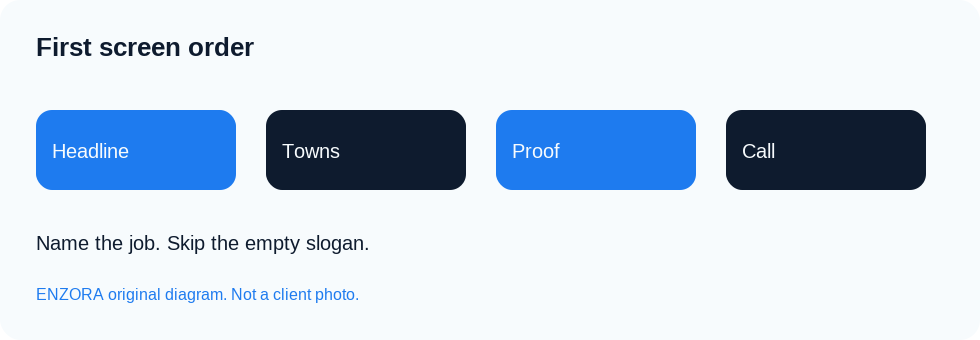
Here is a filled example you can adapt. "Emergency roof tarps and full replacements. We work in the towns on our board." Then a Call button. Change the towns to yours. Do not claim emergency if nobody answers. The first screen diagram stacks headline, towns, proof, and call.
This week, write the headline on paper and read it to someone who does not work for you. If they cannot say what you do, rewrite it. Web design can place that line. The need a website guide is the earlier decision if you are still unsure you need the page.
Proof
Proof is a real photo, a real review, or a license line you can show. Pick what you have. A roof photo you took is better than a stock house. A review you can open on Google is better than stars you drew. A license number is better than a badge with no issuer.
Put one piece of proof in the first screen if it fits. The rest can sit just below. Label photos with the job type. Do not mix a storm tarp and a kitchen remodel without words. People should know what they are looking at.
If you have neither photos nor reviews yet, say what the first visit includes and skip the fake gallery. You can add proof after the next jobs. An empty honest page beats a borrowed one. Roofing pages are one place the same proof rules show up for that trade. A license line you can show is also proof. A badge with no issuer is not. Put the proof next to the call button so it supports the tap instead of sitting alone at the bottom.
This week, choose one photo and one review you have rights to show. If you only have one of those, use that one. Delete anything you cannot explain.
Services
The homepage should name the jobs you want, each as a link if the story is longer than a sentence. A roofer might link storm help and planned replacement. A plumber might link leaks and water heaters. Do not list forty tasks in a single scrolling wall. The extra jobs can live on a services page.
Use the customer's words. "No heat" is clearer than "thermal solutions." Match the links to pages that exist. A button that 404s is a broken promise. If the page is not written, do not link it yet.
Keep the list stable for a season. Changing the names every week confuses the menu and the crew. Add a job when you are ready to answer the calls it brings. If a job needs a license you do not hold, leave it off the home page even if a rival lists it. Link only the jobs that have a real page behind them. A menu of promises with no pages is a list of dead ends. Name the job the way a customer would search for it.
This week, pick the jobs that should be one tap from home. Write the link names. Remove any link that does not resolve.
Service area
Say where you go. A sentence with the real towns is better than "serving the greater area." If the list is long, group it. Do not publish a state you will not drive. The area on the homepage should match the Google profile. If they differ, fix both in the same week.
A small map can help when the shaded area matches the words. A map of the wrong region creates bad leads. If you have no shop, do not invent a street address to look local. Say you come to the customer.
People decide from this block whether to call. A clear no for a far town saves everyone time. Put that limit in normal words. If the profile map is wider than this sentence, shrink the map or widen the sentence only when dispatch agrees. Neighbors use this line to decide if you will come to their street. Make it true. If you are unsure about a town, leave it off until dispatch says yes. You can add it later in one sentence.
This week, read the area line to dispatch. If they laugh at a town, delete it. If they name a missing town you do serve, add it.
The call to action
One main action is enough on a phone. Call, or a short form for people who cannot talk. A row of five equal buttons is a stall. Make Call obvious. Put the form under it or behind a second quiet link.
Say what happens next. "We answer this number during the hours in the footer" is fair if it is true. Do not promise a callback speed you miss. Repeat the action at the end of the page for people who scrolled. The click to call guide covers the sticky bar and the tel link.
Watch the button on a small phone. It should be easy to tap and it should not cover the form's send control. Test with your thumb, not with a mouse. If Call and the form both matter, stack them instead of squeezing them into one thin row. The first action should be the one you want when the job is urgent. The form can be the second line. Repeat that order at the bottom of the page for people who read the whole story.
This week, tap Call from a second phone. If your line does not ring, fix the link before you change colors. A website audit will also show if the path is hard to see.
Footer details
The footer is the second chance. Repeat the phone number, the area line, and links to the job pages and contact. Hours belong here if they match the profile. The business name should match the license and the map card. A different name in the footer looks like a mistake or a second company.
Do not stuff the footer with seals you cannot verify. A real association you belong to can be named in text. A downloaded badge cannot. Link the privacy and contact pages you actually maintain.
| Block | Example of a true line | Skip |
|---|---|---|
| Headline | Roof repair in your real towns | A slogan with no job |
| Proof | A photo you took, or a linked review | Stock houses, drawn stars |
| Services | Storm help and replacements | Every task you have ever done |
| Area | The towns dispatch already drives | A whole state you will not enter |
| Action | Call, plus a short form | Five equal buttons |
| Footer | Same phone as the map card | A second address |
This week, scroll to the footer on a phone and compare it with the profile. Make the phone and the name match. Then read the headline one more time.
Next step
Want a markup of your first screen? Get a free site review. Tell us the trade. We will look at the headline, the proof, and the tap. We will not invent a review.
Questions
What is the most important thing on a contractor homepage?
A visitor should see what you do, where you work, and how to call without scrolling far. Proof such as a real photo or a real review can sit next to that. A slogan with no number is not a homepage. Test it on your phone.
How long should the headline be?
Short enough to read on a phone. Name the trade and a place or a problem. House painting in your city is a pattern. Quality you can trust is not. If the line wraps into a paragraph, cut it until the job is obvious.
Should I list every service on the home page?
List the jobs you want. Link each to its own page if the explanation is long. Do not paste every task you have ever done into one block. A roofing company can point at storm work and planned replacements as two clear links.
Where do reviews go?
Near the proof, not in a footer nobody reaches. Use real words and link the profile. Two short quotes beat a wall of stars you drew. If you have no reviews yet, use a real job photo instead of a fake score.
What belongs in the footer?
The same phone number, the towns or the service-area line, and links to the jobs and the contact page. Hours if they match the profile. Do not put a different address in the footer than on the Google card. Match them.
Was this helpful?
Related ENZORA services
Want help with your website?
Get a fixed quote from the ENZORA team. We work with businesses worldwide.