SEO
Make Your Links Look Great When Shared (Open Graph Guide)
By Fidyan Ahmed, founder · Published · Last updated · 7 min read
On this page
Open graph tags are the lines that tell a chat app which title, description, and image to show when someone shares your link. Set them yourself so the card is not a random photo. Then test the real preview on a phone.
Key takeaways
- Open graph tags pick the title, the words, and the image on a shared link.
- Facebook's guide asks for a large image, close to 1200 by 630 pixels.
- Chat apps do not all crop the card the same way. Send a test.
- Change the image address when you replace a photo, or the old card can stick.
What shows when you share a link
When you paste a link in a text or a post, the app builds a card. The card is usually a picture, a title, and one or two lines. That card is what people see before they tap. If the card is blank or shows the wrong job, they may not tap.
The Open Graph protocol says each page should name a title, a type, an image, and the page URL. Checked 23 Nov 2026. A description is extra, and you should still write one. Facebook's sharing guide for sites says that without these tags the crawler guesses. The guess can pull a tiny icon or a sentence from the footer.
Picture a roofer who shares a leak page in a neighborhood text. The card shows a stock sky photo and the words "Home". The page itself is clear. The card is not. The neighbor never opens it. The fix is the tags, not a new truck.
Write the title the way you would say it on the phone. "Leak repair in Mesa" is better than "Welcome". Write the description as the next sentence a customer needs. Keep the page URL as the real address, not a short link that hides the page.
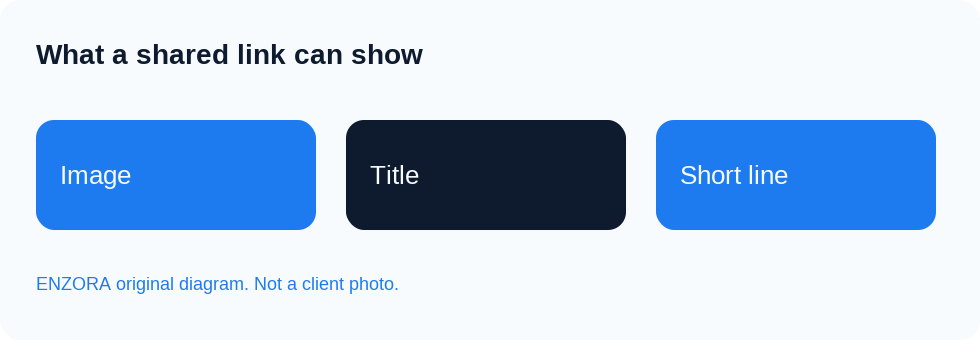
The share card diagram shows the image on top and the title under it. Use it when you brief the person who edits the site.
This week, share your home page to a note you keep private. Write down the title and the image you see. If either is wrong, the tags are the job. Try the Open Graph Preview. Draft the title with the Meta Tag Generator and check length with SERP Preview.
OG image sizes
The picture does more work than the sentence. A tiny image becomes a blur. A tall image gets cut. Facebook publishes the sizes in its image guide for link shares. Checked 23 Nov 2026, these are the rules on that page.
Use an image at least 1200 by 630 pixels for a sharp screen. If you can, also stay close to a 1.91 to 1 shape so the feed does not crop it. The page says 600 by 315 pixels is the smallest size that still gets the larger card. Below that, the card is much smaller. The minimum it allows is 200 by 200 pixels. The file must not be over 8 MB.
Those numbers are Facebook's rules for Facebook. They are not a promise about every chat app. Still, a 1200 by 630 image gives you a clear file to test everywhere.
Put the important words in the middle. Do not set a phone number in tiny type at the edge. The edge is what gets cut. Use a photo you took, or a simple branded shape. Do not use a photo of a customer house if the address is visible.
Add the width and height tags too. Facebook says those tags let the image render on the first share, because the crawler does not have to measure the file first. Use a secure https address for the image.
This week, export one image at 1200 by 630 and put it on the home page only. Share the page again. If the card is still the old icon, move to the cache steps below. Try the Social Media Image Resizer. Web design can place the image in the page head if you do not edit code.
WhatsApp and iMessage previews
A card on Facebook is not the only card that matters. Your customers send links in WhatsApp and in iMessage. Those apps build their own preview. You should look at the real bubble, not only at a desktop tool.
Apple's Link Presentation page, checked 23 Nov 2026, describes how apps fetch metadata and show a rich link. It does not list a pixel size for the Messages app. So do not trust a blog that quotes a size without Apple's page. Send the link to your own phone and look.
WhatsApp's help pages load as an app view, so this guide will not invent a crop size for them. The practical test is the same. Send the link to yourself. Wait for the card. If the title is wrong, the tags are wrong. If the image is cut, try the Facebook size and look again.
Picture an HVAC owner who posts a maintenance page in a family group chat. On the owner's laptop the card looks fine. On a parent's phone the image is a sliver of the logo and the title is the slogan. The parent asks "is this a real company?" The page was fine. The preview was not. One test on a phone would have shown it.
Do the test on the same URL you will send to customers. A test on a draft address does not prove the live address. Turn off any blocker that might hide images, or the card will look empty for a reason that is not your tags.
This week, send the home page to one iPhone and one Android phone if you have both. Save a screenshot of each card. Circle anything cut off. Fix the image or the title, then send a new message. Do not edit the old bubble and assume it updates.
Fixing old cached previews
The first person who shares a page may not see the image. Facebook's image guide says the crawler has to see the image once before it can draw it. After that, Facebook stores the image under that file address. If you replace the file but keep the same address, the old picture can remain.
The fix has two parts. First, use a new image address when the picture changes. A new file name is enough. Second, run the URL through the Sharing Debugger. Facebook says that tool can pre fetch the tags and can refresh a share. Checked 23 Nov 2026.
Old messages people already sent may still show the old card. The guide says updating the image for a URL does not automatically update every old story. You refresh the share in the debugger if you need that story to change. You cannot force every private text in the world to redraw.
Picture a cleaner who changed the photo in January and still sees December's logo in a pinned post. The file on the site is new. The address is the same, so the cache is loyal to the old file. Rename the image, update the tag, and scrape the page in the debugger.
Do not delete the old image file on day one if old posts still point at it. Facebook says to leave the old file up so older stories do not break. You can remove it later when those stories no longer matter.
This week, open the debugger, paste your home page, and read the title and image it scraped. If they match the tags you wanted, you are done with Facebook. Then send a fresh chat message for the phone test. The content checklist covers the words on the page itself.
Checklist
Use this list before you announce a new page. One pass beats a week of "why is the photo wrong?"
| Check | Pass looks like | If it fails |
|---|---|---|
| Title tag | Names the job and the area | Rewrite the title in plain words |
| Description | Says what the visit is | Replace a slogan with a fact |
| Image size | At least 1200 by 630 pixels | Export a new file at that size |
| Image address | A new https name when the art changes | Rename the file and update the tag |
| Phone test | The card matches the page | Send a fresh link after the fix |
| Debugger | Scraped title matches your tag | Scrape again after the new image name |
Read each row out loud. If you cannot point at the tag in the page code, ask the person who built the site to show you. Web design includes the head of the page, not only the colors.
Picture the same checklist on a new town page. The title still says the old city. The image is the home page photo. You would send people to the right URL and the wrong promise. The checklist catches that before the text goes out.
Do not add a different title in the share tag than the page shows. A mismatch feels like a trick. The page and the card should tell the same story. The SEO checklist for Next.js is a deeper code list if your site is custom.
This week, run the table on your home page and on the one service page you share most. Fix the first fail only. Then test again. A single corrected card is worth more than a plan to redesign every image.
Want us to fix this for you?
Get a free fix plan. Send the link you share most. Contact ENZORA.
Questions
What are open graph tags?
Open graph tags are lines in the page code that tell a site how to preview your link. The Open Graph protocol asks for a title, a type, an image, and the page address. Facebook also reads a description. Without those lines, the app guesses. The guess is often the wrong photo or a cut off title.
What size should the share image be?
Facebook's image guide, checked 23 Nov 2026, says to use at least 1200 by 630 pixels for a sharp phone screen. It also says 600 by 315 is the smallest size for the larger card, and 200 by 200 is the minimum it allows. Keep the shape near 1.91 to 1 so the card does not crop the words.
Why does my old photo still show?
Facebook caches the image by its address. The sharing guide says a new file will not replace the old one unless the image address changes. Put a new name on the file, update the tag, then run the Sharing Debugger. Old posts already sent may keep the old card until you refresh that share.
Do WhatsApp and iMessage use the same tags?
Test both apps with a link you send to yourself. Do not assume they crop the image the same way. Apple's Link Presentation docs describe rich links inside apps, and they do not publish a pixel size for Messages. If the card looks wrong on your phone, fix the tags, then send a fresh link.
Can I use my logo as the only image?
A logo on a plain field is a weak card. People scroll past it. Use a simple picture of the job, with few words on the image. Facebook rejects blurry images and images that do not fill the frame. Put the business name in the title tag, not only inside the picture.
Was this helpful?
Related ENZORA services
Want help with your website?
Get a fixed quote from the ENZORA team. We work with businesses worldwide.