SEO
How to Beat a Competitor on Google Maps
By Fidyan Ahmed, founder · Published · Last updated · 7 min read

On this page
You rank higher on Google Maps by being a clearer match, not by a secret switch. Google's local ranking tips, reviewed 23 Nov 2026, say local results lean on relevance, distance, and prominence. You cannot pay for a better spot. You can make the card complete, the reviews real, and the website consistent.
Key takeaways
- Compare the public card with a rival before you change yours.
- Reply to reviews in a short, honest, public note.
- Add photos of your own jobs, not stock people.
- Make the website say the same name, phone, and job as the card.
Compare profiles side by side
Open Google Maps and search the job plus one town you serve. Open your card and one rival who does the same work. Read both on a phone. Note the category, the hours, whether the phone is tappable, and whether the website opens. Write only what you see.
Google's ranking help says complete and accurate info makes a business more likely to show for relevant searches. Relevance is how well the card matches the search. If your category is vague and theirs is specific, fix the category first. The category guide walks that choice. Distance is how far you are from the searcher. You cannot fake that with towns you will not drive.
Prominence is how well known the business is. The same help page says this also uses info such as how many sites link to you and how many reviews you have. More reviews and positive ratings can help. It does not say a rival's review count is a number you must pass. Copy a category only if it is true for you.
Picture a plumber and a rival in the same town. The rival has a specific plumbing label, recent job photos, and replies under the newest reviews. Yours has a general contractor label, no replies, and a website link that fails. The gap is visible without a paid grid. Close those gaps before you worry about a pin you cannot see.
The Google Profile Comparison compares profile fields we can read. Compare Websites still compares two public home pages. It checks security, title length, business code, and tap to call. It does not invent a map rank. Pair it with the NAP Checker if the name, address, or phone might not match.
This week, fill one page: their card, your card, and the one gap you will close first.
Reviews: count, speed and replies
Reviews feed prominence, and replies show you are listening. Google's tips to get more reviews, reviewed 23 Nov 2026, say a review must reflect a genuine experience. Offering a free or discounted job so someone will post, change, or remove a review is prohibited. Ask after the work is done. Ask for an honest review. Do not hand them a script.
You must verify the profile before you can reply. That is in Google's manage customer reviews help, reviewed the same day. Google reviews the reply against its content policies. If it is not approved, you edit it.
Speed matters in a plain way. A new review with no reply sits in public. Reply while the job is still fresh, so the facts are right. Do not wait for a stack of ten and then paste the same sentence. Google's reply tips say customers value a direct response, and a reply that is too long may not get read. Skip a deal in the reply. The tips say to be conversational, not promotional.
Picture a 1 star note that says the tech was late. A useful reply admits the late arrival if it is true, says what you changed, and invites a private call if the story is messy. It does not name the customer's street. It does not attack them. Google's tips say never share private information and never make a personal attack.
The Review Reply Generator drafts a calm reply from the review text. The Review Link and QR builds a link and a code you can send after a real job. It does not post a review for you.
This week, reply to the newest unreplied review, if you have one. Then send the review link to the last finished job where the customer was willing.
Photos and posts that matter
Google's ranking tips say you can show what you offer with photos and videos. They do not set a quota. Use photos of jobs you did, a truck with your name, and a crew photo only with permission. Google's photo help, reviewed 23 Nov 2026, is the place to read the file rules before you upload a blurry pile. Skip stock families. A stock smile is not your work.
Posts on the card are short updates. Use one when something real changed: a service you added, a week you are booked, or a finished job. Do not post the same sentence with a new town name every day. That looks empty. Link a post only to a page that opens.
Picture two washing cards. One shows a driveway before and after, with the customer's okay. The other shows a skyline and a logo. The first card answers "can they do my driveway." The second card answers nothing. You still might not be the closest pin. You are easier to trust.
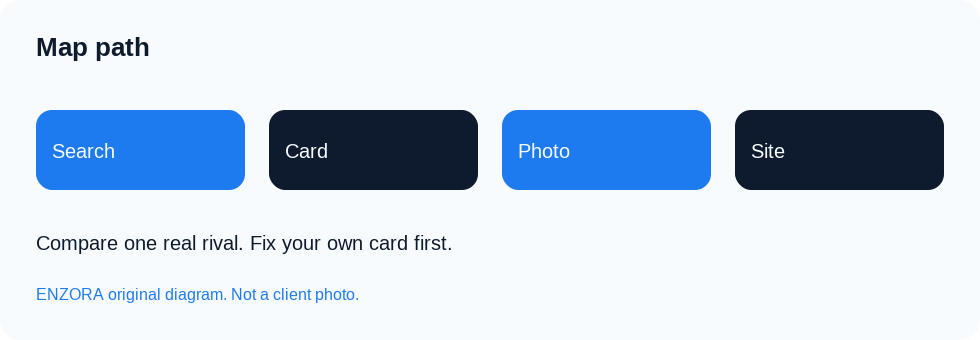
The map path diagram is search, card, photo, reply, site. Check your card against that order on a phone that is not logged in as you.
This week, replace the first photo a stranger sees if it is not your job. Publish one post about work you can take this month. Read it the next day in a private window.
Website signals Google reads
The website field should open the live site, with the same name and phone as the card. Google's ranking help says inaccurate info can keep you out of relevant local searches. A dead link, a coming soon page, or a phone that does not match the footer is inaccurate in a way a customer feels immediately.
Relevance is not only the category. The site should name the job and the towns in plain words. If the card says roofer and the site says "solutions for every need," the two stories fight. Use the local SEO checklist for the wider list. Local SEO is the service if you want that match done with you.
Google also mentions links from other sites as part of prominence. Do not buy a bundle of junk links. A link from a supplier, a chamber page you really joined, or a local news note you earned is a normal mention. We will not invent a count of links you need.
The Google Maps Rank Grid draws map points around a business for one keyword. The Local SEO Score is a readiness quiz you answer yourself. It does not look up a pin for every corner of town, and it does not promise a position.
This week, tap the website link on your card. If it fails, paste the correct address. Then call the number on the card and the number in the footer. They should be the same line.
A 30 day plan
This is a work plan, not a study and not a promise. Spread it over a month so you do not edit the card in a panic.
| Week | Do this | Done when |
|---|---|---|
| Week 1 | Compare your card with one real rival | You have a written gap list |
| Week 2 | Reply to open reviews and send one honest ask | The newest review has a reply, if one exists |
| Week 3 | Add one real job photo and one true post | A stranger can see both on a phone |
| Week 4 | Fix the website link, name, and phone | The card and the footer match |
Do the category edit in week 1 only if the label is wrong. Google may ask you to verify again after a category change. Leave room for that. Do not add a town you will not drive just to look bigger than the rival. Distance still depends on the searcher.
At the end of the month, open both cards again. Note what you fixed. Do not declare a win from memory. If the pin did not move, the ranking help still applies: relevance, distance, and prominence. Keep the card true and do the next real gap. A bought review or a fake photo would break the policies you just read.
This week, start week 1. One rival. One page of notes. One fix you can finish before Friday.
Next step
Want us to fix this for you? Get a free fix plan. Tell us the town and the rival you keep seeing. We will look at the card and the site. We will not promise the top pin.
Questions
Can I pay Google to rank higher on Google Maps?
No. Google's local ranking tips, reviewed 23 Nov 2026, say there is no way to request or pay for a better local ranking. Ads are a separate product. The map results still lean on relevance, distance, and prominence. A complete card, real reviews, and a matching website are the work you can do. A payment to a stranger who promises the top spot is not a Google feature.
What should I compare on a competitor card?
Read the category, the hours, the photos, the review replies, and the website link. Write down only what you can see on the public card. Do not invent their review count into a score. Google's ranking help says more reviews and positive ratings can help prominence. It does not publish a number you must beat. Fix the gaps on your own card first.
Do I need more reviews than the other company?
Not as a made up target. Google's ranking help says more reviews and positive ratings can help, and it does not give a quota. Ask for a genuine review after a finished job. Google's review tips, reviewed 23 Nov 2026, prohibit incentives for posting, changing, or removing a review. A smaller set of real reviews is safer than a bought pile.
How often should I post photos?
Post a photo when you have a real job photo the customer agreed you can share. Google's ranking tips say photos and videos can show what you offer. There is no required weekly count on that page. Skip stock people. Verify the profile before you count on the photos to show. Replace a blurry truck photo before you add a tenth image of the same driveway.
What if I am farther from the searcher?
Distance is one of the three ideas Google names, and you cannot move the customer's house. You can still be relevant and prominent for the towns you serve. Keep the service area honest. Put the same phone and name on the site. A card that matches the website is easier to trust than a card that lists a state you will not drive.
Was this helpful?
Related ENZORA services
Want help with your website?
Get a fixed quote from the ENZORA team. We work with businesses worldwide.