SEO
Choosing the Right Google Business Profile Categories
By Fidyan Ahmed, founder · Published · Last updated · 7 min read

On this page
Google business profile categories are the labels on your map card. The primary label should name the job you want most. Extra labels are only for work you really do. Choose from Google's list. You cannot invent a label, and a long list of jobs you rarely do brings the wrong calls.
Key takeaways
- Pick one primary category that names the main job.
- Add an extra category only for work you would schedule.
- Do not use a category as a keyword or a slogan.
- Read the list again when the work you want changes.
Primary vs secondary categories
The primary category is the main answer to "what is this business." Extra categories, sometimes called secondary categories, are for other real work. Google's page on how to manage your business category, reviewed 23 Nov 2026, says to select a primary category that best describes the business, and to choose a specific label from the list that appears. Their example is a nail salon instead of a vague salon. The same idea fits a trade. If a plumbing label exists, a plumber should not hide inside a generic contractor label.
You cannot create your own category. If the exact label is missing, pick a general one that still fits. Google's guidelines for representing your business, reviewed 23 Nov 2026, say to use as few categories as possible. They also say the label should finish "this business is a," not "this business has a." A license and a town are not categories.
Google's edit profile help, reviewed the same day, says you can select up to 9 more categories. Treat that as a ceiling. A roofer who also hangs gutters might use a roofing label as primary and a gutter label as the extra, if both labels exist and both jobs are for sale. Adding electrician, plumber, and painter because a customer once asked is how the card starts attracting the wrong work.
Picture two cards in one city. One says roofing. The other says contractor, then a pile of extras that include jobs the crew will not take. The homeowner with a leaky roof taps the first card. The label did the sorting.
This week, open the profile and write the primary category on paper. If it is not the job you want next month, change it before you add extras. Google Business Profile setup can walk the rest of the card with you if you would rather not do it alone.
How to see what competitors use
You do not need a paid report to see a rival's category. Open Google Maps on your phone. Search the job plus a town you actually serve. Open three cards for companies that do the same main work. The category usually sits under the business name. Write down the primary label and any extras you can see. If a label is not on the public card, do not guess.
Do not copy a label for work you do not offer. The guidelines say not to use categories as keywords, and not to take a label that belongs to another business. A copied label brings calls you have to refuse.
Google's category help says your labels can affect local ranking, and it points to the local ranking tips. That page, reviewed 23 Nov 2026, says local results lean on relevance, distance, and prominence. A category helps relevance. It does not let you pay for a higher spot. The same page says there is no way to request or pay for a better local ranking.
Here is a concrete pass. You open three roofing cards. Two use a specific roofing label. One uses a general contractor label. The specific label is the clearer sign. If your card still says general contractor, and roofing is the work you want, confirm that roofing label exists in your editor before you switch.
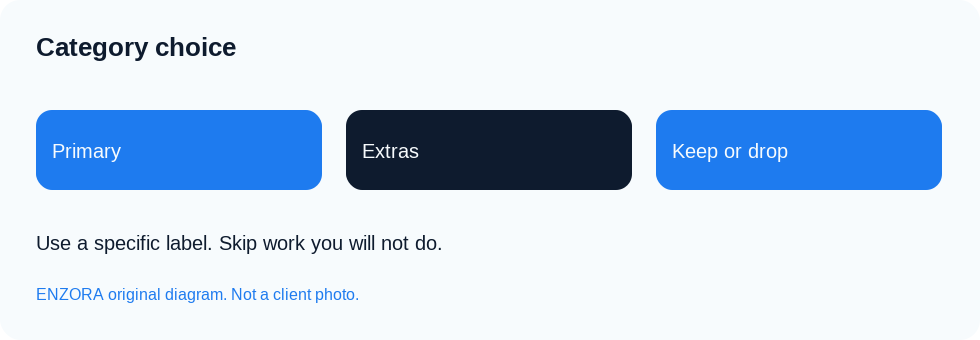
The category diagram is a simple row: their label, your label, keep or drop. Use it while you scroll Maps. Then compare the note with the local SEO checklist, which covers the rest of the card, not only the label.
This week, make a three line note with name, primary label, and extras. Circle any extra you would not put on your own truck. Do not add a label just because a bigger company uses it.
Common category mistakes for contractors
The first mistake is a vague primary label when a specific one exists. "Contractor" feels safe. It is also easy to ignore when the search was for a drain, a roof, or a panel. Google's category help says to prefer the specific label. If that label is not offered, then use the general one. Do not stay general out of habit.
The second mistake is a category for every task. Drain cleaning and water heater work are services, not separate identities. Put the task list on the website. The service area guide helps if the towns are the other half of the confusion.
The third mistake is borrowing a neighbor's trade. A heating company adds an electrical label because they once swapped a disconnect. The card can start matching panel work, and the office spends the morning saying no. If a cafe in the lobby is not your cafe, do not take that label.
Another mistake is a category that only describes a feature. Licensed, insured, family owned, and free estimates are claims, not categories. Put a true claim in the description. A stale label is the same kind of problem. If you stopped a service, remove that label. People still call for what the card promises.
Picture an HVAC card that lists electrician and plumber on top of heating and cooling. The owner added them after a slow week. The phone rings for jobs the techs are not sent to do. Delete the labels that are not the company.
This week, read every category out loud to the person who answers the phone. If they say "we do not do that," remove it. Local SEO work starts with this kind of match between the card and the real crew.
When to change categories
Change the primary category when the main job changes. Change an extra when you start or stop a real service. Do not change labels every week to chase a phrase you saw in a forum. Google's category help says that if you add or edit a category, you might be asked to verify the business again. Verification is a real step. Do it on a quiet day, when someone can answer Google's prompt. Do not start it on the morning you need the card for a storm.
After you save, Google reviews the edit before it shows. That is in the edit help. The public card might not flip the second you tap save. Check later in a private window, or on a phone that is not logged in as the owner. You should see the label a stranger sees.
Review again when the season flips. A heating company that wants cooling calls in spring should read the primary label before the first hot week. If one season is a side job you rarely take, do not let it become the primary label. A pressure washing company that starts soft washing roofs can add that label only if it exists and the work is real.
Do not change a label to chase a rank you cannot see. Distance and prominence still matter. A label does not move the shop closer to the searcher, and it does not invent reviews.
This week, put a note on the first Monday of next month: read the categories. Change one only if the work changed. If Google asks you to verify, finish that before you judge the edit.
Checklist
Use this pass on a phone. It takes one sitting. The category diagram is the same list as a picture: primary, extras, rival note, then save.
| Check | Pass looks like |
|---|---|
| Primary label | Names the job you want, and it is specific if Google offers that label |
| Extra labels | Only work you would schedule this month |
| Count | As few as you can. The edit help cap is 9 extras, not a goal |
| Not a keyword | The label is what you are, not a phrase you hope to match |
| Not a neighbor | You did not borrow another trade or another business in the building |
| After save | You can verify again if asked, and you reread the public card |
The GBP Category Finder searches official Google category names for a trade and a city. The GBP Checklist is the live pass for profile questions. It scores answers you type yourself. It does not invent a rank or a category Google does not offer.
Walk the table with one rival card beside you. If your primary label is vaguer than theirs, and a specific label fits you, switch to the specific one. If your list is longer than the work on this month's board, delete the extras. Then open the website field on the card and confirm it still points at a live page with the same phone number.
This week, complete the table and save a screenshot of the category editor for your own notes. If a label is wrong a month from now, you will remember why you chose it.
Next step
Want us to fix this for you? Get a free fix plan. Tell us the main job and the towns. We will look at the categories and the site link. We will not promise a map position.
Questions
What is a primary category on Google Business Profile?
The primary category is the main label for the work you want most. Google's category help, reviewed 23 Nov 2026, says to pick a specific label from their list, not a vague one. A plumber should not hide inside a generic contractor label if a plumbing label exists. You cannot invent a label that is not on the list.
How many extra categories can I add?
Google's edit help, reviewed 23 Nov 2026, says you can select up to 9 more categories besides the primary one. That number is a cap, not a target. The representation guidelines say to use as few categories as possible to describe the core business. Add a label only for work you really do.
Can I see the category a competitor uses?
Yes. Open their public card on Google Maps and read the label under the name. Write down the primary label and any extras you can see. Do not copy a label for work you do not offer. The guidelines say not to use categories as keywords or to describe a different business.
Will changing a category make me verify again?
It might. Google's category help, reviewed 23 Nov 2026, says that if you add or edit a category, you might be asked to verify the business again. Do the edit on a quiet day, not the morning of a storm week. After you save, open the public card in a private window and read the label.
Should every service get its own category?
No. Google's guidelines say categories should finish the sentence 'this business is a,' not 'this business has a.' A list of every task you sometimes do makes the card look unfocused. Put the task list on your website. Keep the map labels for the trades you are.
Was this helpful?
Related ENZORA services
Want help with your website?
Get a fixed quote from the ENZORA team. We work with businesses worldwide.