Business
Seasonal Marketing Calendar for Home-Service Businesses
By Fidyan Ahmed, founder · Published · Last updated · 5 min read

On this page
A home service marketing calendar is a list of seasons you can actually serve, with one update for each. It is not a poster of fake holidays. Match the month to the job, then say the same thing on the profile, in email, and on the site.
Key takeaways
- Plan months when your trade is honestly in demand.
- One profile post should match one website banner.
- Email only people who asked, and keep the offer the same.
- Prepare the words before the busy week, then take old banners down.
Month by month ideas
Do not copy a generic calendar from another trade. A plumber's winter is frozen pipes and no hot water. A painter's spring is exterior work when the weather allows. A cleaner may see more moves in summer. Write your own year from the jobs already on the board. If a month is slow, say you are booking ahead instead of inventing a holiday sale.
Pick a few beats, not fifty. For many trades that is early spring, the hot or storm months, and a quiet season checkup. Name the job in the customer's words. "No cool air" is clearer than "midsummer comfort solutions." Leave months blank when you have nothing true to say.
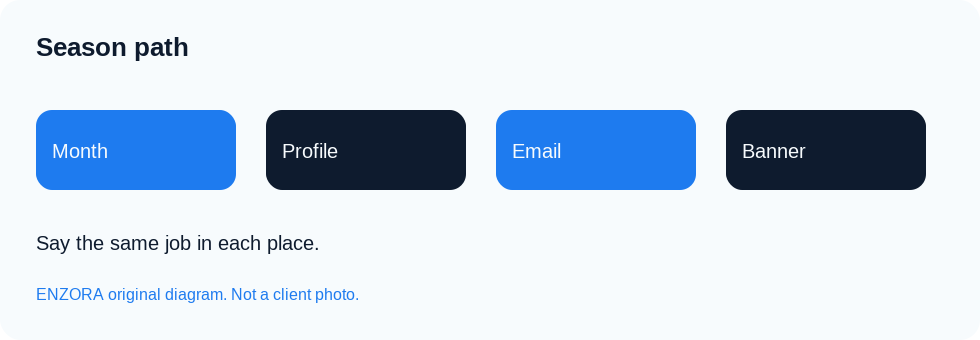
Picture a pressure washing company that posts about ice dams in July because a template said so. Neighbors scroll past. The same company posting about pollen on siding in spring gets calls. The calendar was the difference. The season path diagram is month, job, photo, then the same line in three places. Social media can carry the photo. The site still has to agree.
This week, list four times of year when the phone already changes. Write one job next to each. That is the calendar. Do not add a fifth until those four are easy to explain.
Profile posts
A Google Business Profile post is a short note on the map card. Use it for the season you can book now. One photo of a real job, one sentence, and the phone number. The GBP checklist walks the profile and can suggest post ideas you edit yourself. Do not publish a post that points at a page you have not updated.
Retire the note when the season ends. A December post about spring cleanup in August looks abandoned. You do not need a post every day. One honest note when the work changes is enough. If you mention an offer, honor it. This article does not print sample discounts. If you do not have a real offer, do not invent one. Say you are booking the work.
A post that says we are open is too thin. Name the job and the month. Storm cleanup in April is a post. Quality service is not. Add a photo from a real job if you have one, and say what it is. Do not post a stock house. The profile checklist on this site walks the fields people forget, including hours and the website link.
This week, publish or refresh one post that matches this month. Read it on a phone while signed out. If the words could fit any month, rewrite them.
Email offers
Email is for people who gave you an address and expect news. A past customer can hear about the season that matches work you did for them. A stranger who never asked should not be on the list. Say how they can stop the mail. The records that help mail arrive are in the deliverability guide.
Keep the email and the website on the same offer. If the email says you are booking heater checks and the site still shouts about air conditioners, people trust neither. One owner should approve both on the same day. Email marketing is the longer setup if you want templates and a list you control.
Do not attach a file full of prices you will not keep. Point them to a page or a phone call. This guide does not list amounts. Your pricing page is the public list for site work. Job prices stay in your own quote.
This week, look at the last email you sent. Does the site still say the same thing? If not, fix the older of the two before you send again.
Website banners
The banner is the first screen. It should name the season's job and how to call. A huge photo that hides the number is a failed banner even if the picture is pretty. Put the words in real text so they can be updated without a designer on a Sunday.
Change the banner when the calendar says the job changed. Remove the old line the same day. Teams forget this and leave a storm banner up in a calm month. Put a reminder next to the calendar date. The person who answers the phone should recognize the banner. If they would not say that sentence, do not print it.
Link the banner to a page about that job, not always to the home page. A heater banner should open a heater page. If that page does not exist, do not promise it in the banner.
This week, read the first screen out loud. Name the month. If the screen is wrong for this month, rewrite the line and check the number still taps.
Prep timeline
Write backward from the busy week. Photos should exist before you need the post. The page should be updated before the email goes out. The profile should match before you tell a customer to search your name. Doing it in the rush means typos and a number that does not match.
A simple order works. Two weeks before the season, confirm you can take the work. One week before, update the page and the banner. A few days before, send the email and post on the profile. The day the season ends, take the banner down. Adjust the gaps to your trade. A storm business prepares the page in calm weather, not during the warning.
The security basics matter here too. Do not let a lapsed domain kill the season you planned. Check the renewal date when you write the calendar.
Honor the offer you posted, or do not post an offer at all.
This week, put one prep date on the calendar you already use for jobs. When it arrives, do only the banner and the profile. Leave the rest for the next date.
| When | Do this | Do not |
|---|---|---|
| Quiet weeks | Take photos and write the line | Wait for the rush |
| Season starts | Banner, profile, email agree | Three different offers |
| During | Answer the number you printed | A new discount every post |
| Season ends | Remove the banner | Leave last year up |
Next step
Want a calendar that matches the work you can book? Get a free site review. Tell us the trade and the busy months. We will look at the banner and the profile. We will not invent a promotion.
Questions
Do I need a post for every month?
No. Plan the months when people actually need your trade. A roofer may care about storm season and a quiet winter check. A cleaner may care about holidays and spring. Empty months can stay empty. A fake sale every week trains people to ignore you.
What should a Google Business Profile post say?
One true update. The work you can take, a photo of a finished job, and how to call. Do not promise a discount you will not honor. Take the post down when the season ends. The checklist tool can help you walk the profile before you publish.
How do email offers fit the calendar?
Send to people who asked to hear from you. Name the season and the job. Say how to stop the emails. Do not attach an offer that the website banner contradicts. One message and one page should tell the same story.
When should I change the website banner?
When the work you want changes, not when a template looks stale. Swap the banner the week you can book the new job. Remove the old one the same day. A summer banner in winter tells people the site is asleep.
How early should I prepare?
Write the words and take the photo before the rush. A storm page written during the storm is late. A spring cleanup note written in late winter is on time. Put the prep date on a calendar you already open.
Was this helpful?
Related ENZORA services
Want help with your website?
Get a fixed quote from the ENZORA team. We work with businesses worldwide.