For Home-Service Pros
Click-to-Call Done Right: Mobile Calls From Your Website
By Fidyan Ahmed, founder · Published · Last updated · 6 min read

On this page
A click to call button website visitors tap should dial you. That sounds obvious. Many sites show a number that is only a picture, or a bar that covers the form, or a label that says emergency when nobody is there. Fix the link, the placement, and the hours. Then test on a real phone.
Key takeaways
- Use a tel link on every visible number, not a photo of digits.
- Keep a call bar on the phone screen without covering Send.
- Match the label to the hours you actually answer.
- Test from a second phone on cellular data after every change.
tel links
A tel link is the piece that makes a tap dial. The address starts with tel: and then your number in a simple form, with the country code if you want the link to travel well. The visible text can be "Call" or the printed number. Both must point at the same link. If you change the business number, change every link the same day.
Do not put the only number inside a banner image. Some phones will not treat that art as a phone link. Screen readers will not read a number that is only pixels. Type it in the page. If you show the number in more than one style, such as dots or spaces in the text, keep the tel link as a plain digit string so the dialer does not drop a character. Check a forwarded call too, if the shop line rolls to a mobile.
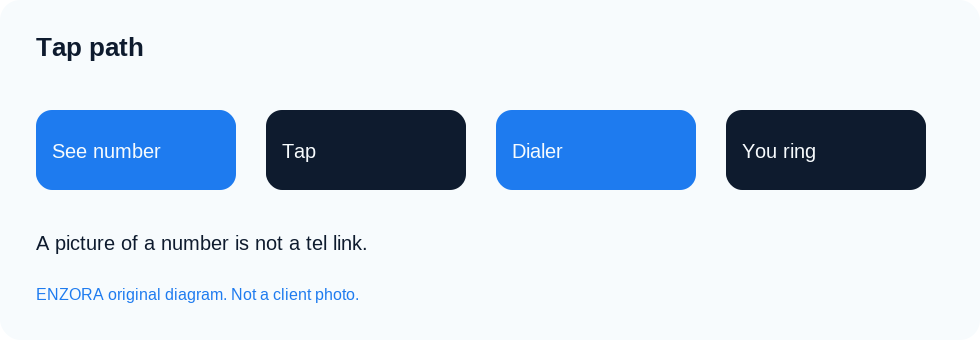
Put the link in the header, in the first screen, and in the footer. Repeat it in the text where you talk about emergency work, if you offer that. One missed spot is where angry customers tap and nothing happens. The tap path diagram is see the number, tap, your phone rings. If a tracking script swaps the digits, the link and the visible number must still be the line you answer.
This week, tap every number on the home page from a phone that is not the shop line. Write down any tap that does nothing. Web design can rebuild the header if the theme will not allow a real link. The homepage guide shows where the number should sit.
Sticky call bars
A sticky bar stays on screen while the visitor scrolls. On a phone, the bottom edge is easy for a thumb. Two actions are plenty: Call, and a short request. More icons turn the bar into a second menu.
The bar must not cover Send, Next, or the last line of a form. Scroll to the bottom on a small phone. If the button hides, add space under the form or shrink the bar. A bar that wins the call and blocks the form is only half a fix.
Do not show the bar on top of a cookie notice and a chat bubble all at once. The customer cannot see the page. Pick one extra layer. Call should win. Conversion help looks at this pileup. The form guide is the partner article if the form is the thing being covered. Leave a gap at the bottom of long pages so the last line is not trapped under the bar. On a phone with a home indicator, the bar can sit even lower than you expect. Preview with that control visible. If the bar repeats a second number for texts, label it Text so people do not think both buttons dial.
This week, scroll a long page with the bar on. Try to send the form. If you cannot, fix the overlap before you add another campaign.
Hours-aware calls to action
The label should tell the truth about this hour. If the office is open and a person answers, Call is right. If you are closed, say when you open, and offer a form you will read at the start of the day. If a tech is on call for true emergencies, say which problems count. A dripping faucet and a tree on a roof are not the same night.
Do not leave an "emergency" sticker on a number that goes to voicemail you check in the morning. People remember the miss. Change the label with the hours, or use one honest line all day: "Call during the hours in the footer. After that, use the form."
Update the line when the season changes your staffing. A summer on-call plan that is still on the site in January is a lie by leftover text. Read the button on the first business day of a new season. If a holiday changes the hours, change the label before the holiday starts, not after the complaints. Write the closed line in the same place as the button, not only in a footer the thumb never reaches. A form link in that spot should say when a person will read it.
This week, call the published number at a time you claim to answer and at a time you claim to be closed. Match the label to what really happened.
Call tracking
Tracking can show which page was on screen when someone called. It helps if you use it carefully. The number on the Google profile and the footer should stay stable. A tracking number that swaps in public and never matches the card makes you look like two businesses.
If a vendor inserts a number, know which one a customer sees and which one your report sees. Test a call and confirm it rings the office, not a full mailbox at the vendor. If the vendor's script slows the page or covers the button, weigh that cost. A pretty report is not worth a dead tap.
Write down calls the simple way too. A note that says profile, site, or unknown will teach you a lot before a paid tracker does. Do not replace the public number until the test call succeeds. Tell the office which number is the real one so they do not read a tracking line back to a customer. If the report shows calls you never received, the vendor routing is wrong. Fix that before you trust the chart. A missed ring is a customer problem, not a spreadsheet problem.
This week, place one test call from the home page and one from a job page. Confirm both reach a person. If a tracking number appears, check it against the profile.
Testing on phones
Desktop preview lies. Buttons look fine with a mouse and fail with a thumb. Test on a small phone and a larger one. Use cellular data. Tap the header, the bar, the footer, and any number in a paragraph. All of them should dial the same business line.
Scroll. Open the menu. Send a test form. Look for overlap. The mobile friendly test is a checklist for the small screen, including whether the number is a real link. Run it after the thumb test, not instead of it.
Retest after edits. A new banner is the usual thing that covers Call. Make the test part of publishing, like reading the headline aloud. Ask one person who is not on the crew to find the number without help. If they scroll first, the first screen is still hiding the tap. Note the phone model if one device fails and another works. Repeat the test after a banner change and after you edit the hours. A path that worked last month can break when a plugin updates. Keep the test on the publish list.
| Check | Pass |
|---|---|
| Header number | tel link, same business line |
| First screen | Number visible without a hunt |
| Sticky bar | Call stays, Send stays usable |
| Hours | Label matches who answers |
| Tracking | Profile number stays stable |
| Second phone | Every tap dials you |
This week, do the table on one phone and fix the first fail. Do not redesign the logo in the same hour. The call path is the job.
Next step
Want a thumb test with a second set of eyes? Get a free site review. Tell us the number you want customers to reach. We will look at the links, the bar, and the hours. We will not invent a call count.
Questions
What is a click to call button?
It is a link that opens the phone dialer with your number filled in. The code starts with tel: and then your real number. The words on screen can say Call or show the digits. Both should use that link. A picture of a number is not a button.
Where should the button sit on a phone?
In the first screen, and again in a bar that stays put while they scroll. The bottom of the screen is a natural spot for a thumb. Do not cover the form's send button with that bar. Check on a small phone, not only on a large one.
Should the button change after hours?
If nobody answers at night, do not shout emergency. Show the hours, or switch the label to a form you will read in the morning. If someone does answer, say so and test the ring at that hour. A false always-open line creates angry calls.
Can call tracking break the button?
It can, if the public number on the site no longer matches the Google profile. Use tracking in a way that keeps one stable number on the card and the footer. Test a call from the site and confirm it reaches the office, not a dead vendor line.
How do I test click to call?
Use a second phone on cellular data. Tap the header, the bar, and any number in the text. Each one should dial the same business number. Scroll to the form and confirm Send is still visible. Fix any tap that does nothing.
Was this helpful?
Related ENZORA services
Want help with your website?
Get a fixed quote from the ENZORA team. We work with businesses worldwide.