SEO
Google Business Profile for Contractors: Step-by-Step Setup
By Fidyan Ahmed, founder · Published · Last updated · 7 min read
On this page
A google business profile for contractors is the card people see before they see your site. Set it up in order: category, area, photos, posts, reviews, questions, then the link to your site. Skip a step and the card looks unfinished even when the crew is excellent.
Key takeaways
- Choose a category that names the work you want, not a vague label.
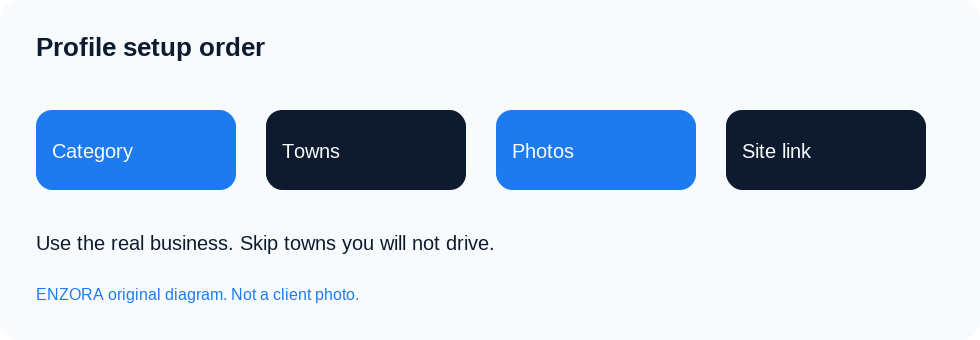
- List only the towns you will actually drive.
- Upload your own photos after the profile is verified.
- Point the website field at a live page with the same phone number.
Categories
The category tells Google what you are. Pick the closest match to the jobs you want more of. A plumber who also clears drains should not hide inside a generic contractor label if a plumbing category exists. Extra categories are for real side work, not for every word you hope to rank for.
Read the category after you save it. Some tools suggest a long list. A long list of jobs you rarely do brings the wrong calls. If you stop offering a service, remove that category. The guidelines for representing your business expect the profile to match the real company.
Picture two cards in one city. One says plumber. The other says contractor and then a slogan. The homeowner with a leak taps the first. Your skill never got compared. The category did the sorting. If you added a category for work you stopped doing last year, remove it before the next busy week. A stale label still sends the wrong calls.
This week, open the profile and write down the primary category. If it is not the job you want next month, change it. Google Business Profile setup can walk the rest of the card with you. The profile checklist is a plain pass you can do on a phone.
Service areas
Contractors often work at the customer's place. The area you publish should be the area you will drive. Add the towns on this month's board. Leave off the county you only enter for a friend. A huge area looks busy and then makes you say no. Those no's become bad moods and bad reviews.
If you have a shop people can visit, the address should be real and the hours should match the door. If you do not have a shop, do not borrow a virtual office you never use. Follow the on-screen choice for a service-area business. The phone number must match the site and the invoice. Small differences make you look like two companies.
The area diagram is a short list of towns, not a state outline. Compare it with your profile map. If the shaded area is wider than the list, shrink it. A town you only serve in a true emergency can stay off the public list so weekday calls stay close to the board. Say that limit out loud to the person who builds the weekly routes.
This week, read the town list to the person who answers the phone. Delete any town they refuse. Add a town they already drive if it is missing.
Photos
Photos decide whether a stranger trusts the card. Use jobs you did, a truck with your name, and a crew photo only with permission. Google's help on Business Profile photos and videos, reviewed 23 Nov 2026, says photos should be in focus, well lit, and true to the real place. It also says they show on Google only after you verify the profile.
Do not upload a stock family, a logo you do not own, or a heavy filter that hides the work. Add before and after pairs when the customer agreed. Verify the profile before you count on those photos for a storm week. The help page notes that review can take time, so upload on a quiet day. Name the job in your own notes so you can remove a photo later if the customer asks. A photo of a messy unfinished site can wait until the work looks like the visit you want to repeat. Shoot in daylight when you can so the work is easy to see on a small screen.
This week, look at the first photos a stranger sees on a phone. Replace any image that is not your job. If the profile is not verified, start that step before you add more files.
Posts
Posts are short updates on the card. Use them for a real change: a week you are booked, a service you added, or a photo of a finished job. Do not post a fake sale. Do not post every day with the same sentence and a new town name. That looks automatic and says nothing.
Write the way you text a customer. One update, one photo, one next step. If the next step is a call, use the same number as the card. If you link a page, link a page that exists. A post that points at a dead URL wastes the tap.
Retire old posts that promise a season you are no longer in. A summer banner in January tells people the card is on autopilot. You do not need a post calendar you will abandon. One true update a month beats a pile of blanks. If the update mentions a price, use only a figure you will still honor when they call. Take the post down when the offer ends instead of leaving a stale promise on the card.
This week, publish one post about work you can take this month. Read it the next day on a phone that is not logged in as you. If the words are vague, rewrite them.
Reviews
Reviews are part of the card, not a separate hobby. Ask after the work is done and the customer has seen the result. Ask for an honest review. Do not pay for stars. Do not hand over a script. The review link and QR tool can print a link for the invoice. The review rules guide covers what to avoid.
Reply in public when a note needs a fact, such as a return visit you made. Do not argue. Do not share a private address in the reply. If you have no reviews yet, do not invent a rating on the website to fill the gap. Say you are glad to share references. A reply that repeats the whole job story is harder to read than two calm lines. Thank them once. Do not add a new sales pitch under their words. If they ask what to write, tell them to describe the visit in their own words and then stop.
This week, send the review link to the last customer who was happy and whose job is finished. Do not send it in the middle of a mess. Then check that the link opens your card, not a rival's.
Questions and answers
People ask questions on the card. You can answer them. You should not ask yourself a question and answer it in a fake customer voice. That trick is easy to spot and it breaks trust. If a real question is wrong, correct it kindly. If nobody has asked anything, you can still add a clear answer only where the product allows an owner fact, and label it as you.
Watch the questions each week. A wrong phone number left in an answer will send calls astray. A question about a job you do not do should say so, and point them to the right trade if you know it. Do not guess at a price in a public answer if the job needs a look. If you are unsure, invite them to call during open hours instead of inventing a figure. Check the questions after a storm week, when strangers write in a hurry and may have the wrong company. Correct a wrong number the same day.
This week, read every question on the card. Fix any answer that mentions an old number or a town you dropped. Delete nothing that is a real customer's words unless the platform's tools say the note breaks its rules.
Linking to your site
The website field should be the live site, with https, and the same name and phone as the footer. Do not paste a Facebook link there if you also have a site. Do not paste a page that says coming soon. If the site is down for a move, fix the field when the new address works.
Use one domain. If an old domain still shows on the card, update it the day you redirect. The local SEO guide covers how the card and the site should agree. A mismatch looks like two businesses. Open the link in a private window so you see what a stranger sees, not your logged-in editor.
| Step | Pass looks like |
|---|---|
| Category | Names the work you want |
| Area | Towns you drive |
| Photos | Your jobs, after verify |
| Posts | One true update |
| Reviews | Honest asks, real replies |
| Questions | No fake customer voice |
| Website | Live link, same phone |
This week, tap the website link on the card from a phone. If it fails, paste the correct address and test again. Then compare the phone number on the card with the site footer.
Next step
Want a second pass on the card? Get a free site review. Tell us the main job and the towns. We will look at the category, the photos, and the site link. We will not invent a map rank.
Questions
What category should a contractor pick?
Pick the category that names the work you want most, such as plumber or roofer, if Google offers it. Add extra categories only for work you really do. A generic label makes the card harder to trust. Check the list again after you add a new service.
How should a service-area business set the area?
List towns you will drive to, not a whole state you will not cover. If you have no public shop, do not invent a storefront address. Hide the address if Google lets a service-area business do that, and keep the phone the same as the site.
Which photos belong on the profile?
Use photos of your jobs, your truck, and your crew if they agreed. Google's photo help, reviewed 23 Nov 2026, says images should be in focus and true, and they show after you verify. Skip stock people. Upload before the busy week, not the morning of.
Can I ask customers for reviews?
Yes, if you ask for an honest review and you do not pay for praise or hand them a script. Send a link after the job is done. The review link tool can make that link. Do not filter the profile so only kind words remain.
Should the profile link to my site?
Yes. Put the real site in the website field. Use the same name and phone as the footer. If the site is not live yet, do not point the field at a dead page. A wrong link sends ready customers nowhere.
Was this helpful?
Related ENZORA services
Want help with your website?
Get a fixed quote from the ENZORA team. We work with businesses worldwide.