For Home-Service Pros
HVAC Website Checklist: 21 Things That Win More Service Calls
By Fidyan Ahmed, founder · Published · Last updated · 8 min read

On this page
An HVAC site should book a service call, not just look cold or warm. HVAC website design works when the first screen matches the season, the number is easy to tap, and a maintenance plan is easy to find. The list below is the practical version of that idea.
Key takeaways
- Show the phone number and the current season before anything else.
- Keep separate pages for cooling, heating, and maintenance.
- Explain financing only when a real plan exists, with no made up payments.
- Capture after hours leads with a call button and a short form.
Above the fold essentials
The first screen is what people see before they scroll. On a phone, that space is small. Use it for the job you want this month, the towns you cover, and a tappable number. A slogan with no number wastes the spot. A photo of a smiling truck is fine only if the number is still visible on top of it, as real text.
Say the problem in the customer's words. "No cool air" and "no heat" match how people search. "Premium comfort solutions" does not. Put one main button for the urgent case and one quiet link for a tune up. Two paths are enough. More buttons turn the screen into a menu.
The best HVAC website design also shows you are a real local company. The city, the license line your state expects, and hours belong up high. Hours should match the hours on your Google profile. If they differ, callers show up angry or they call when nobody answers.
On your next break, open the home page on a phone and cover the screen below the first view with your hand. Can you see the season, the number, and the area you serve? If one is missing, move it up before you add more sections. The HVAC page is built around that first view.
Seasonal pages for cooling and heat
Cooling and heating are not the same emergency. A family with a dead air conditioner in July is not reading about furnaces. A family with no heat in January is not shopping for a condenser. Write a page for each, and let the home page point at the one that matches the weather.
The cooling page should lead with no cool air, warm rooms, and odd noises from the outdoor unit. Say whether you service the brands you actually work on, without claiming every brand if you do not stock the parts. Offer a visit window you can keep. The heating page should lead with no heat, burning smells, and thermostats that do not respond. Mention safety in plain words. If you smell gas, tell them to leave and call the gas utility or emergency line first. Do not make your form the only advice in that case.
You can leave both pages on the site all year. Change the home page feature when the season turns. A July photo of a furnace, or a January banner about tune ups only, looks asleep. Set a reminder on the first hot week and the first cold week. Swap the headline, the hero, and the button. Leave the other page one tap away for the odd day.
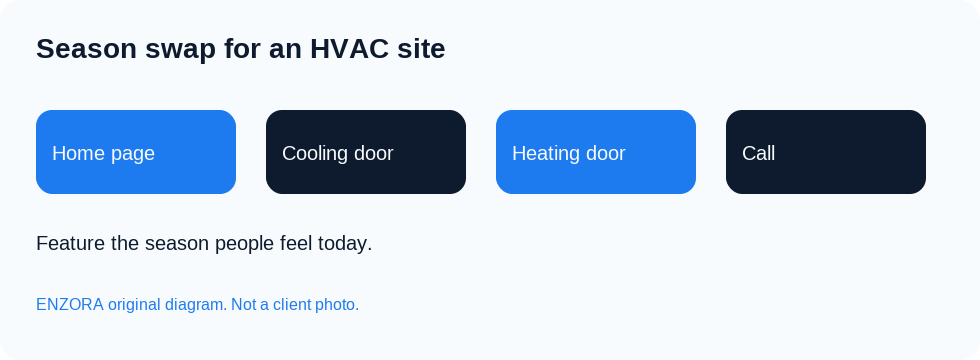
Look at the season swap diagram. It shows one home page with two doors: cooling now, heating later, or the reverse. Before the next temperature swing, rewrite the first line of the featured page so it names the problem people have this week.
Maintenance plan pages
A maintenance plan is a repeat visit, not a coupon with no rules. The page should say how often you come, what the tech checks, and what the visit does not include. Filters, drains, and basic safety checks are common. Parts, refrigerant, and after hours calls are often extra. If that is true for you, write it. Hidden exclusions create bad reviews.
Use a simple list, not a wall of fine print in a photo. People should be able to read it on a phone. Give the plan a name your office already uses, so the person who answers the phone and the page say the same thing. If you have more than one plan, show them side by side with the same rows. Do not make the cheap plan a puzzle.
Do not print a price you have not decided. If the price is on a written offer you honor, you can state it. If it changes by system size, say that and ask them to request the number. A fake "from" price trains the wrong calls. Skip testimonials you wrote yourself. A short note on what a visit prevents, in plain cause and effect, is stronger than a boast.
This week, read the plan page next to your paper agreement. Circle every promise on the site that the agreement does not make. Fix the site or the agreement so they match. Then link the plan from the home page and from both seasonal pages.
Financing info
Many replacements cost more than a household wants to pay in one day. Financing can help when it is real. It hurts when the banner is a guess. If a lender, a manufacturer program, or your own written terms exist, name them. Link to the place where the rate, the term, and the credit rules live. Those details change, and your page should not freeze an old number.
Say who can apply and what the visit is for. A repair under a small amount may not fit a long plan. Do not imply that everyone is approved. Do not show a monthly payment you calculated on a napkin. If you are not sure of the math, leave the payment off and offer a conversation. Wrong payments are a trust problem, and they can be a legal problem in your state.
Keep financing off the emergency screen. A no heat call should see the phone first. A replacement page can explain options after the problem and the scope. One short block is enough. A full second site about credit is noise.
This week, open every page that mentions payments or special terms. If you cannot point to a current lender page or a written offer, take the claim down. Add the link back when the offer is real.
After hours lead capture
HVAC problems do not wait for office hours. If you roll a truck at night, the site should say so and show the number. If you do not, say when you will read the form. Silence feels like a broken site. A clear line such as "We read this form when the office opens" is fair if that is true. Do not copy a promise from another company.
Night visitors need two choices. Call, if a person answers. Or a short form: name, mobile, address, and "no heat" or "no cool air." A photo of the thermostat helps. Do not ask for a model number as a required field at midnight. They can text it later.
Send night forms to a phone someone checks. A shared inbox that waits until Monday loses the job. Put an auto reply that repeats what you will do next, in the same words as the page. If the auto reply promises a faster call than you make, fix the reply.
On a night you are on call, submit the form from your own phone and wait. If it does not reach the on call tech, the page is a brochure. Route it before you spend on ads. Pair this with the plumber call guide if you also want the daytime tap path tightened.
Local SEO basics
Local search is how neighbors find a truck. Start with the name, address, and phone. They should match the site, the Google Business Profile, and the invoice. Small differences, like a suite number on one and not the other, make you look like two companies. Our local SEO service is the longer version of this pass.
Use the local SEO score to see the gaps in plain language. Then fix the profile categories so they match HVAC work you do, not a generic contractor label if a better fit exists. Post photos of your own jobs. Google explains how business details can be marked up for search in the local business structured data guide. Markup should repeat the facts on the page, not add a city you do not serve.
City pages are optional and easy to abuse. Build one only for a town where you take jobs and can say something true: neighborhoods you drive, the kind of homes, the season you are busy. Swapping the city name on the same paragraph is not a page. It is a copy. Skip towns you will not drive to. Saying no is better than a lead you cannot serve.
This month, pick the three towns that already call you. Check that each one appears in a true sentence on the site and that the profile area matches. Delete or rewrite any city page that only swaps the name.
The 21 point checklist
Count these on a phone. Fix the first fail before you add pages. The electrician must-haves cover license lines if you also wire homes. The diagram groups the rows into first screen, season, plan, and after hours.
| # | Check | Pass looks like |
|---|---|---|
| 1 | Phone on the first screen | Real text that taps |
| 2 | Season is obvious | Matches this month |
| 3 | Service area | Towns you drive |
| 4 | Hours match Google | Same as the profile |
| 5 | One main button | The urgent job |
| 6 | Cooling page | No cool air first |
| 7 | Heating page | No heat, plus safety |
| 8 | Home page feature | Current season |
| 9 | Other season | One tap away |
| 10 | Maintenance list | Visits and checks |
| 11 | Exclusions | Parts called out |
| 12 | Plan name | Matches the office |
| 13 | Prices | Only ones you honor |
| 14 | Financing source | Lender page linked |
| 15 | Payments | No made up amounts |
| 16 | Night phone | Only if answered |
| 17 | Night form | Name, mobile, address |
| 18 | Form routing | Reaches on call |
| 19 | Name and phone | Match the profile |
| 20 | Photos | Your own jobs |
| 21 | City pages | Towns you serve |
Before the season turns, mark each row pass or fail. Fix the home page first.
Next step
Want help walking the 21 rows? Get a free site review. Tell us your main towns and whether you take night calls. We will look at the first screen, the season pages, and the form. We will not invent a rank or a call total.
Questions
What pages does an HVAC company website need?
Give cooling, heating, and maintenance their own pages. Add a clear way to call and a short form for after hours. A single page that lists every job in one block makes the visitor guess. Match each page to one job a homeowner would search.
Should I change my HVAC site with the seasons?
Yes. In hot months, lead with cooling and no cool air. In cold months, lead with heat and no heat. You can keep both pages live all year. Change which one the home page features. A summer banner in January tells people you did not look.
How do I explain a maintenance plan without hype?
List the visits, what the tech checks, and what is not included. If a part costs extra, say so. Do not print a price that is not your real offer. Link the plan from the home page so it is not buried under a blog.
Can I advertise financing on the site?
Yes, if a real lender or your own written terms back it up. Name who provides the plan. Send people to that source for the rate and the rules. Do not invent a monthly payment or a teaser rate to make a banner look good.
What is the first local SEO step for HVAC?
Make the business name, address, and phone match on the site and on your Google Business Profile. Then run a plain local checklist before you write more pages. Only build city pages for towns you truly serve. A page that only swaps the city name does not help.
Was this helpful?
Related ENZORA services
Want help with your website?
Get a fixed quote from the ENZORA team. We work with businesses worldwide.