For Home-Service Pros
Electrician Website Must-Haves (License, EV Chargers, Emergency)
By Fidyan Ahmed, founder · Published · Last updated · 7 min read
On this page
An electrician website has to feel safe before it feels clever. People want the license, a plain explanation of the job, and a number that reaches a person. EV chargers and panel upgrades are common asks. So are lights that went out. The page should sort those jobs instead of blending them into one banner.
Key takeaways
- Show the license number and insurance in words a neighbor can check.
- Give EV chargers and panel work their own plain pages.
- Use an emergency button only when someone answers.
- Keep reviews real and the service area honest.
License and insurance display
Electrical work is licensed in many states. Show the number your state issued, next to the company name on that license. If a city wants a separate registration, show that too when you have it. Do not crop a number from a photo you found online. The SBA guide to licenses and permits is a starting map for owners. Your state board is the source for the exact display rule. If you are unsure, ask the board before you design a badge.
Insurance belongs beside the license. Say you carry it and that you can send proof. Do not invent a coverage figure. A homeowner with a remodel may ask for a certificate. The page should make that request feel normal.
Put this block in the footer and near the estimate button. Hiding it on an about page that nobody opens wastes it. The industry pages cover the trades that are live. An electrical page is not there yet, so treat the license as part of the first impression on your own site, not a footnote. Repeat the number as text so a screen reader and a person can both copy it.
This week, compare the name and number on the site with the card in the truck. If they differ, fix the site the same day. Put the number in text, not only inside a photo of the card.
EV charger pages
A charger page should say you install the unit at homes, if that is true, and what you need to see first. Photos of the panel and of the place the car parks are enough to start. Say that many cities require a permit and an inspection. Do not promise that every house can take a fast charger. The panel and the utility have a say. You look, then you tell them.
Skip a wall of code numbers you have not verified for that city. A wrong citation is worse than a plain sentence. Say you pull the permit when that is your service, or say the owner pulls it if that is the deal. Name the step so the invoice matches the page.
Do not sell a specific utility rebate unless you have the current program in front of you. Programs change. Link the utility page or leave the rebate off. A stale dollar figure is a promise you did not mean.
This week, read the charger page and delete any line you would not say at the panel. Add the photo request to the form for that service only. Tell them the parking spot photo can be taken from the driveway.
Panel upgrade explainers
People search panel upgrades when breakers trip, when they add a charger, or when a home inspector wrote it up. Explain that you look before you recommend a new panel. Some homes need a repair, not a replacement. Say that, if it is how you work. It builds trust and filters the wrong job.
Do not tell the reader how to remove a cover or test a live bus. The page is for booking a licensed visit, not for a weekend project. Describe what the visit includes: a look, a written scope, and the next step if they want the work. Mention if power will be off for part of the day, when that is typical, without a fake duration you cannot keep.
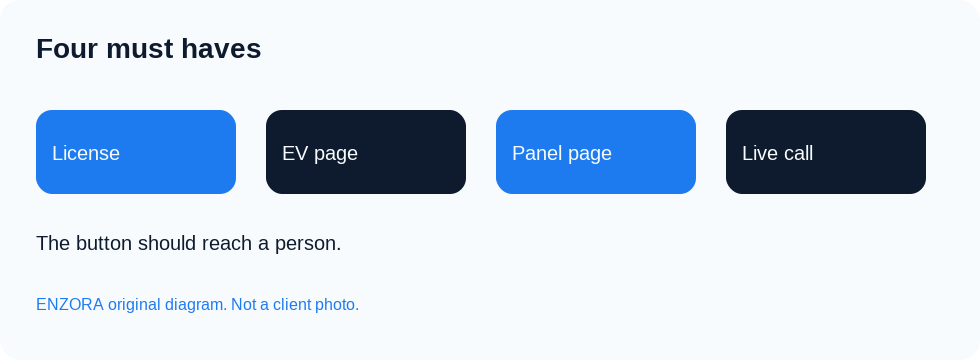
Photos of finished panels you installed, with the covers on, are enough. Do not post a messy open panel as a thrill. Label the city if you did the job there. The must-have diagram puts license, charger, panel, and the emergency tap in one row so you can see what is missing.
This week, rewrite the first paragraph in words a homeowner uses. Cut any sentence that sounds like a dare. End with how to book the look, not with a scare line.
Emergency call button
Some electrical problems should not wait. Sparking, a burning smell, or a house with no power are different from a new fan install. If you answer those calls, give them a button that dials a live phone. Say what you treat as urgent and what can wait for a weekday. If nobody answers after hours, do not use the word emergency. Use "request a visit" and state when you read it.
Tell people to leave the house and call the fire department if they see fire or smell strong burning. Your form is not the first step in that case. A calm sentence can say that without a horror story.
Test the button. The plumber guide uses the same tap test. HVAC night forms are in the HVAC checklist. Borrow the habit, not their wording. If two numbers exist, label which one is urgent and which one is the office.
This week, call the emergency number at the time you claim to answer. If it rings to a voicemail you do not check, change the label. Write the problems that can wait so people stop using the urgent line for a new fan. A clear split saves the night tech for real hazards.
Reviews
Reviews should mention real visits: a panel, a charger, a repair that held. Link the profile. Do not write them yourself. The eCFR review rule (16 CFR part 465, edition dated 1 Jan 2026) bars reviews that pretend a person used the service when they did not.
Reply to a hard note if you returned to fix a mistake. Do not share private panel details in the reply. Ask for a review after the inspection passes or the lights stay on, not in the middle of a dusty remodel. A short note in their words beats a badge that says top-rated with nowhere to look. If the profile is empty, say so and offer references instead of stars on the page.
If you have few reviews, do not add stars in the code to look busy. The review snippet guide says the markup should match reviews people can see.
This week, remove any rating graphic you cannot point to the profile. Keep the quotes that a customer actually wrote. If you are just starting out, say you will share references on request. Do not fill the gap with a story you wrote. A quiet honest line beats a fake score.
Local SEO
Name the towns you will drive. Use the same phone and company name as the Google profile. A service area business should not invent a storefront. Markup can repeat those facts for search. Google explains the fields in the local business structured data guide. The schema generator can draft the block. Check that every line matches the footer before you publish it.
City pages only help when the paragraph is true for that city. Do not spin one essay into many towns. Web design can rebuild the structure if the current site is a single scrolling page that hides the license.
This week, read the footer, the profile, and the schema side by side. Make the name, phone, and area agree. Delete any town that is only there to look big.
| Must have | On the page | Leave off |
|---|---|---|
| License | Number and matching name | A borrowed badge |
| Insurance | Offer to send proof | A made up limit |
| EV charger | Permit note and a photo ask | An unchecked code quote |
| Panel | Inspect first, then a scope | Steps to open a live panel |
| Emergency | A number a person answers | A fake night promise |
| Area | Towns you drive | A statewide copy |
Next step
Want a pass on the license block and the call button? Get a free site review. Tell us the jobs you want, such as chargers or panels. We will look at proof, pages, and the tap. We will not invent a permit rule.
Questions
Where should an electrician show a license?
Put the license number where a homeowner can see it without a hunt, and match the name on the license. If your state has a public lookup, you can say so. Do not borrow another company's number. The SBA launch guide points owners to the right local permits and licenses.
What belongs on an EV charger page?
Say whether you install home chargers, what a visit includes, and that the local office may require a permit. Do not promise a city will approve every house. Ask for photos of the panel and the parking spot. Leave code citations off unless you have checked them.
How do I explain a panel upgrade without jargon?
Say why people ask for one, such as a full panel, flickering, or a new charger, and that you inspect before you recommend. Do not tell the reader to open a live panel. Describe your visit and the booking step. Offer a photo of the panel door if they can take it safely.
What should the emergency button do?
It should call a number a person answers for the problems you treat as urgent, such as a sparking outlet or a dead house. If you do not roll at night, do not label the button emergency. Say when you reply instead. Test the tap from a second phone.
How do reviews and local pages fit?
Use real reviews and link the profile. Build area pages only for towns you serve. Mark up the business facts so they match the visible page. The schema generator can draft that markup. Do not add a city you will not drive to.
Was this helpful?
Related ENZORA services
Want help with your website?
Get a fixed quote from the ENZORA team. We work with businesses worldwide.