For Home-Service Pros
Pressure Washing Website Ideas That Book More Jobs
By Fidyan Ahmed, founder · Published · Last updated · 7 min read

On this page
A pressure washing website should make the dirty surface and the clean result obvious, then make the next step easy. People hire with their eyes. If the photos are vague, or the quote form asks for a novel, they text the next truck. These ideas are the ones that book work.
Key takeaways
- Pair before and after photos of the same surface, shot by your crew.
- Split house, driveway, and commercial work into their own pages.
- Ask for a photo quote when you cannot price from a sentence.
- Put real job photos on your Google Business Profile, not stock art.
Before and after galleries
The gallery is the sales pitch. A homeowner wants to see their kind of stain gone. Show the before and the after in the same frame of mind: same wall, same light if you can, same distance. Label the surface. Siding, brick, concrete, wood deck, and a soft washed roof are different jobs. A slider that mixes them looks like a stock folder.
Take the photos yourself. A bright stock driveway helps every company and none of them. If a customer does not want the house shown, skip that job and use another. Do not crop a logo onto someone else's photo. Write a caption with the town you served when that is true. "Front walk in the town we cover" is enough. You do not need a novel under each image.
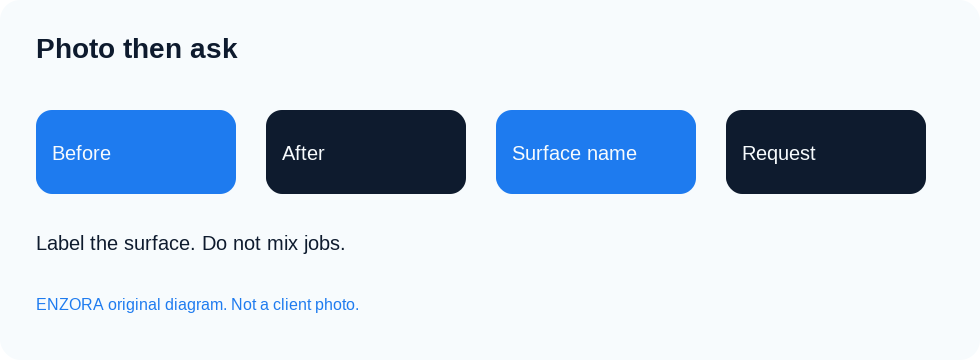
Put the best pair high on the page, near the button to request a visit. Burying proof under three screens of text wastes it. On a phone, a wide pair should stack so both states are visible without a tiny slider dot. The photo path diagram shows before, after, then the request.
This week, choose four jobs you have rights to show. Build pairs for houses and pairs for concrete. Delete any image you cannot name. Pressure washing pages should lead with that proof.
Instant quote forms
"Instant quote" is a promise. Keep it only when the form can produce a price you will honor. Some crews can price a simple driveway from the size and a photo. Many cannot price a two-story house, a delicate roof, or heavy oil stains that way. If you need to see it, say "Send a photo and we will call with a number." That is honest, and it still books the job.
Ask for the surface, the address, a photo, and a phone number. Size can be a choice such as small walk, single driveway, or whole house, if your crew uses those words. Do not ask for square footage as a required guess. People invent a number and then argue. Optional notes are enough for gates, pets, and water access.
Show the price rules you actually use, in words, not a fake calculator. If steep roofs are a different visit, say you will confirm after the photo. If you do not wash roofs, say that on the form so you stop the wrong leads. A clear no saves a Saturday.
This week, submit the form as if you were a stranger. If the page says instant and a human still has to guess, change the button text. Then make sure the photo arrives with the lead, not as a broken link.
House, driveway, and commercial pages
House washing, driveway cleaning, and commercial work draw different buyers. A homeowner worries about siding damage and plants. A shop owner worries about hours, slips, and a clean entrance before open. One page titled "services" with a bullet list makes both people do the sorting. Give each a page with its own first line.
On the house page, say what you will not blast. Soft wash for painted siding, and a warning about old caulk or loose paint, builds trust. On the driveway page, talk about oil, rust, and concrete. On the commercial page, name the sites you accept, such as storefronts, lots, or dumpster pads, and the hours you can work. If you need a water spigot, say so.
Link the pages from the home page with those plain names. Do not hide them in a dropdown only a desktop user can open. A person on a phone should tap "Driveways" and land on driveways. The best pressure washing website examples follow that split even when the colors differ.
This week, read the first sentence of each page. If it could fit any of the three jobs, rewrite it until the surface is obvious. Add a photo that matches that surface only.
Seasonal promos
Spring pollen, summer mildew, and fall leaf stains are real reasons people book. A promo can name the season and the surface. "Spring house wash" is clear. A banner that shouts a percent off, with no end date, looks like every other ad and may not match the price you quote in the driveway. If you do not have a real discount, do not invent one. A booked-out week can say "now booking June" instead of a fake sale.
When you do run an offer, write the end date and what is included. "Front entry and walk, this month, for customers in our normal area" is something the office can repeat. Take the banner down when the date passes. An expired special tells people the site is on autopilot.
Pair the promo with a photo of that season's grime, then the clean result. Pollen on siding and green concrete are easy to see. Update the Google profile post or photo when you change the site, so the two do not argue.
At the start of each season, decide on one offer or none. Put it on the matching surface page, not on every page at once. Remove last season's line the same day.
Google Business Profile photos
Your site is not the only place people look. The map listing shows photos before many visitors ever click through. Use pictures of your work. Google's help page, Manage your Business Profile photos and videos, reviewed on 23 Nov 2026, says photos should be in focus, well lit, and true to the real place. It also says they show on Google only after you verify the profile. A stock couple on a deck does not meet that spirit.
Add a few before and after pairs, your truck if the name is readable, and a clear shot of a finished house. Skip heavy filters. The help page also notes that a review can take time, so upload before the week you hope to be busy, not the morning of. Match the business name on the profile to the site.
Ask happy customers for a review with a simple link, not a script that puts words in their mouth. The review link and QR tool can make a link you print on the invoice. Google Business Profile help is the longer setup if the listing itself is thin. Painters who need the same photo habit can read the estimate guide for painters. Landscapers can use the portfolio guide.
This week, open the profile on a phone and look at the first photos a stranger sees. Replace any image that is not your job. Confirm the profile is verified so new photos can go live.
Examples to copy
You do not need to clone another brand. Copy the structure. A strong page has the surface in the title, a real before and after, a short form, and a phone number that taps. A weak page has a slogan, a stock hose, and a contact link in the footer. Use the strong shape with your towns and your photos.
Here is a layout you can sketch on paper. Top: the surface and the towns. Middle: two photo pairs. Lower: what you will not do, then the form. Footer: the same phone number again. Repeat that shape for house, driveway, and commercial, and change the words. That is a pressure washing website tip you can finish without a new logo.
| Page | Show this | Skip this |
|---|---|---|
| House | Siding before and after | A roof photo with no label |
| Driveway | Oil or rust, then clean concrete | A price you will not honor |
| Commercial | The entrance you actually washed | A fake percent off banner |
| Profile | Verified listing and your photos | Stock people on a patio |
This week, rebuild one page in that shape. Then copy the shape to the next surface. Leave the colors alone until the path books a real request.
Next step
Want a second look at the photos and the form? Get a free site review. Tell us which surfaces you wash. We will look at the gallery, the pages, and the profile. We will not invent a booking total.
Questions
What photos should a pressure washing site show?
Show the same surface before and after, with the dirt and the clean side both visible. Use your own jobs. House siding, concrete, and a roof you washed gently should not share one unlabeled photo. A caption with the town helps a neighbor trust the work.
Can I offer an instant quote online?
Only if the form collects enough truth to price the job, such as the surface and a photo. If you still need to see the site, call it a photo quote, not an instant price. A number you cannot honor trains the wrong customers and starts the job with an argument.
Do I need separate pages for houses and driveways?
Yes. People search those jobs with different words, and the risks differ. High pressure on a soft roof is not the same as a concrete driveway. A commercial page should say which sites you will schedule. One mixed list hides the job they want.
How should seasonal specials be written?
Name the season and the surface, and give an end date you will keep. Do not invent a percent off. If the offer is a free add-on you truly give, say what it is. When the date passes, take the banner down so the site does not look forgotten.
Where should Google Business Profile photos come from?
Upload photos of your real jobs after the profile is verified. Google’s photo help, reviewed on 23 Nov 2026, asks for clear images that match the business, and it says photos show only after verification. Skip stock driveways and people who are not your customers.
Was this helpful?
Related ENZORA services
Want help with your website?
Get a fixed quote from the ENZORA team. We work with businesses worldwide.