For Home-Service Pros
Landscaping Website Design: Show Your Work, Get Booked
By Fidyan Ahmed, founder · Published · Last updated · 7 min read

On this page
Landscaping website design is a picture business with a scheduling problem. People book the crew whose yards look like the yard they want, and who make the next step obvious. A slow gallery or a vague maintenance plan sends them to the next truck. Show the work, then make the ask easy.
Key takeaways
- Lead with real before and after photos, labeled by the kind of job.
- Write maintenance plans as a task list, not a slogan.
- Change seasonal offers when the work changes.
- Shrink photos so the quote form still appears on a phone.
Portfolio that sells
The portfolio is the proof. Sort it by the work you want more of. Patios, plantings, lawn care, and lighting should not live in one unlabeled stream if you do all of them. A person who wants a front walk should see walks. Use photos from jobs you did, with permission. A magazine garden you did not build will not match the yard you deliver.
Show before and after when the change is the story. Keep the angle close enough that the viewer believes it is the same place. Caption the town and the season if you know them. "Spring planting in a town we serve" is better than "stunning transformation."
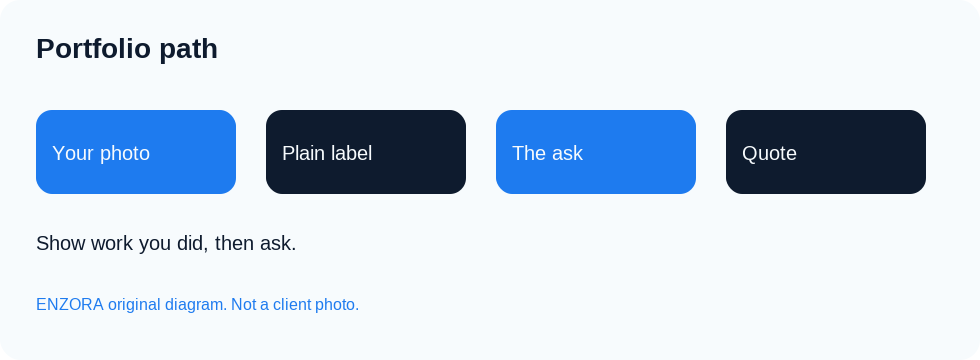
Put one strong pair above the fold, next to a button that says what happens next. Request a look, or request a quote, if that is the real step. Do not make them scroll past a pile of awards you cannot verify. The portfolio path diagram is photo, label, then request. If the button says book and you only quote, change the word.
This week, pick the jobs you want to repeat and rebuild the top of the page around those photos. Remove any image you cannot name. The industry pages list the trades that are live. A landscaping page is not there yet, so start the portfolio on your own site. Add one caption a neighbor could trust.
Maintenance plans
Maintenance is the repeat work. The page should say how often you come and what the visit includes. Mowing, edging, blowing, and bed care are clear words. If irrigation checks or mulch are extra, say so. A plan that hides extras creates the reviews you do not want.
Use the plan name your crew already says. If you have a basic visit and a fuller visit, show the same rows for both so people can compare. Do not invent a price to look specific. If the price depends on the lot, say you will quote from a photo or a walk. A made up weekly number is worse than no number.
Tell them what cancels a visit, such as a frozen week, if that is your rule. Say how they pause service. People fear a plan they cannot leave. A plain exit line builds trust. Write it in the same place as the task list so they do not miss it.
This week, set the page next to your paper agreement. Highlight every task on the site that the agreement does not include. Fix one or the other before you send the link to a new customer. Read the plan name out loud and confirm the crew uses that same name.
Seasonal offers
Yards change. The site should too. Spring cleanup, summer color, and leaf season are different asks. Feature the one you have capacity for. If the schedule is full, say you are booking ahead instead of pretending there is a hole this week.
Write offers you will honor. "Book a spring cleanup this month" is fine if the crew can do it. A percent off banner with no rule is not. Skip the fake discount. A limited route, such as a neighborhood you are already driving, is a real reason to invite those streets.
Update the photos with the offer. Leaves on a lawn sell fall work. Flowers sell a planting week. Leave winter damage photos up only while that work is what you want. Painters change exterior offers the same way in the painting estimate guide. One current photo beats a gallery from another year. Retire the old line the day the crew switches tasks.
At each season change, rewrite the home page first line and retire the old banner the same day. Check the Google profile so it does not still advertise the old task. If the crew is booked out, say so instead of inviting a visit you cannot take.
Image speed without losing quality
Landscape photos are large. That is the point and the problem. A crisp photo of a patio helps. A file straight from the camera can stall the page. Resize for the screen, use a modern format, and let a tap open the larger view. The first screen needs the photo and the quote button together.
Google's image guide wants images that match the page. The Core Web Vitals guide covers how loading feels. You do not need a lab coat. Open the page on a phone on a cellular signal. If the button arrives late, the photo is too heavy or a script is in the way.
Do not use a slideshow that loads many files before the ask. One hero and a short grid is enough. Lazy load the lower photos so the top stays quick. Speed optimization is the right help when the theme itself will not shrink. Keep the button in the page text, not painted on the photo.
This week, run a website audit and then replace the heaviest home page image with a smaller copy. Compare the look. If it is still clear, keep the smaller file. Ask someone on a phone outside the office whether the quote button shows without a wait.
Service area pages
Write areas you serve, not a list of every town in the state. Group neighborhoods you drive in one day. Say if you maintain weekly routes only inside a core, and if installs travel farther. That split stops a weekly lawn lead from a place you will not visit.
Each area block needs a true detail. The soil, the lot size, or the kind of homes is useful if you know it. A copied paragraph with a new city is not. One honest area page can hold the list. Extra pages are for places you can say more.
Match the phone and the company name to the Google profile. If you have no public yard, do not invent a showroom address. Say you come to the property. Wash companies split surfaces the way you should split routes. See the pressure washing ideas. A route you drive weekly deserves a truer note than a town you might add someday. Name the drive, not just the dot on a map.
This week, delete any town you have not worked in and do not plan to add. Read the remaining list to the person who schedules. If they name a town you forgot, add a true detail, not just the name.
Quote form
The form should ask for the address, the kind of work, and a few photos of the yard. Name and mobile too. Do not require square footage. People guess, and the quote starts wrong. Optional notes can cover pets, gates, and slopes.
Say whether you visit before you price installs. Say if maintenance can be quoted from photos. Then do what you said. Tell them when you reply, in words you can keep during the busy week.
Send the form to the estimator, with the photos attached. Test it from a phone in a backyard, where the signal is average. If the upload fails, offer an email fallback or a smaller photo tip on the form.
This week, cut the form to the fields you used on your last few quotes. Submit a test and confirm the photos open on the estimator's phone.
| Piece | Good | Weak |
|---|---|---|
| Portfolio | Your before and after | Stock gardens |
| Plan | Tasks and extras named | A slogan and a fake price |
| Season | The work you can book | Last year's banner |
| Photos | Clear and light | Camera originals on the first screen |
| Area | Towns you drive | A copied statewide list |
| Form | Address, work type, photos | A required lot size guess |
Next step
Want a look at the portfolio and the form? Get a free site review. Tell us the work you want more of. We will look at photos, plans, and speed. We will not invent a lead count.
Questions
What should a landscaping portfolio include?
Show jobs you built, with a before and after when you have both. Label the work, such as a patio, a planting bed, or a weekly maintenance route. Skip stock gardens. A caption with the town helps a neighbor see that you work nearby.
How do I explain a maintenance plan?
List the visits and the tasks, such as mowing, edging, and beds, if those are in the plan. Say what costs extra, such as mulch or irrigation repairs, if that is true. Do not print a price you have not set. Use the same plan name the crew uses.
How should seasonal offers be written?
Name the season and the work, such as spring cleanup or fall leaves. Give an end to the offer if you have one. Do not invent a discount. When the season passes, change the banner so the site matches the work you want now.
Will large photos hurt my landscaping site?
They can. A full camera file can delay the quote button on a phone. Resize images and keep the first screen light. You can still offer a larger photo on tap. Google's image and speed notes both point the same way: match the picture to the page and let it load.
Do I need a page for every town?
Only for towns where you take work and can say something true. A swapped city name on the same paragraph is thin. List the areas on one strong page if that is clearer. Match the phone to your Google profile.
Was this helpful?
Related ENZORA services
Want help with your website?
Get a fixed quote from the ENZORA team. We work with businesses worldwide.